
ESP32-C3: Blink LED
ESP32-C3: Blink LED is a runnable microcontroller simulation example on SensBench — open the wired circuit, inspect the code, and compile real firmware in your browser, no install needed. Last updated Aug 14, 2026.
FREE SIMULATOR EXAMPLE · BEGINNER
ESP32-C3: Blink LED
This example blinks an LED on GPIO8 of the ESP32-C3 — 500 ms on, 500 ms off — while the Serial Monitor prints “LED ON” and “LED OFF” at 115200 baud, two lines a second. It is the RISC-V member of the family doing the classic toolchain smoke test: press play and in one glance you know the code, the emulation and the pin mapping all work.
| Board | ESP32-C3 (RISC-V single-core, 160 MHz) |
|---|---|
| Difficulty | beginner |
| Category | basics |
| Libraries | None — just the Arduino core |
| Runs in | Sensbench browser simulator — free, no account |
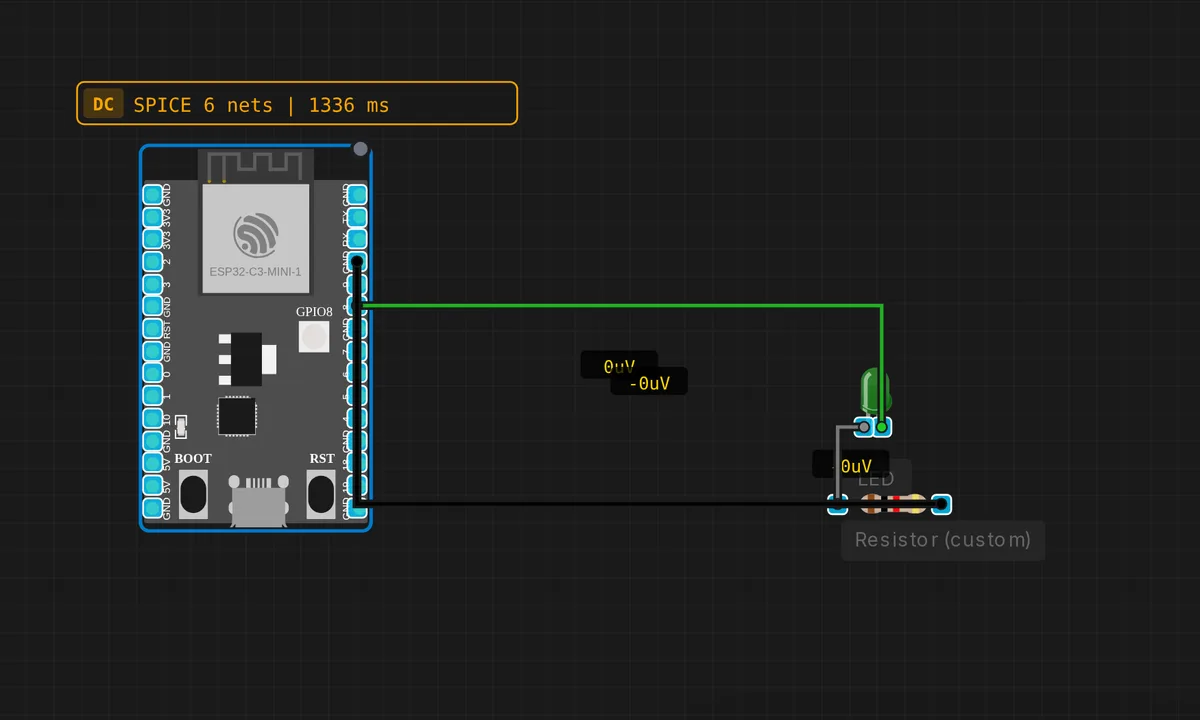
The exact circuit you get when you open this example — already wired, ready to run.
The sketch
// ESP32-C3 — Blink LED on GPIO 8
// Runs via QEMU libqemu-riscv32 (esp32c3-picsimlab machine)

#define LED_PIN 8

void setup() {
  pinMode(LED_PIN, OUTPUT);
  Serial.begin(115200);
  Serial.println("ESP32-C3 Blink ready!");
}

void loop() {
  digitalWrite(LED_PIN, HIGH);
  Serial.println("LED ON");
  delay(500);
  digitalWrite(LED_PIN, LOW);
  Serial.println("LED OFF");
  delay(500);
}
How it works
The whole sketch is eight meaningful lines: pinMode(LED_PIN, OUTPUT) in setup(), then a loop that writes the pin HIGH, waits 500 ms, writes it LOW, waits again. The pin number lives in #define LED_PIN 8, so moving to a different board means editing one line instead of hunting through the loop.
The Serial.println() on every transition is doing more than logging: with two lines a second in the Serial Monitor you can verify the loop is alive without ever looking at the canvas. On a stubborn real board, that stream is how you tell “LED wiring is wrong” from “firmware never ran”.
Under the hood this is not the classic ESP32: the C3 is a single-core RISC-V (RV32IMC) part at 160 MHz, and the simulator emulates exactly that core. The Arduino API hides the difference completely — the same four lines compile for both architectures, which is precisely the point of the framework.
Before you build it for real
Two things the simulator forgives and real silicon does not. First, this circuit has no series resistor on the LED — a simulation sources whatever current the model wants, but a real C3 GPIO is rated for about 20 mA and a bare red LED will push past it. Use 220 Ω to 1 kΩ in series. Second, GPIO8 is a strapping pin: its level at reset controls the boot ROM’s UART logging. An LED through a resistor will not pull it low enough to matter — but never tie GPIO8 directly to GND. One more quirk: on the official DevKitM-1, GPIO8 also feeds an onboard addressable RGB LED, so this sketch may light that instead of your breadboard LED. Same pin, two destinations.
Get the parts
Related examples
FAQ
Is the ESP32-C3 just a cheaper ESP32?
Architecturally it is a different chip: a single-core RISC-V RV32IMC at 160 MHz instead of the dual-core Xtensa LX6, with WiFi and BLE 5 but no classic Bluetooth. The Arduino core hides almost all of it — this exact sketch compiles and runs identically on both.
Can I move the LED to another GPIO?
Yes — change #define LED_PIN 8 and the rest of the sketch follows. Stay away from GPIO11–17, which talk to the internal SPI flash, and treat GPIO2, GPIO8 and GPIO9 with care: all three are strapping pins sampled at reset.