
ESP32: Analog Joystick
ESP32: Analog Joystick is a runnable microcontroller simulation example on SensBench — open the wired circuit, inspect the code, and compile real firmware in your browser, no install needed. Last updated Aug 14, 2026.
FREE SIMULATOR EXAMPLE · BEGINNER
ESP32: Analog Joystick
This example reads a two-axis analog joystick: X on GPIO35, Y on GPIO34, and the click button on GPIO15 using the internal pull-up. The Serial Monitor prints raw ADC counts, a −100 to +100 percentage per axis and the button state, ten times a second.
| Board | ESP32 DevKit (Xtensa LX6, 240 MHz) |
|---|---|
| Difficulty | beginner |
| Category | sensors |
| Libraries | None — just the Arduino core |
| Runs in | Sensbench browser simulator — free, no account |
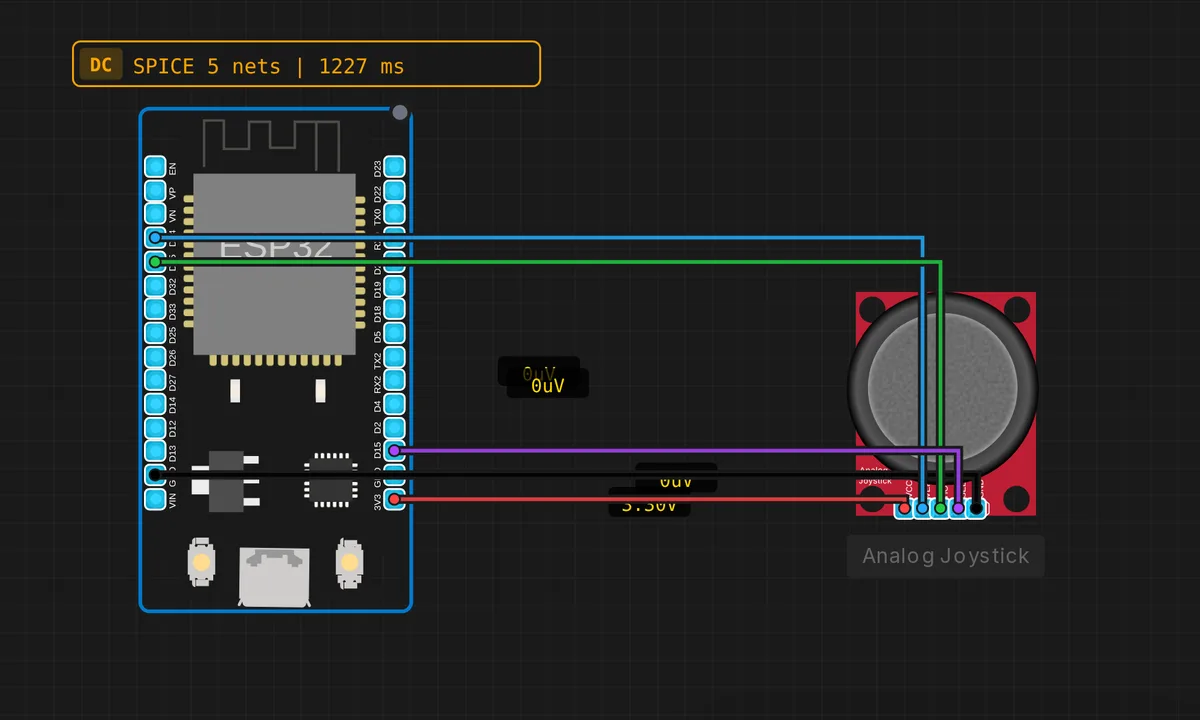
The exact circuit you get when you open this example — already wired, ready to run.
The sketch
// ESP32 — Analog Joystick
// Wiring: HORZ → D35 | VERT → D34 | SEL → D15
//         VCC → 3V3  | GND → GND


#define JOY_HORZ 35  // input-only ADC pin
#define JOY_VERT 34  // input-only ADC pin
#define JOY_BTN  15  // GPIO with pull-up


void setup() {
  Serial.begin(115200);
  pinMode(JOY_BTN, INPUT_PULLUP);
  Serial.println("ESP32 Joystick ready");
}

void loop() {
  int x    = analogRead(JOY_HORZ); // 0–4095
  int y    = analogRead(JOY_VERT); // 0–4095
  bool btn = (digitalRead(JOY_BTN) == LOW);

  int xPct = map(x, 0, 4095, -100, 100);
  int yPct = map(y, 0, 4095, -100, 100);

  Serial.printf("X=%4d(%4d%%) Y=%4d(%4d%%) BTN=%s\n",
    x, xPct, y, yPct, btn ? "PRESSED" : "---");
  delay(100);
}
How it works
The two axes sit on GPIO35 and GPIO34 — the code comments call them what they are: input-only ADC pins. analogRead() returns 0–4095 from the ESP32’s 12-bit ADC, then map(x, 0, 4095, -100, 100) turns raw counts into a signed percentage, so centre reads near 0 and the stick’s ends read ±100.
The click button is wired to GPIO15 with pinMode(JOY_BTN, INPUT_PULLUP), which makes it active-low: digitalRead(JOY_BTN) == LOW means pressed, no external resistor needed. A delay(100) closes the loop, so the Serial Monitor gets a fresh line of X, Y and button state ten times a second — fast enough to feel live while you wiggle the stick.
Before you build it for real
GPIO34 and GPIO35 are input-only — no output driver, no internal pull-up — which is exactly why they suit a joystick’s voltage-divider wipers, but never plan to reuse them for anything you need to drive. GPIO15 is a strapping pin: it must read high at reset, so if the button is held down while the board boots you can silence the boot log and confuse yourself. And real sticks never centre at exactly 2048 — add a deadband around zero or your project will drift on its own.
Get the parts
Related examples
FAQ
Why are the axes on GPIO34/35 and not other pins?
Those two are input-only ADC1 pins: they cannot drive anything, but they read analog cleanly and — more importantly — ADC1 keeps working when WiFi is on, while ADC2 pins get claimed by the radio. For any project that might grow WiFi later, reading analog on ADC1 is the safe habit.
The values jitter around center — is that normal?
Yes. Cheap joystick pots are electrically noisy and the ESP32’s ADC wanders a few counts on its own; the simulator just makes it look clean. Average several readings and add a deadband of about ±3–5% around zero before your code acts on the value.