
ESP32: MPU-6050 Accelerometer
ESP32: MPU-6050 Accelerometer is a runnable microcontroller simulation example on SensBench — open the wired circuit, inspect the code, and compile real firmware in your browser, no install needed. Last updated Aug 14, 2026.
FREE SIMULATOR EXAMPLE · INTERMEDIATE
ESP32: MPU-6050 Accelerometer
This example reads an MPU-6050 inertial sensor over I2C — SDA on GPIO21, SCL on GPIO22 — and prints 3-axis acceleration, 3-axis gyro rate and the chip temperature to the Serial Monitor every half second. It runs on Adafruit’s unified sensor API, so the pattern transfers to their other sensors unchanged.
| Board | ESP32 DevKit (Xtensa LX6, 240 MHz) |
|---|---|
| Difficulty | intermediate |
| Category | sensors |
| Libraries | Adafruit MPU6050, Adafruit Unified Sensor, Adafruit BusIO |
| Runs in | Sensbench browser simulator — free, no account |
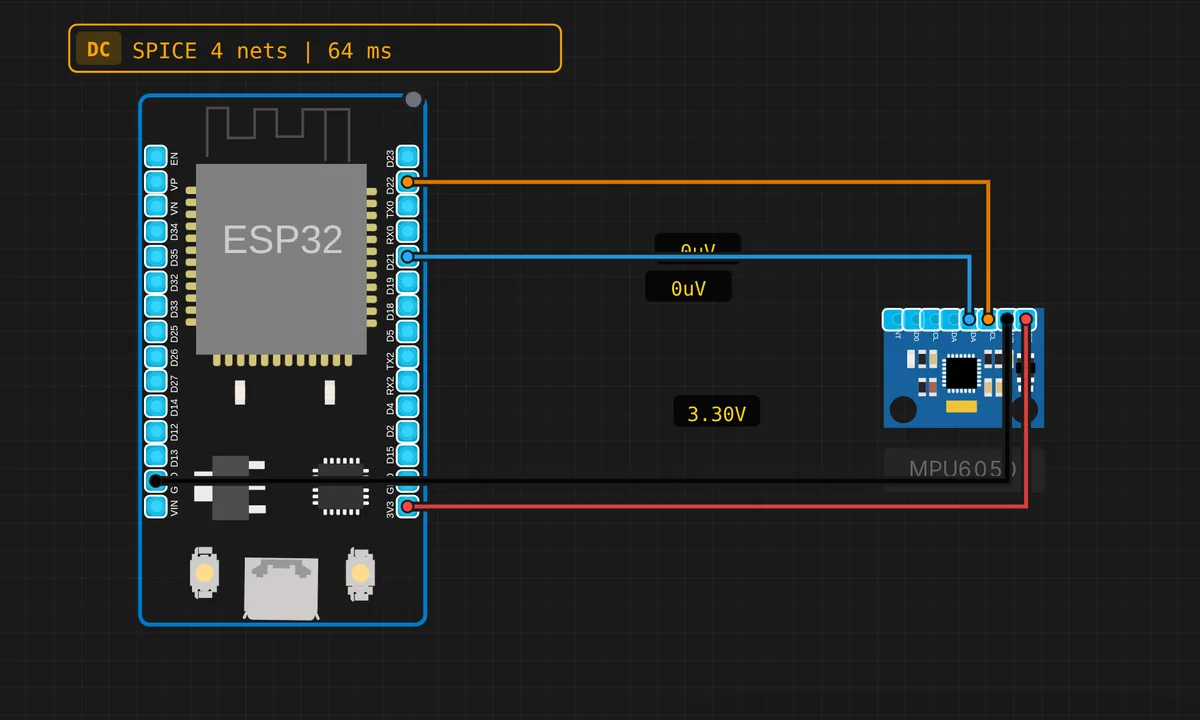
The exact circuit you get when you open this example — already wired, ready to run.
The sketch
// ESP32 — MPU-6050 Accelerometer & Gyroscope (I2C)
// Requires: Adafruit MPU6050, Adafruit Unified Sensor libraries
// Wiring: SDA → D21  |  SCL → D22  |  VCC → 3V3  |  GND → GND

#include <Adafruit_MPU6050.h>
#include <Adafruit_Sensor.h>
#include <Wire.h>

Adafruit_MPU6050 mpu;


void setup() {
  Serial.begin(115200);
  Wire.begin(21, 22); // SDA=21, SCL=22
  if (!mpu.begin()) {
    Serial.println("MPU6050 not found! Check wiring.");
    while (true) delay(10);
  }
  mpu.setAccelerometerRange(MPU6050_RANGE_8_G);
  mpu.setGyroRange(MPU6050_RANGE_500_DEG);
  mpu.setFilterBandwidth(MPU6050_BAND_21_HZ);
  Serial.println("MPU6050 ready!");
}

void loop() {
  sensors_event_t a, g, temp;
  mpu.getEvent(&a, &g, &temp);

  Serial.printf("Accel X=%.2f Y=%.2f Z=%.2f m/s²\n",
    a.acceleration.x, a.acceleration.y, a.acceleration.z);
  Serial.printf("Gyro  X=%.2f Y=%.2f Z=%.2f rad/s\n",
    g.gyro.x, g.gyro.y, g.gyro.z);
  Serial.printf("Temp: %.1f C\n---\n", temp.temperature);
  delay(500);
}
How it works
Wire.begin(21, 22) starts I2C on the standard ESP32 pins and mpu.begin() probes for the chip — same fail-loud pattern as other Adafruit sensor sketches: print and park if nothing answers. Then three config calls set the instrument up: setAccelerometerRange(MPU6050_RANGE_8_G) for ±8 g full scale, setGyroRange(MPU6050_RANGE_500_DEG) for ±500 °/s, and setFilterBandwidth(MPU6050_BAND_21_HZ) to engage the on-chip digital low-pass filter that knocks down vibration noise.
Reading is one call: mpu.getEvent(&a, &g, &temp) fills three sensors_event_t structs. This is Adafruit’s Unified Sensor API — acceleration arrives in real m/s², gyro in rad/s, temperature in °C, not raw ADC counts — so the same code shape works across their entire sensor line. Half a second of delay keeps the Serial Monitor readable instead of a blur.
Before you build it for real
“MPU6050 not found!” on real hardware is almost always the I2C address: the chip sits at 0x68, or 0x69 when AD0 is pulled high — and clone modules are notorious for a floating AD0 solder joint. Second, the Z axis reading ~9.8 m/s² with the board lying flat is gravity, not a bug — an accelerometer at rest measures 1 g upward. Finally, that temperature channel reads the die, which runs a few degrees above ambient; do not log it as room temperature in a weather project.
Get the parts
Related examples
FAQ
Why does Z read about 9.8 when the board is sitting still?
That is gravity. An accelerometer measures proper acceleration, so at rest it reports 1 g — 9.81 m/s² — on whichever axis faces the sky. It is the single most-asked MPU-6050 question, and seeing it means your sensor is working correctly.
Can I get tilt angles from this sketch?
Not directly — this prints raw accelerometer, gyro and temperature. Angles need sensor fusion (a complementary, Madgwick or Kalman filter) that integrates the gyro and corrects the drift with the accelerometer. Get clean raw data first, fuse second.