
ESP32: SSD1306 OLED Display
ESP32: SSD1306 OLED Display is a runnable microcontroller simulation example on SensBench — open the wired circuit, inspect the code, and compile real firmware in your browser, no install needed. Last updated Aug 14, 2026.
FREE SIMULATOR EXAMPLE · INTERMEDIATE
ESP32: SSD1306 OLED Display
This example puts text and a live counter on a 128×64 SSD1306 OLED wired to the ESP32 over I2C — SDA on GPIO21, SCL on GPIO22, module address 0x3C. Press play and the screen shows two lines of double-size text plus a counter that ticks once per second, while the Serial Monitor prints a frame number for every refresh.
| Board | ESP32 DevKit (Xtensa LX6, 240 MHz) |
|---|---|
| Difficulty | intermediate |
| Category | displays |
| Libraries | Adafruit SSD1306, Adafruit GFX Library, Adafruit BusIO |
| Runs in | Sensbench browser simulator — free, no account |
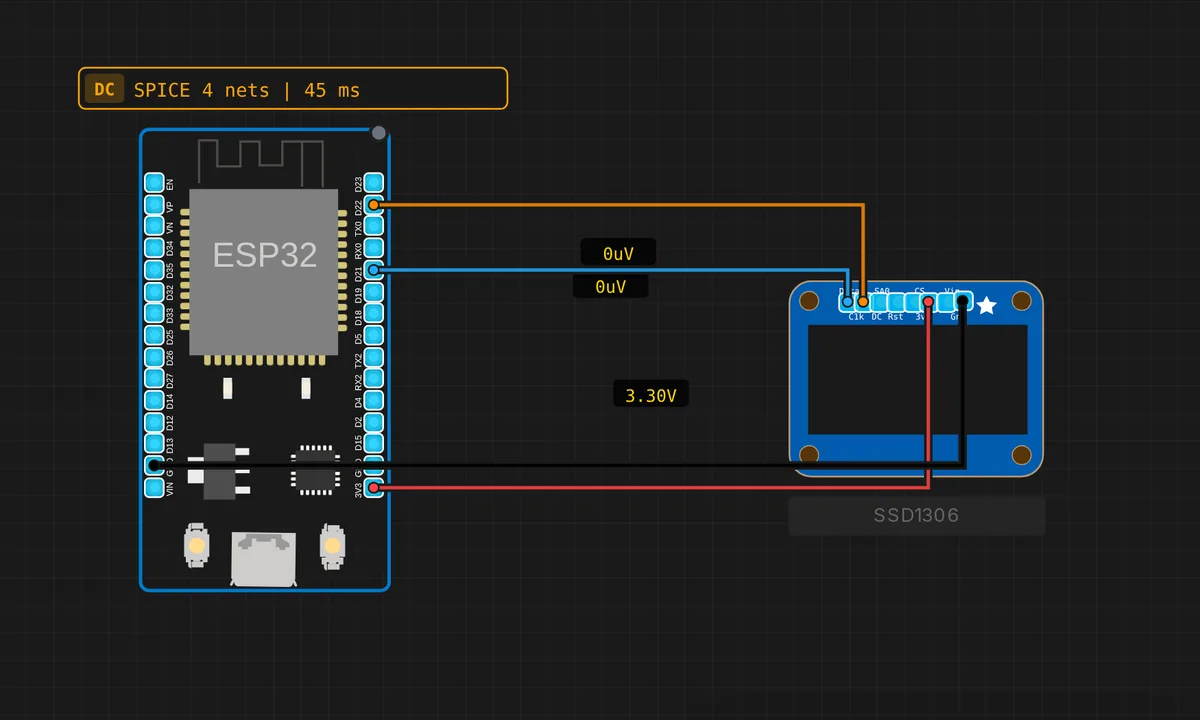
The exact circuit you get when you open this example — already wired, ready to run.
The sketch
// ESP32 — SSD1306 OLED Display (I2C 128×64)
// Requires: Adafruit SSD1306, Adafruit GFX Library
// Wiring: SDA → D21  |  SCL → D22  |  VCC → 3V3  |  GND → GND

#include <Wire.h>
#include <Adafruit_GFX.h>
#include <Adafruit_SSD1306.h>

#define SCREEN_WIDTH 128
#define SCREEN_HEIGHT 64

Adafruit_SSD1306 display(SCREEN_WIDTH, SCREEN_HEIGHT, &Wire, -1);

int counter = 0;

void setup() {
  Serial.begin(115200);
  Wire.begin(21, 22);
  if (!display.begin(SSD1306_SWITCHCAPVCC, 0x3C)) {
    Serial.println("SSD1306 not found!");
    while (true) delay(10);
  }
  display.clearDisplay();
  display.setTextSize(2);
  display.setTextColor(SSD1306_WHITE);
  display.setCursor(0, 0);
  display.println("Hello");
  display.println("sensbench!");
  display.display();
  Serial.println("OLED ready!");
}

void loop() {
  counter++;
  display.clearDisplay();
  display.setTextSize(2);
  display.setTextColor(SSD1306_WHITE);
  display.setCursor(0, 0);
  display.println("Hello");
  display.println("sensbench!");
  display.setTextSize(1);
  display.setCursor(0, 48);
  display.printf("Count: %d", counter);
  display.display();
  Serial.printf("Frame: %d\n", counter);
  delay(1000);
}
How it works
The sketch brings up I2C explicitly with Wire.begin(21, 22) — the ESP32’s default SDA and SCL — then calls display.begin(SSD1306_SWITCHCAPVCC, 0x3C) to probe the module at address 0x3C. If the probe fails it prints an error and parks in while (true) instead of running silently with a dead screen; on real hardware that halt is your first debugging clue. The constructor’s last argument, -1, tells the library there is no reset pin — these modules reset themselves at power-on.
Adafruit GFX works on a draw-then-push model. clearDisplay(), setCursor() and println() only write into a 1 KB frame buffer in the ESP32’s RAM — nothing reaches the panel until display.display() clocks the whole buffer over I2C. That is why the loop can erase and redraw every cycle without any flicker: the screen only ever changes in one atomic push.
The counter line uses display.printf(), which formats like C’s printf straight into the buffer — no String juggling. Cursor position (0, 48) drops it onto the bottom row of the 64-pixel panel at text size 1, and a matching Serial.printf() logs each frame so you can follow the refresh rhythm without watching the canvas.
Before you build it for real
Two things differ on a real bench. First, the address: most 128×64 modules are 0x3C, but plenty ship as 0x3D — if the screen stays black and Serial says not found, run an I2C scanner before suspecting the wiring. Second, speed: every display.display() pushes 1 KB over I2C, and at the default 100 kHz clock a full frame takes around 90 ms. One refresh per second is comfortable; smooth animation is not. Call Wire.setClock(400000) before display.begin() and the same frame drops to roughly a quarter of that — the SSD1306 handles 400 kHz without complaint.
Get the parts
Related examples
FAQ
The screen stays black. What do I check first?
Address first, wiring second. display.begin() returns false when the module does not answer at 0x3C, and this sketch prints a message and halts in that case — so a black screen with no serial output points at SDA and SCL swapped or a loose wire, while the error message points at a 0x3D module. An I2C scanner sketch settles it in seconds.
Can I use pins other than 21 and 22?
Yes. Wire.begin(sda, scl) accepts almost any free GPIO on the ESP32 — 21 and 22 are just the defaults the board silkscreen assumes. Stay clear of the strapping pins (0, 2, 12, 15) and the input-only pins 34-39, and the library does not care which pair you pick.