
ESP32: SSD1306 OLED (4-pin I2C)
ESP32: SSD1306 OLED (4-pin I2C) is a runnable microcontroller simulation example on SensBench — open the wired circuit, inspect the code, and compile real firmware in your browser, no install needed. Last updated Aug 14, 2026.
FREE SIMULATOR EXAMPLE · INTERMEDIATE
ESP32: SSD1306 OLED (4-pin I2C)
This example drives the cheapest display in the ESP32 parts bin: a 4-pin SSD1306 module with just GND, VCC, SCL and SDA. It hangs off the ESP32’s default I2C pins — SDA on GPIO21, SCL on GPIO22 — and shows two lines of text plus a counter that updates every 500 ms.
| Board | ESP32 DevKit (Xtensa LX6, 240 MHz) |
|---|---|
| Difficulty | intermediate |
| Category | displays |
| Libraries | Adafruit SSD1306, Adafruit GFX Library, Adafruit BusIO |
| Runs in | Sensbench browser simulator — free, no account |
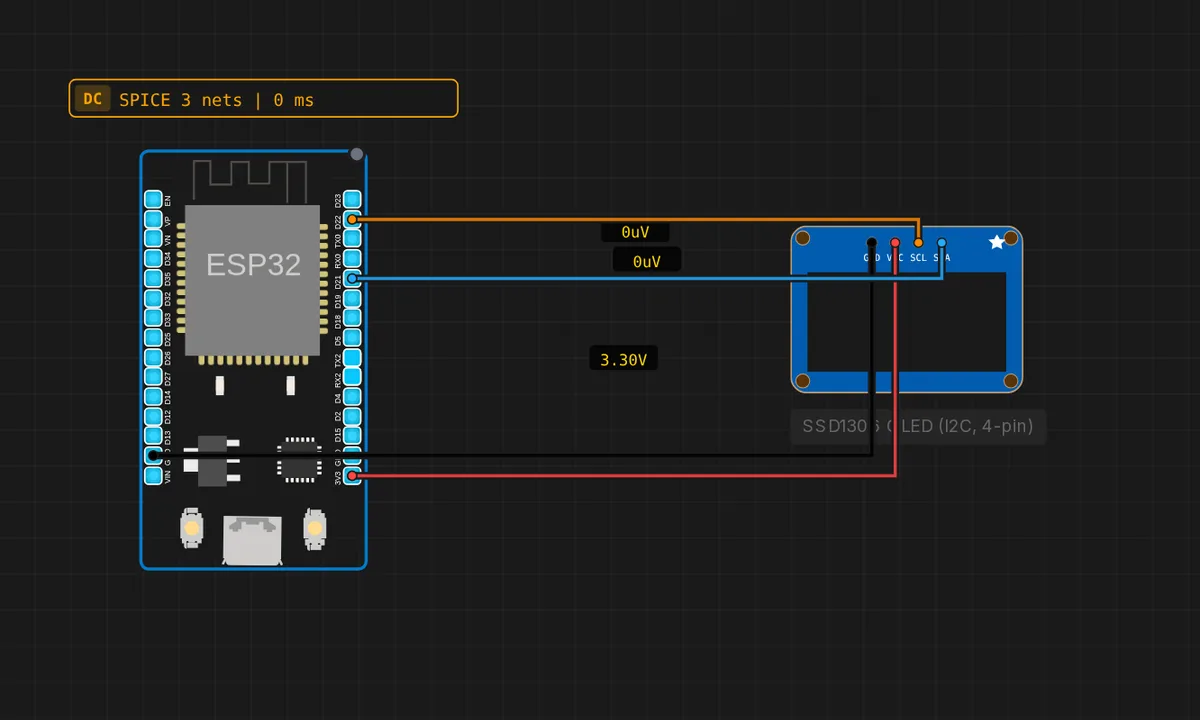
The exact circuit you get when you open this example — already wired, ready to run.
The sketch
// ESP32 — SSD1306 128x64 OLED (4-pin I2C module)
// Wiring: SDA -> 21  |  SCL -> 22  |  VCC -> 3V3  |  GND -> GND
#include <Wire.h>
#include <Adafruit_GFX.h>
#include <Adafruit_SSD1306.h>

Adafruit_SSD1306 display(128, 64, &Wire, -1);
int n = 0;

void setup() {
  Serial.begin(115200);
  Wire.begin(21, 22);
  if (!display.begin(SSD1306_SWITCHCAPVCC, 0x3C)) {
    Serial.println("SSD1306 not found!");
    while (true) delay(10);
  }
  display.clearDisplay();
  Serial.println("OLED ready");
}

void loop() {
  n++;
  display.clearDisplay();
  display.setTextSize(2);
  display.setTextColor(SSD1306_WHITE);
  display.setCursor(0, 0);
  display.println("Hello");
  display.println("sensbench!");
  display.setTextSize(1);
  display.setCursor(0, 48);
  display.printf("Count: %d", n);
  display.display();
  delay(500);
}
How it works
Four pins means the module is I2C-only: no SPI, no chip-select, no reset line. That is why the constructor is Adafruit_SSD1306 display(128, 64, &Wire, -1) — the -1 stands in for a reset pin this board does not have, and Wire.begin(21, 22) is the entire bus setup. display.begin(SSD1306_SWITCHCAPVCC, 0x3C) then probes address 0x3C, and the sketch halts with a serial message if nothing answers.
All the drawing calls — clearDisplay(), setTextSize(), setCursor(), println(), printf() — write into a 1 KB RAM buffer. Only display.display() moves pixels, pushing the full frame over I2C in one go. The loop redraws every 500 ms, which even the default 100 kHz bus handles with room to spare.
Note what is not here: no per-frame serial spam. The single Serial.println() in setup() confirms the display initialized, and after that the screen itself is the output. On a battery project you would strip the serial entirely — the OLED becomes the whole UI.
Before you build it for real
The trap with these modules is the pin order: two versions exist, GND-VCC-SCL-SDA and VCC-GND-SCL-SDA, and they look identical until you read the silkscreen. Wire one by habit from the other and you feed power into the wrong pins — the simulator never has this problem because its module is fixed. Second: the address is almost always 0x3C, but if a real screen stays dark and the sketch prints its not-found message, try 0x3D before rewiring anything.
Get the parts
Related examples
FAQ
Can this module show graphics, or just text?
Full graphics. It is the same SSD1306 and the same Adafruit GFX API as any other size — drawPixel(), drawLine(), drawRect() and drawBitmap() all work. Everything still lands in the RAM buffer until you call display.display().
Why does the constructor pass -1 for the reset pin?
Because the 4-pin module has no reset line to connect — it resets itself at power-on. Passing -1 stops the library from toggling a pin that does not exist. The 7-pin SPI versions of this display do have a reset pin, and there you would pass its GPIO number instead.