
ESP32: Servo Motor + Potentiometer
ESP32: Servo Motor + Potentiometer is a runnable microcontroller simulation example on SensBench — open the wired circuit, inspect the code, and compile real firmware in your browser, no install needed. Last updated Aug 14, 2026.
FREE SIMULATOR EXAMPLE · BEGINNER
ESP32: Servo Motor + Potentiometer
This example links a potentiometer on GPIO34 to a servo on GPIO13: turn the knob and the horn follows in real time. The loop reads the 12-bit ADC (0 to 4095), maps it to 0-180 degrees, and updates the servo at 50 Hz while the Serial Monitor prints both the raw reading and the angle.
| Board | ESP32 DevKit (Xtensa LX6, 240 MHz) |
|---|---|
| Difficulty | beginner |
| Category | robotics |
| Libraries | ESP32Servo |
| Runs in | Sensbench browser simulator — free, no account |
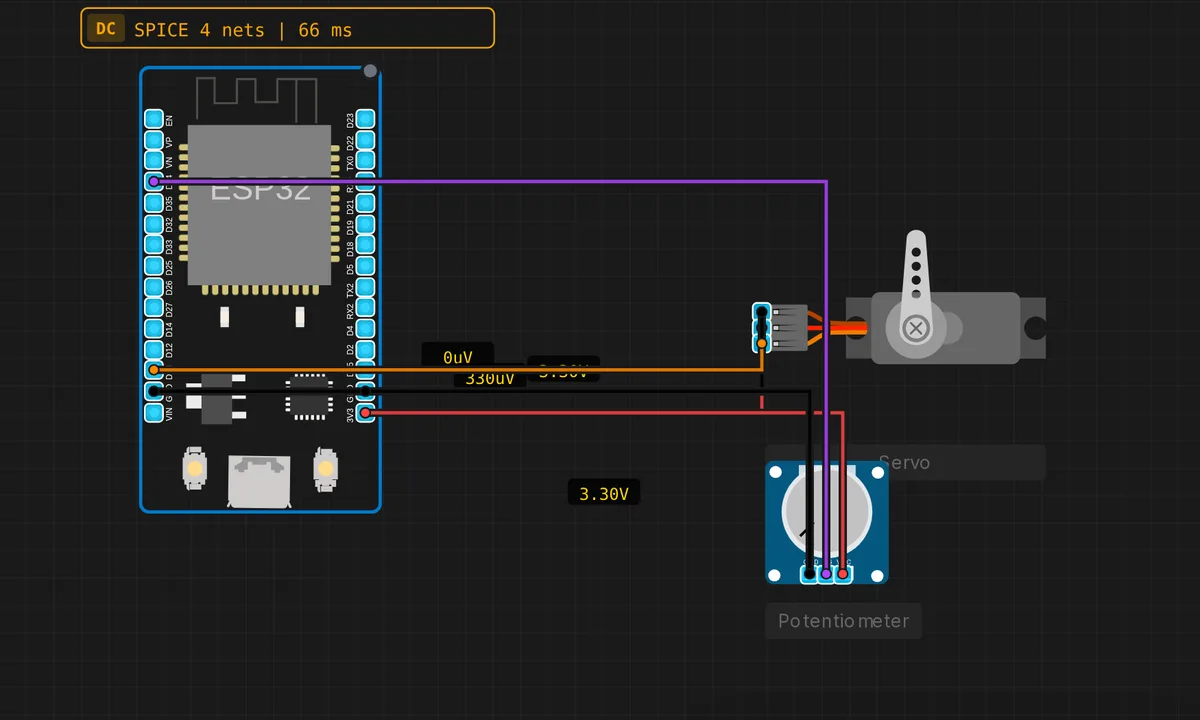
The exact circuit you get when you open this example — already wired, ready to run.
The sketch
// ESP32 — Servo controlled by Potentiometer
// Servo: PWM → D13  |  V+ → 3V3  |  GND → GND
// Pot  : SIG → D34  |  VCC → 3V3  |  GND → GND

#include <ESP32Servo.h>

#define SERVO_PIN 13
#define POT_PIN   34  // input-only GPIO (ADC)

Servo myServo;


void setup() {
  Serial.begin(115200);
  myServo.attach(SERVO_PIN, 500, 2400); // standard servo pulse range
  Serial.println("ESP32 Servo + Pot control");
}

void loop() {
  int raw   = analogRead(POT_PIN);         // 0–4095 (12-bit ADC)
  int angle = map(raw, 0, 4095, 0, 180);
  myServo.write(angle);
  Serial.printf("Pot: %4d  Angle: %3d deg\n", raw, angle);
  delay(20);
}
How it works
A hobby servo expects a pulse every 20 ms, and the pulse width sets the angle. myServo.attach(SERVO_PIN, 500, 2400) hands the pin to the ESP32Servo library with explicit limits — 500 us for 0 degrees, 2400 us for 180 — and from then on the library’s LEDC-backed driver keeps the pulse train running in hardware. write(angle) just changes the width; no timing code of yours is involved.
GPIO34 feeds the ESP32’s 12-bit ADC, so analogRead() returns 0 to 4095 — not the 0 to 1023 an Uno gives you. map(raw, 0, 4095, 0, 180) scales the reading to degrees, and the pair of numbers printed each pass lets you watch the ADC’s last-digit jitter, which is normal analog behavior, not a bug in your wiring.
The delay(20) paces the loop at 50 Hz — the same frame rate the servo speaks. Polling faster accomplishes nothing, because the servo only samples a new command once per frame. This is the tightest sensible coupling between a knob and a horn you can write in fifteen lines.
Before you build it for real
The wiring diagram feeds the servo from 3V3, and a real build should not. The simulated servo draws no current, but a real SG90 pulls 100-500 mA mid-move and amps when stalled — the ESP32’s little regulator browns out and the board reboots, which looks exactly like a code bug. Give the servo its own 5 V supply, tie the grounds together, and keep the signal on GPIO13; 3.3 V logic is fine for nearly all servos. Also note GPIO34 is input-only with no internal pull-up — perfect for a pot wiper, useless if you later try to hang the servo or a pulled-up button on it.
Get the parts
Related examples
FAQ
Why 500 to 2400 microseconds instead of the usual 1000 to 2000?
1000-2000 us is the conservative standard for 0-180 degrees; many servos physically travel further, and 500-2400 squeezes out that extra range. If your servo buzzes or stalls at the ends of the knob, it has hit its mechanical stops — tighten the limits in attach() until the buzzing stops.
Can I use a different pin for the servo?
Any output-capable GPIO works — the library routes the signal through LEDC, which can reach almost any pin. Just avoid the input-only pins 34-39 and the strapping pins. GPIO13 is a safe default, which is exactly why the sketch uses it.