
Fade LED
Fade LED is a runnable microcontroller simulation example on SensBench — open the wired circuit, inspect the code, and compile real firmware in your browser, no install needed. Last updated Aug 14, 2026.
FREE SIMULATOR EXAMPLE · BEGINNER
Fade LED
This example breathes an LED on pin 9 of the Arduino Uno: brightness ramps from 0 to 255 and back in steps of 5, one step every 30 ms, so a full fade takes about a second and a half each way. It is the canonical first PWM sketch — the LED is never actually dim, it is switched on and off too fast for your eye to catch.
| Board | Arduino Uno (ATmega328P, 16 MHz, 5 V logic) |
|---|---|
| Difficulty | beginner |
| Category | basics |
| Libraries | None — just the Arduino core |
| Runs in | Sensbench browser simulator — free, no account |
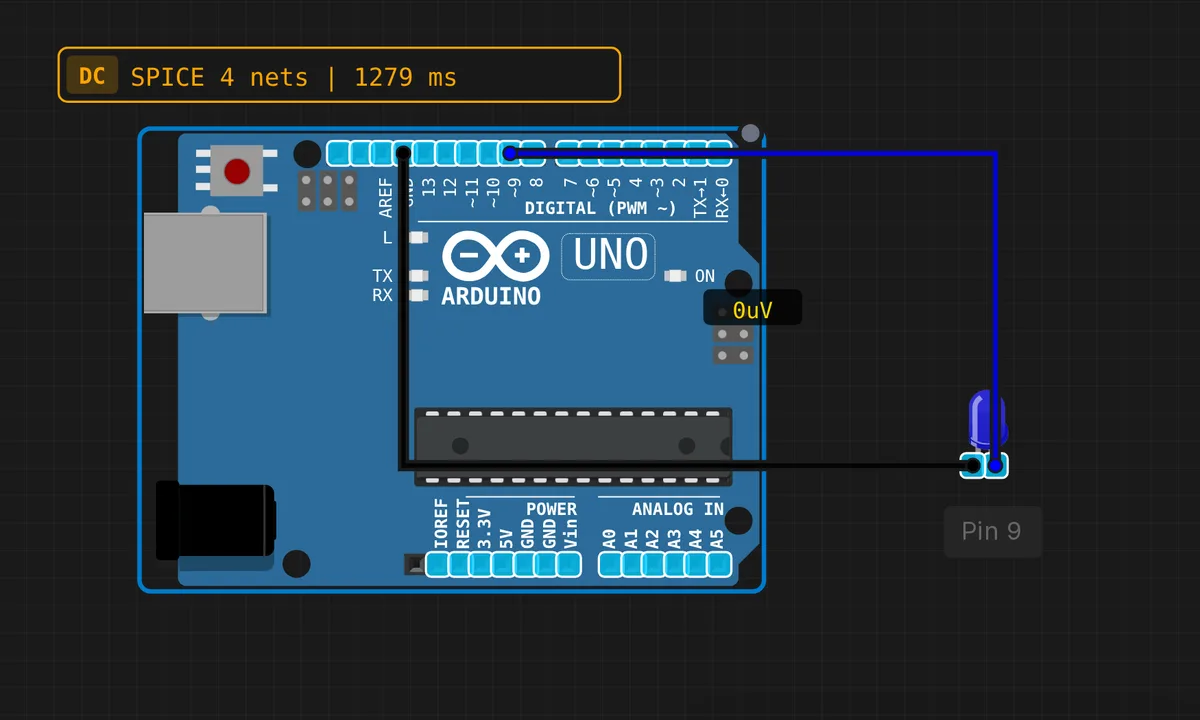
The exact circuit you get when you open this example — already wired, ready to run.
The sketch
// Fade LED with PWM
// Smoothly fade LED brightness

const int LED_PIN = 9; // PWM pin

int brightness = 0;
int fadeAmount = 5;

void setup() {
  pinMode(LED_PIN, OUTPUT);
}

void loop() {
  analogWrite(LED_PIN, brightness);

  brightness += fadeAmount;

  if (brightness <= 0 || brightness >= 255) {
    fadeAmount = -fadeAmount;
  }

  delay(30);
}
How it works
analogWrite(LED_PIN, brightness) writes a duty cycle, not a voltage. The ATmega328P only has hardware PWM on pins 3, 5, 6, 9, 10 and 11 — that is why the sketch lives on pin 9. The timer toggles the pin at about 490 Hz and your value sets the on-fraction: 0 is always off, 128 is on half the time, 255 is fully on. Your eye integrates that into smooth brightness.
The ramp logic is three lines: add fadeAmount, flip its sign when brightness reaches 0 or 255, then delay(30) to set the pace. Because the guard is <= 0 || >= 255 rather than an equality test, the ramp stays clean even if you change the step to 7 and overshoot the ends — the sign flips anyway and the LED never sticks at full on.
Before you build it for real
Here is the trap that bites on real hardware: PWM does not limit current. During its on-time the pin drives the full 5 V, so a dim LED with no resistor is still being slammed with the same peak current — duty cycle only averages the damage. Use a 220 Ω series resistor no matter how dim you run it. And remember the pin constraint: call analogWrite() on a non-PWM pin like 13 and you get no fading at all — values under 128 read as off, 128 and above as on, which looks exactly like a dead LED.
Get the parts
Related examples
FAQ
Which pins support analogWrite on the Uno?
3, 5, 6, 9, 10 and 11 — they are marked with a ~ on the silkscreen. Pins 5 and 6 run at about 980 Hz, the rest at about 490 Hz. On any other pin analogWrite silently degrades to plain on/off.
Why 0 to 255?
The ATmega328P’s timers are 8-bit, so the duty cycle has 256 steps. If you need finer control you have to reconfigure the timer to 16-bit mode yourself — analogWrite will not do it for you.