
I2C Scanner (TWI)
I2C Scanner (TWI) is a runnable microcontroller simulation example on SensBench — open the wired circuit, inspect the code, and compile real firmware in your browser, no install needed. Last updated Aug 14, 2026.
FREE SIMULATOR EXAMPLE · INTERMEDIATE
I2C Scanner (TWI)
This example probes every valid I2C address from 1 to 126 and prints which ones ACK, with friendly labels for the usual suspects. On the canvas an SSD1306 OLED answers at 0x3C alongside virtual devices at 0x48, 0x50 and 0x68, then it rescans every ten seconds. When a real bus misbehaves, this is the first sketch you flash.
| Board | Arduino Uno (ATmega328P, 16 MHz, 5 V logic) |
|---|---|
| Difficulty | intermediate |
| Category | communication |
| Libraries | None — just the Arduino core |
| Runs in | Sensbench browser simulator — free, no account |
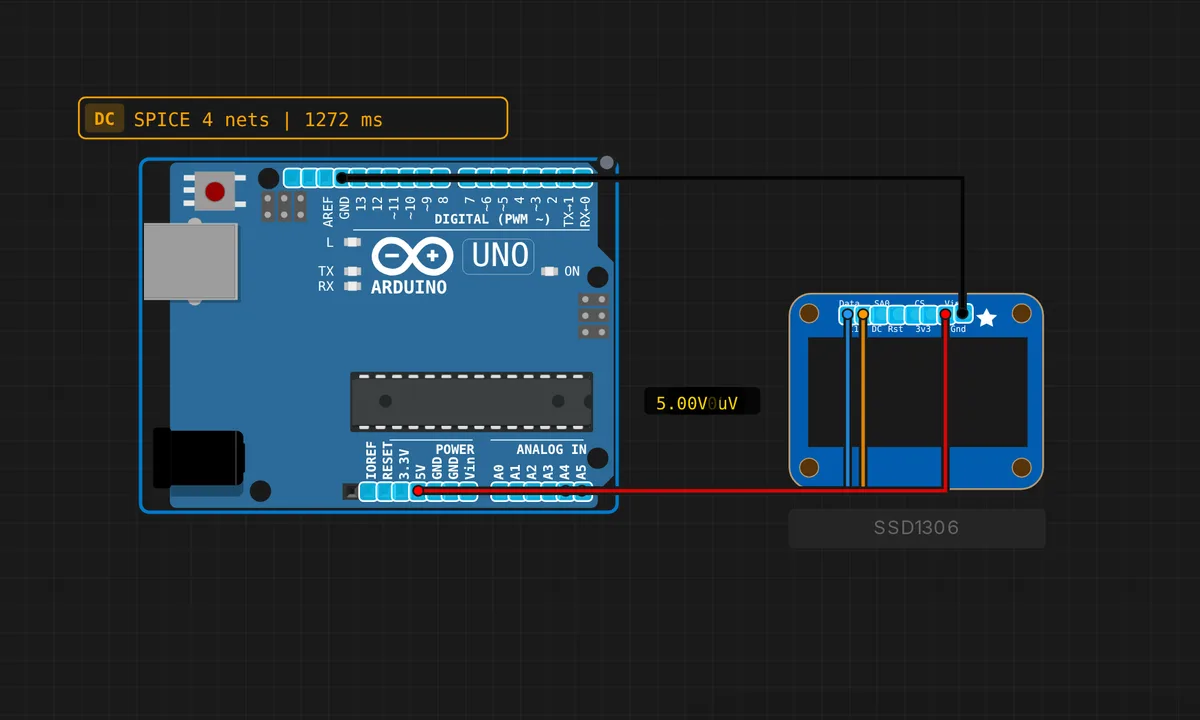
The exact circuit you get when you open this example — already wired, ready to run.
The sketch
// I2C Bus Scanner — TWI Protocol Test
// Scans all 127 I2C addresses and reports which ones respond with ACK.
// The emulator has virtual devices at:
//   0x48 = Temperature sensor
//   0x50 = EEPROM
//   0x68 = DS1307 RTC

#include <Wire.h>

void setup() {
  Wire.begin();
  Serial.begin(9600);

  Serial.println("===========================");
  Serial.println("  I2C Bus Scanner (TWI)");
  Serial.println("===========================");
  Serial.println("Scanning...");
  Serial.println();

  int devicesFound = 0;

  for (byte addr = 1; addr < 127; addr++) {
    Wire.beginTransmission(addr);
    byte error = Wire.endTransmission();

    if (error == 0) {
      Serial.print("  Device found at 0x");
      if (addr < 16) Serial.print("0");
      Serial.print(addr, HEX);

      // Identify known addresses
      switch (addr) {
        case 0x27: Serial.print("  (PCF8574 LCD backpack)"); break;
        case 0x3C: Serial.print("  (SSD1306 OLED)"); break;
        case 0x48: Serial.print("  (Temperature sensor)"); break;
        case 0x50: Serial.print("  (EEPROM)"); break;
        case 0x68: Serial.print("  (DS1307 RTC)"); break;
        case 0x76: Serial.print("  (BME280 sensor)"); break;
        case 0x77: Serial.print("  (BMP180/BMP280)"); break;
      }
      Serial.println();
      devicesFound++;
    }
  }

  Serial.println();
  Serial.print("Scan complete. ");
  Serial.print(devicesFound);
  Serial.println(" device(s) found.");

  if (devicesFound == 0) {
    Serial.println("No I2C devices found. Check connections.");
  }
}

void loop() {
  // Rescan every 10 seconds
  delay(10000);
  Serial.println("\nRescanning...");
  setup();
}
How it works
The probe is beautifully minimal: Wire.beginTransmission(addr) immediately followed by Wire.endTransmission(), with zero data bytes in between. That is an address-only transaction — if anything on the bus owns that address it pulls SDA low for the ACK bit and endTransmission() returns 0. No ACK means a nonzero return code and the scan moves on: 126 probes, a few milliseconds each.
The switch statement is your field guide to common addresses: 0x27 is a PCF8574 LCD backpack, 0x3C the SSD1306 OLED, 0x50 an EEPROM, 0x68 the DS1307 RTC, 0x76/0x77 the BME280 and BMP280. Worth knowing why the loop stops at 127: I2C uses 7-bit addressing, and 0x00–0x07 plus 0x78–0x7F are reserved, so the useful universe is 0x08–0x77.
One honest caveat about the rescan: calling setup() from loop() every ten seconds is a shortcut for a demo, not a pattern to copy. In a real project, wrap the scan in its own function — re-running Serial.begin() and Wire.begin() in a loop is harmless here and confusing everywhere else.
Before you build it for real
On real hardware this sketch is the bus doctor, and its diagnoses are specific. Zero devices found almost always means SDA/SCL are swapped (A4/A5 on the Uno), the pull-ups are missing, or there is no common ground. Found at a different address than the datasheet says usually means you read the 8-bit address, R/W bit included, instead of the 7-bit one. And the Uno is a 5 V bus master: a 3.3 V-only sensor may ACK today and die slowly tomorrow — put a level shifter between them, because the simulator will never warn you about that.
Get the parts
Related examples
FAQ
Why does the scan only go up to 127?
Classic I2C uses 7-bit addresses, so 0x00–0x7F is the whole space — and the first eight and last eight are reserved for protocol features. Everything you will ever wire up lives between 0x08 and 0x77.
The scanner finds my OLED at 0x3C but the library says the address is 0x78 — which is right?
Both. 0x78 is the 8-bit form: the 7-bit address 0x3C shifted left by one with the R/W bit sitting in bit 0. Datasheets mix the two conventions freely, which is exactly the confusion a scanner settles in one run.