
Uno: DHT22 Temperature & Humidity
Uno: DHT22 Temperature & Humidity is a runnable microcontroller simulation example on SensBench — open the wired circuit, inspect the code, and compile real firmware in your browser, no install needed. Last updated Aug 14, 2026.
FREE SIMULATOR EXAMPLE · BEGINNER
Uno: DHT22 Temperature & Humidity
This example reads temperature and humidity from a DHT22 on pin 7 of the Arduino Uno and prints both — plus the computed heat index in Fahrenheit — every two seconds. It uses Adafruit’s DHT sensor library, the same one you would install from Library Manager on real hardware, so what transfers directly.
| Board | Arduino Uno (ATmega328P, 16 MHz, 5 V logic) |
|---|---|
| Difficulty | beginner |
| Category | sensors |
| Libraries | DHT sensor library |
| Runs in | Sensbench browser simulator — free, no account |
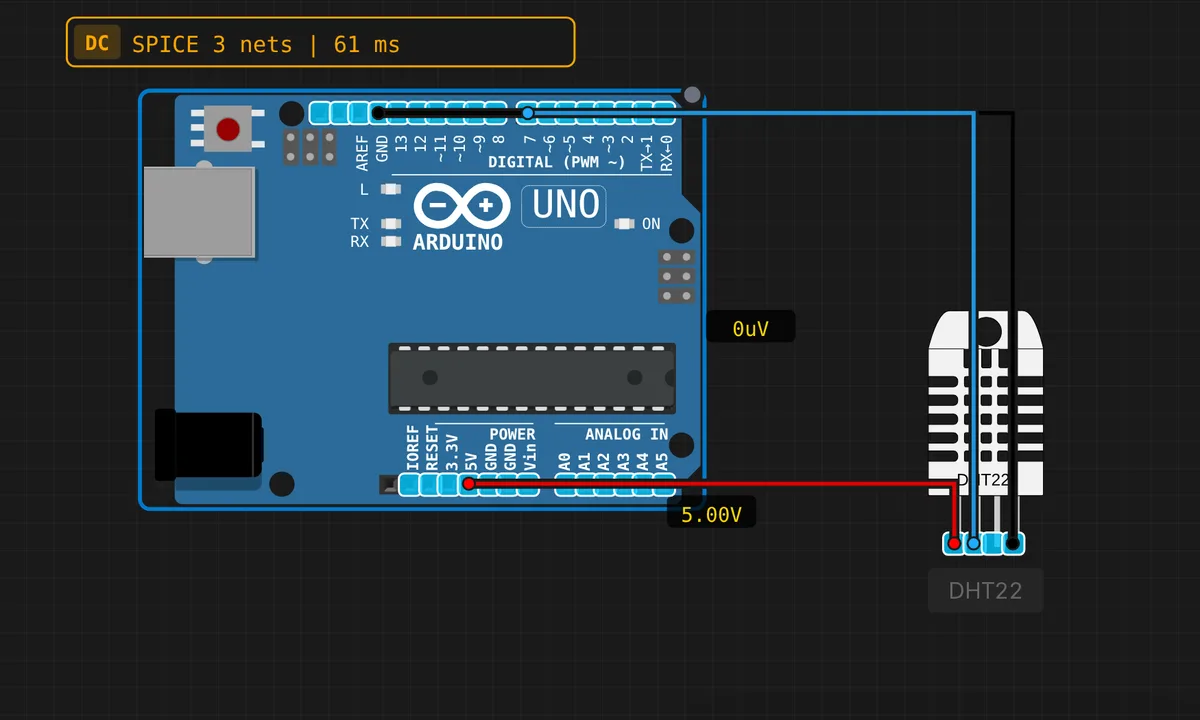
The exact circuit you get when you open this example — already wired, ready to run.
The sketch
// Arduino Uno — DHT22 Temperature & Humidity Sensor
// Requires: Adafruit DHT sensor library (install via Library Manager)
// Wiring: DATA → pin 7  |  VCC → 5V  |  GND → GND

#include <DHT.h>

#define DHT_PIN  7
#define DHT_TYPE DHT22

DHT dht(DHT_PIN, DHT_TYPE);

void setup() {
  Serial.begin(9600);
  dht.begin();
  Serial.println("DHT22 Sensor ready!");
}

void loop() {
  delay(2000);
  float humidity = dht.readHumidity();
  float tempC    = dht.readTemperature();
  float tempF    = dht.readTemperature(true);

  if (isnan(humidity) || isnan(tempC)) {
    Serial.println("ERROR: Failed to read from DHT22!");
    return;
  }

  Serial.print("Humidity   : "); Serial.print(humidity, 1); Serial.println(" %");
  Serial.print("Temperature: "); Serial.print(tempC, 1);  Serial.print(" C  /  ");
  Serial.print(tempF, 1); Serial.println(" F");
  float heatIdx = dht.computeHeatIndex(tempF, humidity);
  Serial.print("Heat Index : "); Serial.print(heatIdx, 1); Serial.println(" F");
  Serial.println("---");
}
How it works
The DHT22 speaks a single-wire protocol with strict timing and 40 bits per reading, and none of that is your problem: the DHT object bit-bangs it for you. dht.begin() in setup(), then dht.readHumidity() and dht.readTemperature() in the loop — pass true to the latter for Fahrenheit, which is exactly what the sketch feeds into dht.computeHeatIndex(tempF, humidity).
The isnan() guard is not decoration. DHT sensors fail checksums regularly — that is the sensor, not your code — and the library returns NaN when a read goes bad. The sketch bails out of that loop iteration instead of printing garbage, which is why an occasional ERROR line is the sign of a healthy setup, not a broken one.
Wiring is three wires: DATA to pin 7, VCC to 5V, GND to GND. On the Uno the 5V rail is the native logic level, so the data line needs no translation — a small luxury you do not get on 3.3V boards.
Before you build it for real
On a real build the DATA line wants a 10 kΩ pull-up to 5V — breakout modules include one, a bare DHT22 does not, and all-NaN readings on real hardware usually trace back to exactly that. Second, respect the delay(2000): the DHT22 needs about two seconds between conversions, and polling faster returns stale or NaN values. Finally, while the Uno’s 5V tolerance makes this exact wiring safe, do not copy it pin-for-pin to a 3.3V board — the DHT22’s data line idles at its supply voltage, and 5V into a 3.3V GPIO is an over-voltage.
Get the parts
Related examples
FAQ
Why does the Serial Monitor print 'ERROR: Failed to read from DHT22!'?
That branch fires when the library returns NaN — a failed checksum or a timing hiccup during the 40-bit transfer. Occasional failures are normal for DHT sensors, and the sketch simply tries again two seconds later. If every single read fails on real hardware, check the DATA pull-up resistor first.
Can I use a DHT11 instead?
Yes — change DHT_TYPE from DHT22 to DHT11 and the rest of the sketch is identical. The DHT11 is cheaper and less accurate, has no decimal resolution, and only covers 20-90% RH. Fine for a demo, frustrating for a thermostat.