
Uno: Potentiometer → Serial
Uno: Potentiometer → Serial is a runnable microcontroller simulation example on SensBench — open the wired circuit, inspect the code, and compile real firmware in your browser, no install needed. Last updated Aug 14, 2026.
FREE SIMULATOR EXAMPLE · BEGINNER
Uno: Potentiometer → Serial
This example reads a potentiometer on analog pin A0 of the Arduino Uno and prints the raw ADC count, the converted voltage and a percentage to the Serial Monitor every 200 ms. Twist the knob and all three columns move together — the quickest possible tour of the ATmega328P’s 10-bit ADC.
| Board | Arduino Uno (ATmega328P, 16 MHz, 5 V logic) |
|---|---|
| Difficulty | beginner |
| Category | sensors |
| Libraries | None — just the Arduino core |
| Runs in | Sensbench browser simulator — free, no account |
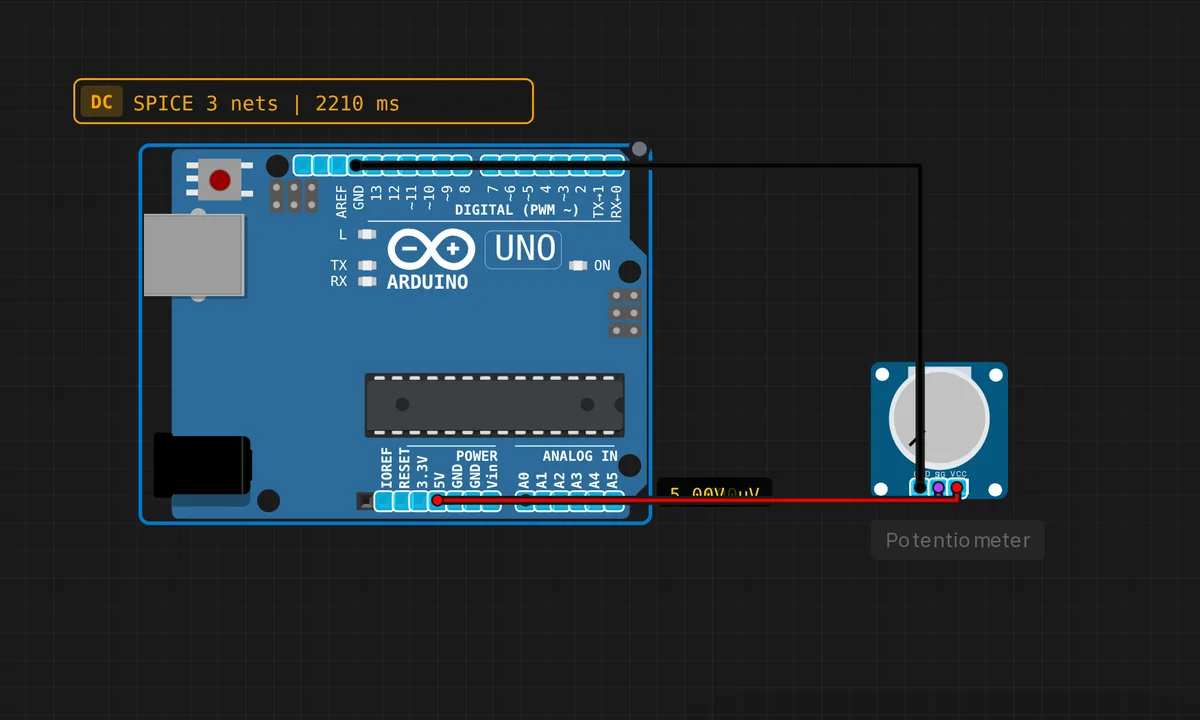
The exact circuit you get when you open this example — already wired, ready to run.
The sketch
// Arduino Uno — Potentiometer ADC reading

const int POT_PIN = A0;

void setup() {
  Serial.begin(9600);
  Serial.println("Potentiometer demo — turn the knob!");
}

void loop() {
  int raw = analogRead(POT_PIN);          // 0–1023
  float voltage = raw * (5.0 / 1023.0);  // convert to volts
  float percent  = raw / 10.23;

  Serial.print("ADC: ");
  Serial.print(raw);
  Serial.print("  |  ");
  Serial.print(voltage, 2);
  Serial.print(" V  |  ");
  Serial.print(percent, 1);
  Serial.println(" %");

  delay(200);
}
How it works
analogRead(POT_PIN) returns 0–1023: ten bits, 1024 steps between ground and the ADC reference. The sketch derives the other two columns from that one integer — raw * (5.0 / 1023.0) for volts and raw / 10.23 for percent. Floating point on an 8-bit AVR is slow, but at five prints a second you will never notice.
There is no pinMode() for A0 — the analog pins are inputs by default and analogRead() needs no setup, so setup() only opens Serial at 9600 baud. The delay(200) in the loop exists purely for human eyes: the ADC conversion itself takes about 100 µs, so the hardware could sample thousands of times per second while this sketch prints five.
Before you build it for real
The volts column is only as honest as the 5.0 in the formula. A Uno on USB power rarely sits at exactly 5.00 V — 4.6 to 4.9 V is common — and the ADC measures A0 against the real 5V rail, whatever it happens to be. Because the pot is powered from that same rail the raw count stays correct (the top of the track and the ADC reference sag together — the nice ratiometric property of this circuit), but the printed volts inherit your USB port’s droop; measure the 5V pin with a multimeter and put that number in the formula if you need true volts. Wiring matters too: outer legs to 5V and GND, wiper to A0. Swap the wiper with an outer leg and the knob does nothing for most of its travel — and if the wiper ever lifts off the track, A0 floats and the counts turn to noise.
Get the parts
Related examples
FAQ
Why 0–1023 and not 0–255?
The Uno’s ADC resolves 10 bits: 2^10 = 1024 steps, numbered 0 through 1023. PWM output via analogWrite() is 8-bit, 0–255. Feeding a pot straight into LED brightness is the classic range mismatch — divide the reading by 4 to map one onto the other.
The last digit jitters. Is my pot broken?
Probably not — the bottom bit or two of any real ADC is noise, and a scratchy knob makes it worse. Average 8 or 16 readings in code, or add a 100 nF capacitor from A0 to GND, and the display steadies. The simulator’s pot is suspiciously clean by comparison.