
Uno: Servo Motor Sweep
Uno: Servo Motor Sweep is a runnable microcontroller simulation example on SensBench — open the wired circuit, inspect the code, and compile real firmware in your browser, no install needed. Last updated Aug 14, 2026.
FREE SIMULATOR EXAMPLE · BEGINNER
Uno: Servo Motor Sweep
This example sweeps a hobby servo from 0 to 180 degrees and back on pin 9 of the Arduino Uno — two-degree steps, 15 ms apart, with a 400 ms breather at each end — and announces “180 deg reached” and “0 deg reached” on the Serial Monitor. It uses the Servo library bundled with the Arduino core, so there is nothing to install.
| Board | Arduino Uno (ATmega328P, 16 MHz, 5 V logic) |
|---|---|
| Difficulty | beginner |
| Category | robotics |
| Libraries | Servo |
| Runs in | Sensbench browser simulator — free, no account |
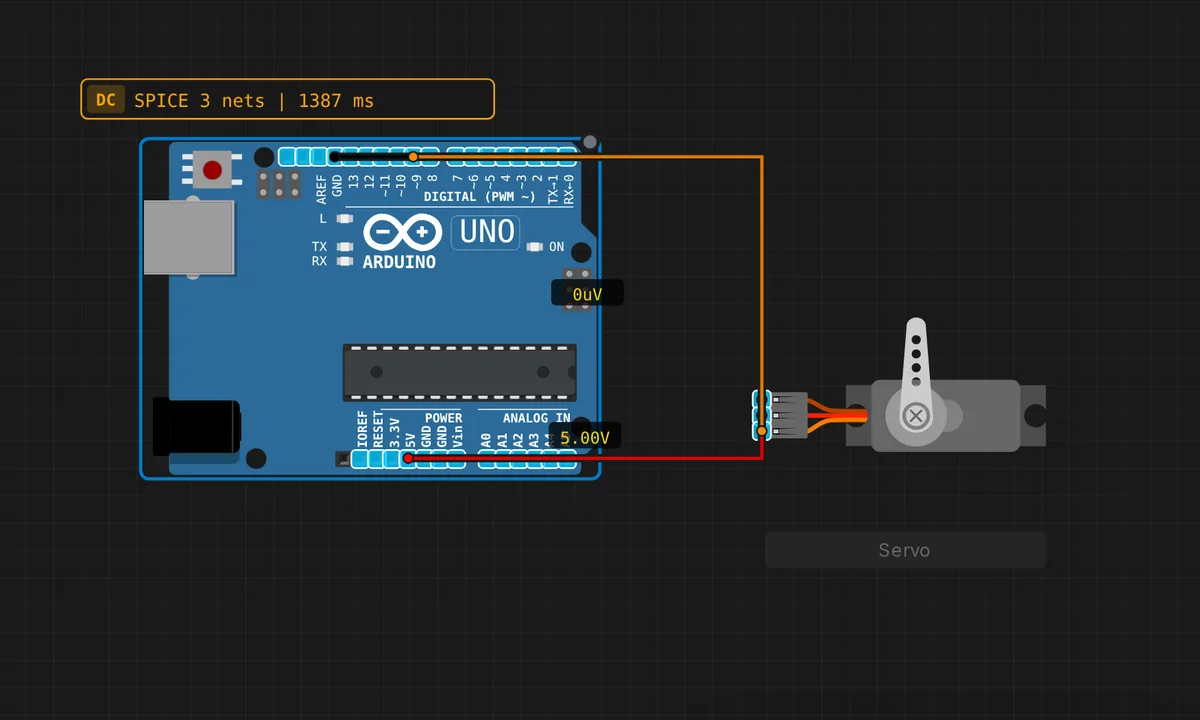
The exact circuit you get when you open this example — already wired, ready to run.
The sketch
// Arduino Uno — Servo Motor Sweep
// Wiring: PWM → pin 9  |  V+ → 5V  |  GND → GND
// Uses the built-in Servo library (no install needed)

#include <Servo.h>

#define SERVO_PIN 9

Servo myServo;

void setup() {
  myServo.attach(SERVO_PIN);
  Serial.begin(9600);
  Serial.println("Servo Sweep demo");
}

void loop() {
  // Sweep 0 → 180
  for (int angle = 0; angle <= 180; angle += 2) {
    myServo.write(angle);
    delay(15);
  }
  Serial.println("180 deg reached");
  delay(400);

  // Sweep 180 → 0
  for (int angle = 180; angle >= 0; angle -= 2) {
    myServo.write(angle);
    delay(15);
  }
  Serial.println("0 deg reached");
  delay(400);
}
How it works
#include <Servo.h> pulls in the library and myServo.attach(SERVO_PIN) hands it pin 9. From that moment the library generates the 50 Hz control signal by itself: myServo.write(angle) sets a target from 0 to 180 and the pin keeps emitting the corresponding 1–2 ms pulses in the background, even while your code sits inside delay().
The sweep is two mirrored for loops — one counts up in steps of 2, one counts back down. The delay(15) inside each step is what turns a snap into a sweep: 91 steps at 15 ms is about 1.4 seconds per traverse, gentle on a plastic gearbox. The 400 ms pauses at the ends exist so the horn actually arrives before the code reverses it — a servo is a physical object with lag, and this sketch respects that.
Before you build it for real
Servos are where the simulator stops forgiving. A real SG90 pulls 100–250 mA while moving and can peak past 500 mA at stall — and that current comes out of your USB port’s 500 mA budget, shared with the Uno itself. The classic hardware symptom is a twitching servo plus a board that keeps rebooting: brown-out. One micro servo on the 5V pin usually survives; anything more wants a separate 5–6 V supply with grounds tied together. Second gotcha: the Servo library commandeers Timer1, which kills analogWrite() on pins 9 and 10 for the entire sketch — attach a servo and PWM on those pins silently stops working. Finally, write(0) and write(180) sit at the edge of many servos’ real travel; if you hear buzzing at either end, back off to 10–170 before you strip the gears.
Get the parts
Related examples
FAQ
Does the servo pin have to be a PWM pin?
No — any digital pin works. The Servo library generates its own 50 Hz timing from Timer1 and never touches the PWM hardware. Pin 9 is convention, not requirement — which is ironic, because attaching the library disables real PWM on pins 9 and 10 as a side effect.
How do I make it move slower or faster?
The library has no speed parameter, so this sketch’s structure is the speed control: smaller angle steps and longer delays move slower, writing the target once moves as fast as the servo can. For truly smooth slow motion, step by 1 degree with delay(20).