
Nano: PWM Fade
Nano: PWM Fade is a runnable microcontroller simulation example on SensBench — open the wired circuit, inspect the code, and compile real firmware in your browser, no install needed. Last updated Aug 14, 2026.
FREE SIMULATOR EXAMPLE · BEGINNER
Nano: PWM Fade
This example breathes an LED on pin 9 of the Arduino Nano: brightness ramps from 0 to 255 and back in steps of 5, with 10 ms per step — about half a second each way, forever. It is the standard way to learn that analogWrite() on an AVR is PWM, not a real analog voltage.
| Board | Arduino Nano (ATmega328P, 16 MHz) |
|---|---|
| Difficulty | beginner |
| Category | basics |
| Libraries | None — just the Arduino core |
| Runs in | Sensbench browser simulator — free, no account |
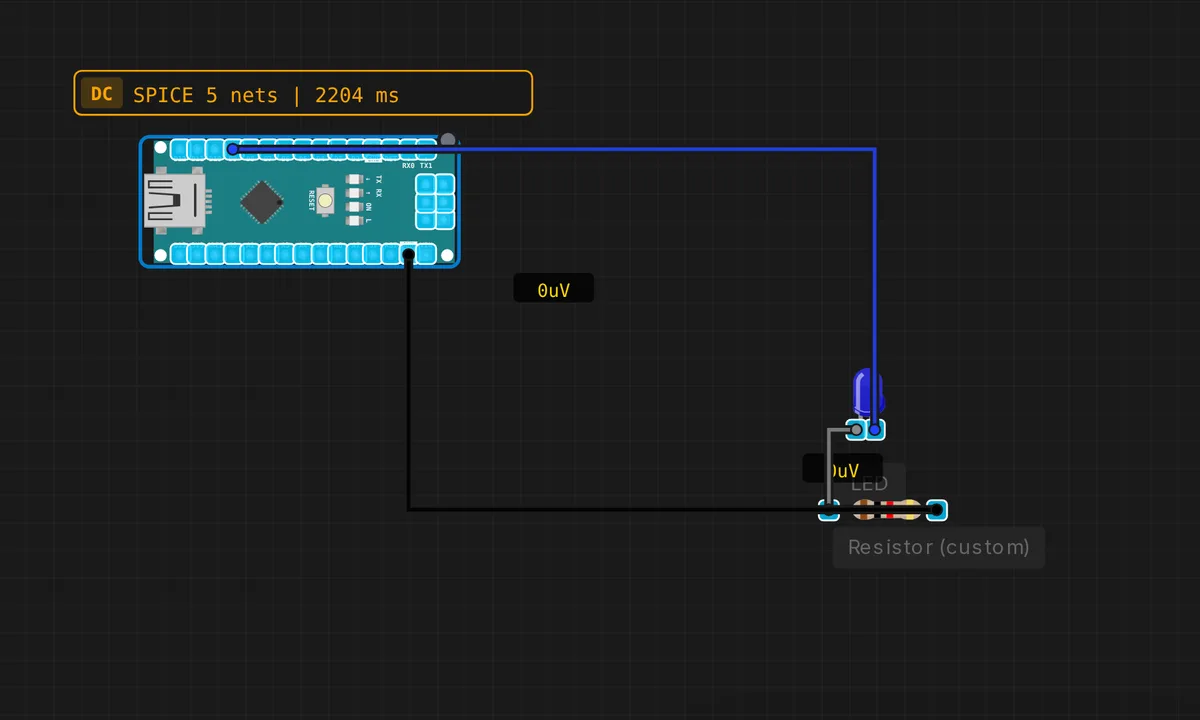
The exact circuit you get when you open this example — already wired, ready to run.
The sketch
// Arduino Nano — PWM LED Fade

const int LED_PIN = 9;  // PWM pin

void setup() {
  pinMode(LED_PIN, OUTPUT);
  Serial.begin(9600);
  Serial.println("Nano PWM Fade demo");
}

void loop() {
  // Fade in
  for (int b = 0; b <= 255; b += 5) {
    analogWrite(LED_PIN, b);
    delay(10);
  }
  // Fade out
  for (int b = 255; b >= 0; b -= 5) {
    analogWrite(LED_PIN, b);
    delay(10);
  }
}
How it works
The two for loops are the whole trick. The first counts brightness up in steps of 5 and calls analogWrite(LED_PIN, b) each time; the second counts back down. Each step holds for delay(10), so a full fade cycle is roughly 52 steps × 10 ms × 2 ≈ one second. Pin 9 is a hardware PWM pin on the Nano, so the waveform is generated by the timer hardware, not by the CPU.
What the pin actually outputs is a square wave at about 490 Hz whose duty cycle is b/255 — 255 is always on, 128 is on half the time, 0 is off, and your eye integrates that into brightness. One honest caveat: perceived brightness is logarithmic, so a linear duty ramp looks like it jumps bright quickly and then crawls. For a smooth-looking fade on a real lamp you would use smaller steps at low values or a gamma table.
Before you build it for real
Only pins 3, 5, 6, 9, 10 and 11 do PWM on the Nano — call analogWrite() on any other pin and you get a plain on/off output, not a fade. Second, a real LED needs its 220 Ω series resistor: at 5 V logic a bare LED on the pin pushes well past the 20 mA continuous rating. And if you move to pins 5 or 6 later, note they run at ~980 Hz on the same timer that drives millis() — PWM tricks there can disturb your timing functions.
Get the parts
Related examples
FAQ
Which Arduino Nano pins support analogWrite()?
D3, D5, D6, D9, D10 and D11 — the six pins wired to the ATmega328P’s hardware timers. On any other pin, analogWrite silently degrades to digital: values below 128 write LOW, 128 and above write HIGH.
Why does my LED fade look uneven?
Human brightness perception is roughly logarithmic, but the sketch ramps duty cycle linearly, so most of the visible change happens in the first third of the ramp. Use smaller steps near zero, or multiply through a gamma-correction table, and the fade will look smooth.