
[Pi + Arduino] Serial LED Control
[Pi + Arduino] Serial LED Control is a runnable microcontroller simulation example on SensBench — open the wired circuit, inspect the code, and compile real firmware in your browser, no install needed. Last updated Aug 14, 2026.
FREE SIMULATOR EXAMPLE · ADVANCED
[Pi + Arduino] Serial LED Control
This example gives a Raspberry Pi 3 remote control of two LEDs on an Arduino Uno over a UART serial link: the Pi sends text commands like LED1_ON and ALL_OFF, the Uno parses them and drives the LEDs. The classic brain-plus-I/O two-board architecture.
| Board | Raspberry Pi 3 + Arduino Uno (two boards, UART link) |
|---|---|
| Difficulty | advanced |
| Category | communication |
| Libraries | None — just the Arduino core |
| Runs in | Sensbench browser simulator — free, no account |
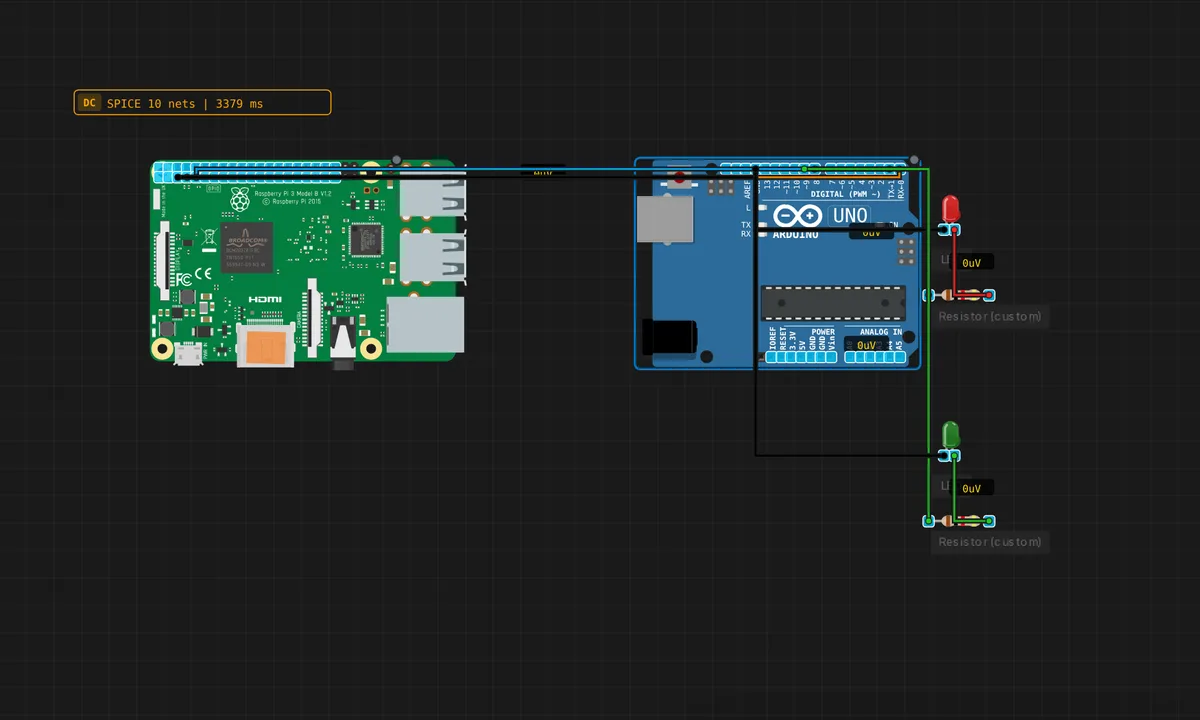
The exact circuit you get when you open this example — already wired, ready to run.
The sketch
// Pi -> Arduino Serial LED Control
// Listens on hardware Serial (pins 0/1, 9600 baud) for commands
// sent by the Raspberry Pi Python script.
//
// Commands:
//   LED1_ON  / LED1_OFF  - Red LED  (pin 8)
//   LED2_ON  / LED2_OFF  - Green LED (pin 9)
//   ALL_ON   / ALL_OFF   - Both LEDs

const int LED1 = 8;   // Red
const int LED2 = 9;   // Green

String buf = "";

void setup() {
  pinMode(LED1, OUTPUT);
  pinMode(LED2, OUTPUT);
  Serial.begin(9600);
  Serial.println("Arduino ready — waiting for Pi commands...");
}

void loop() {
  while (Serial.available()) {
    char c = (char)Serial.read();
    if (c == '\n') {
      buf.trim();
      processCommand(buf);
      buf = "";
    } else {
      buf += c;
    }
  }
}

void processCommand(const String& cmd) {
  if      (cmd == "LED1_ON")  { digitalWrite(LED1, HIGH); Serial.println("LED1: ON");  }
  else if (cmd == "LED1_OFF") { digitalWrite(LED1, LOW);  Serial.println("LED1: OFF"); }
  else if (cmd == "LED2_ON")  { digitalWrite(LED2, HIGH); Serial.println("LED2: ON");  }
  else if (cmd == "LED2_OFF") { digitalWrite(LED2, LOW);  Serial.println("LED2: OFF"); }
  else if (cmd == "ALL_ON")   { digitalWrite(LED1, HIGH); digitalWrite(LED2, HIGH); Serial.println("Both: ON");  }
  else if (cmd == "ALL_OFF")  { digitalWrite(LED1, LOW);  digitalWrite(LED2, LOW);  Serial.println("Both: OFF"); }
  else if (cmd.length() > 0)  { Serial.print("Unknown: "); Serial.println(cmd); }
}
How it works
The Arduino side listens on hardware Serial at 9600 baud and buffers characters until a newline arrives, then trims and dispatches the command. The String buf accumulation pattern handles commands of any length, and the processCommand() function maps six text commands to LED states — with an “Unknown:” branch for anything else.
The Pi side (in the companion Python script) sends commands over the same UART at 9600 baud. The critical wiring is TX-to-RX: the Pi’s TX pin feeds the Uno’s pin 0 (RX), and the grounds are tied. The Arduino’s println acknowledgements come back on pin 1 (TX) to the Pi’s RX — a two-wire link plus ground carrying commands and confirmations.
Before you build it for real
The Pi’s UART TX is 3.3 V logic, which the Uno’s 5 V serial receiver reads as a valid HIGH — but the Uno’s TX back to the Pi is 5 V, which exceeds the Pi’s 3.3 V input limit. On a real bench, that return path wants a level shifter or divider; the simulator is generous. The baud rate must match exactly on both ends — 9600 here, and both boards agree — and the wiring is TX-to-RX crossed, never TX-to-TX. The Uno’s pins 0 and 1 also share the USB programmer: with the USB cable plugged in, the Pi’s data competes with the computer’s serial monitor on the same lines.
Get the parts
Related examples
FAQ
Why does the Pi talk to the Arduino over serial at all?
The Pi is the brain, the Uno is the I/O. A Pi controls a web page, runs logic, or schedules tasks — then sends short commands over UART to the Uno, which drives the actual LEDs, motors or relays with the real-time reliability a Linux kernel cannot guarantee. It is the standard architecture for Pi-based home automation.
Why text commands instead of binary bytes?
Text commands are human-readable: you can type LED1_ON into the Serial Monitor by hand to test the Arduino side before the Pi is even involved. Binary protocols are more compact but unreadable. For a handful of commands at 9600 baud, the human debuggability wins.