
Pico: DHT22 Temperature & Humidity
Pico: DHT22 Temperature & Humidity is a runnable microcontroller simulation example on SensBench — open the wired circuit, inspect the code, and compile real firmware in your browser, no install needed. Last updated Aug 14, 2026.
FREE SIMULATOR EXAMPLE · BEGINNER
Pico: DHT22 Temperature & Humidity
This example reads temperature and humidity from a DHT22 sensor wired to GPIO7 of the Raspberry Pi Pico, printing both values to the Serial Monitor every two seconds. It uses the same Adafruit DHT library you would install on real hardware, so the code transfers directly to a physical build.
| Board | Raspberry Pi Pico (RP2040 dual-core Cortex-M0+, 133 MHz) |
|---|---|
| Difficulty | beginner |
| Category | sensors |
| Libraries | DHT sensor library |
| Runs in | Sensbench browser simulator — free, no account |
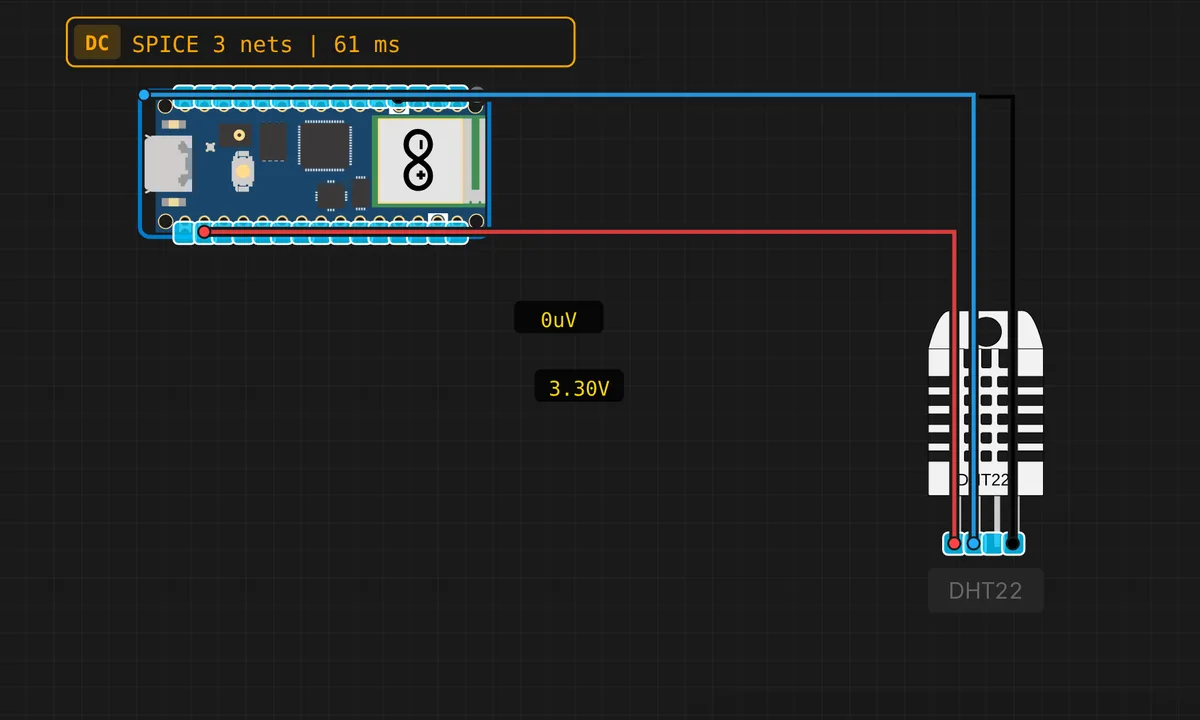
The exact circuit you get when you open this example — already wired, ready to run.
The sketch
// Raspberry Pi Pico — DHT22 Temperature & Humidity
// Requires: Adafruit DHT sensor library (install via Library Manager)
// Wiring: DATA → GP7  |  VCC → 3.3V  |  GND → GND

#include <DHT.h>

#define DHT_PIN  7   // GPIO 7
#define DHT_TYPE DHT22

DHT dht(DHT_PIN, DHT_TYPE);

void setup() {
  Serial.begin(115200);
  dht.begin();
  delay(1000);
  Serial.println("Pico DHT22 ready!");
}

void loop() {
  delay(2000);
  float h = dht.readHumidity();
  float t = dht.readTemperature();
  if (isnan(h) || isnan(t)) {
    Serial.println("DHT22 read error!");
    return;
  }
  Serial.print("Temp: "); Serial.print(t, 1); Serial.print(" C   ");
  Serial.print("Humidity: "); Serial.print(h, 1); Serial.println(" %");
}
How it works
The DHT22 talks a single-wire protocol on the data line: strict timing, 40 bits per reading. You never see any of that — the DHT object from the Adafruit library handles the bit-banging. dht.begin() in setup() initializes it, then dht.readTemperature() and dht.readHumidity() in the loop return the two values.
Wiring is three wires: DATA to GP7, VCC to 3V3, GND to GND. The 1-second delay after dht.begin() gives the sensor time to power up — the DHT22 is famously unresponsive in the first second after power-on, and a read in that window returns garbage.
Before you build it for real
The Pico’s GPIOs are 3.3 V logic, and most DHT22 modules are 3-5 V tolerant, so wiring DATA to GP7 with VCC at 3V3 works — but a bare DHT22 sensor (not a breakout board) wants a 4.7-10 kOhm pull-up on the data line, which the breakout modules usually include. The DHT22 also needs the 2-second minimum read interval mentioned above — the simulator forgives fast polling, real hardware returns NaN. Keep the sensor away from the Pico’s own heat: the RP2040 runs cool but a DHT22 sitting on top of a crowded board reads a few degrees high.
Get the parts
Related examples
FAQ
Why does the code wait 2 seconds between reads?
The DHT22 is a slow sensor by design: it needs about 1.5-2 seconds between readings to sample its internal thermistor and humidity capacitor. The delay(2000) at the top of the loop is not politeness — polling faster returns stale or NaN values, and some DHT22 clones will hang the data line entirely if you hammer them.
Why is there an isnan() check?
DHT sensors fail checksums regularly — it is normal, not a bug. The library returns NaN when a read is bad, and the sketch prints a clean error instead of garbage numbers. On real hardware, frequent NaNs are usually a wiring problem (missing pull-up, wrong pin, power sag).