
Pico: PIR Motion Detector
Pico: PIR Motion Detector is a runnable microcontroller simulation example on SensBench — open the wired circuit, inspect the code, and compile real firmware in your browser, no install needed. Last updated Aug 14, 2026.
FREE SIMULATOR EXAMPLE · BEGINNER
Pico: PIR Motion Detector
This example connects a PIR motion sensor to the Raspberry Pi Pico — OUT on GP16 — and lights the built-in LED on GPIO25 whenever movement is detected. The Serial Monitor reports every motion start and stop, so you can watch the sensor’s field of view react in real time.
| Board | Raspberry Pi Pico (RP2040 dual-core Cortex-M0+, 133 MHz) |
|---|---|
| Difficulty | beginner |
| Category | sensors |
| Libraries | None — just the Arduino core |
| Runs in | Sensbench browser simulator — free, no account |
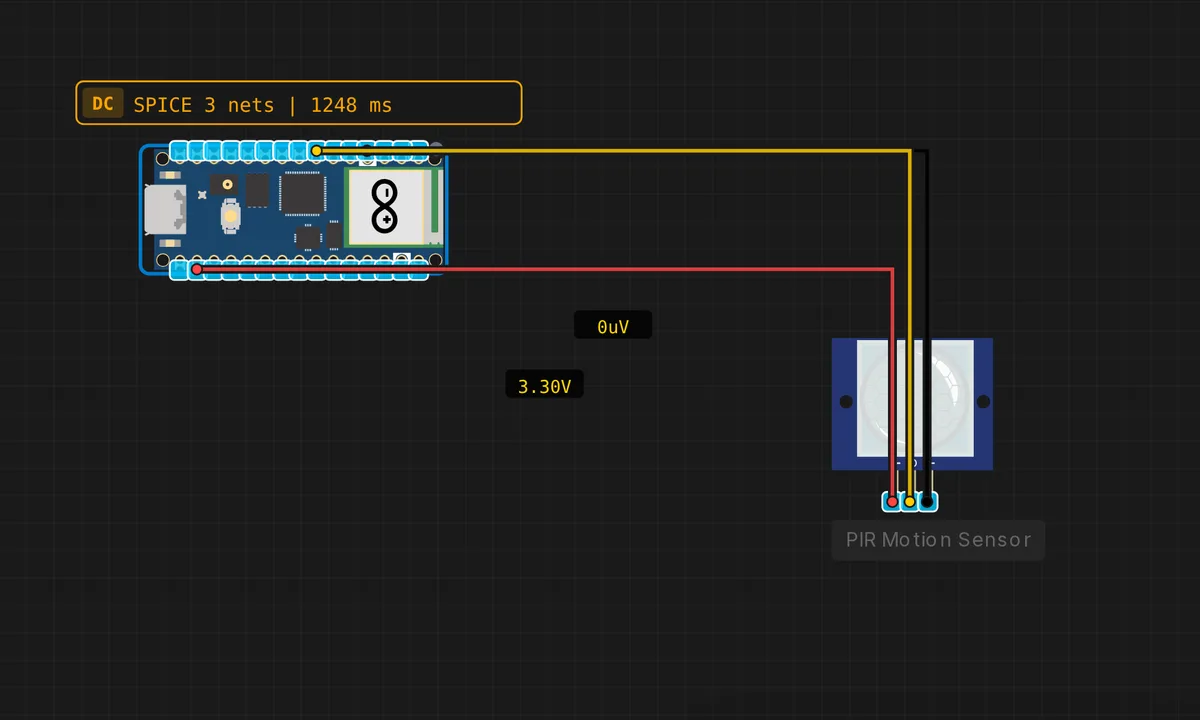
The exact circuit you get when you open this example — already wired, ready to run.
The sketch
// Raspberry Pi Pico — PIR Motion Sensor
// Wiring: OUT → D4(GP16)  |  VCC → 3.3V  |  GND → GND

#define PIR_PIN 16  // GPIO 16 (D4)
#define LED_PIN 25  // on-board LED (LED_BUILTIN on Pico)

bool prevMotion = false;

void setup() {
  Serial.begin(115200);
  pinMode(PIR_PIN, INPUT);
  pinMode(LED_PIN, OUTPUT);
  Serial.println("Pico PIR Motion Sensor — warming up...");
  delay(2000);
  Serial.println("Ready!");
}

void loop() {
  bool motion = (digitalRead(PIR_PIN) == HIGH);
  if (motion && !prevMotion) {
    Serial.println(">>> MOTION DETECTED! <<<");
    digitalWrite(LED_PIN, HIGH);
  } else if (!motion && prevMotion) {
    Serial.println("Calm.");
    digitalWrite(LED_PIN, LOW);
  }
  prevMotion = motion;
  delay(100);
}
How it works
The PIR sensor’s OUT pin goes HIGH when it detects infrared movement within its field of view. The sketch reads it on GP16 and compares against the previous sample stored in prevMotion — printing the motion banner and lighting the built-in LED on the rising edge, “Calm.” on the falling edge.
The 100 ms loop delay sets the response latency: a person walking through the room triggers the LED within 100 ms of the sensor firing, which feels instant. The edge-detection pattern is worth copying — it gives you clean event semantics from a sensor that otherwise outputs a long steady HIGH.
Before you build it for real
PIR modules have two onboard potentiometers — sensitivity and retrigger delay — which the simulator models as fixed defaults. On real hardware, if the sensor triggers constantly or not at all, these trimmers are the first thing to check, not the wiring. Also, the module’s OUT pin is usually 3.3 V-compatible on modern clones, but check the module: some 5 V PIR boards drive OUT at 5 V and need a divider to protect the Pico pin. And PIR sensors cannot see through glass — mounting behind a window defeats the sensor entirely.
Get the parts
Related examples
FAQ
Why does the PIR need a warm-up delay?
PIR sensors contain a pyroelectric element that needs time to stabilize after power-on. The sketch waits 2 seconds before arming — real sensors can take 10-30 seconds to fully settle, during which they may trigger spuriously. For a production device, wait longer or ignore motion for the first minute.
Why track state changes instead of just printing when motion is high?
The prevMotion variable turns the sketch into an edge detector: it prints only when motion STARTS or STOPS, not continuously. If the sensor stayed high for 10 minutes, you get one “MOTION DETECTED” message instead of thousands of identical lines spamming the serial monitor.