
STM32: SSD1306 OLED Display (I2C)
STM32: SSD1306 OLED Display (I2C) is a runnable microcontroller simulation example on SensBench — open the wired circuit, inspect the code, and compile real firmware in your browser, no install needed. Last updated Aug 14, 2026.
FREE SIMULATOR EXAMPLE · INTERMEDIATE
STM32: SSD1306 OLED Display (I2C)
This example drives a 128×64 SSD1306 OLED over the STM32 Blue Pill’s I2C1 bus (SCL=PB6, SDA=PB7), showing “Hello sensbench!” with a live counter that ticks every second. It is the standard display bring-up test for the F103.
| Board | STM32 Blue Pill (STM32F103C8, Cortex-M3, 72 MHz) |
|---|---|
| Difficulty | intermediate |
| Category | displays |
| Libraries | Adafruit SSD1306, Adafruit GFX Library |
| Runs in | Sensbench browser simulator — free, no account |
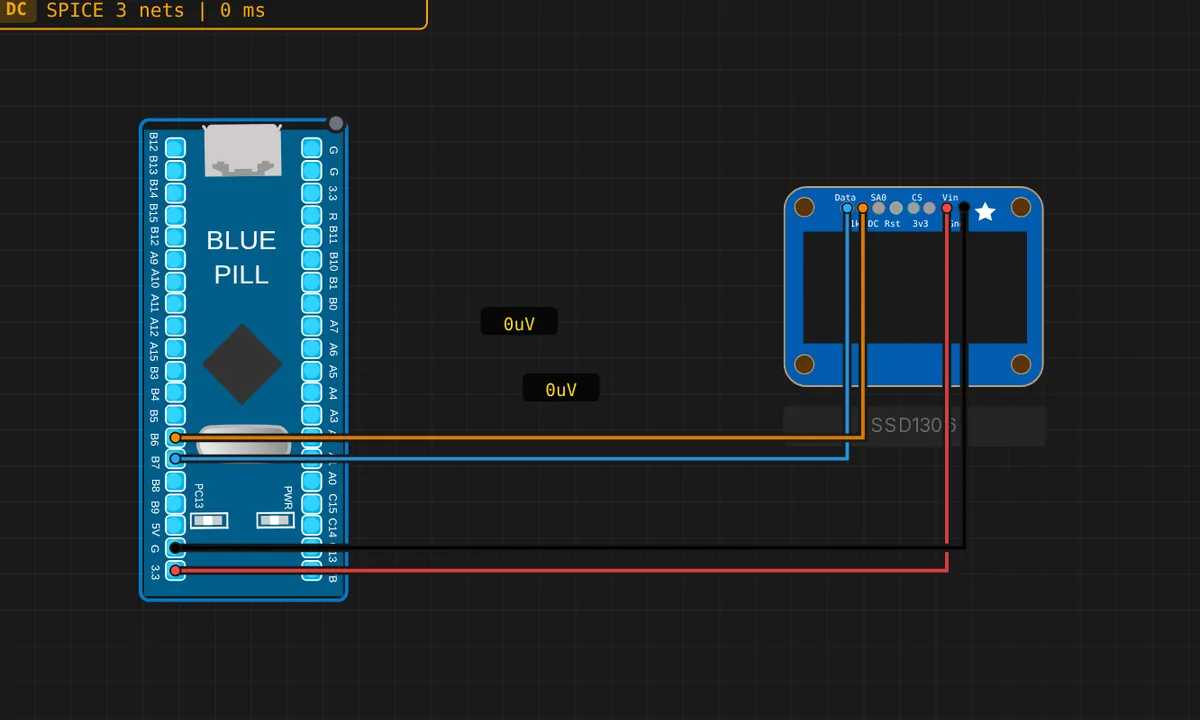
The exact circuit you get when you open this example — already wired, ready to run.
The sketch
// STM32 Blue Pill (F103) — SSD1306 128x64 OLED over I2C1
// Wiring: SDA -> PB7  |  SCL -> PB6  |  VCC -> 3V3  |  GND -> GND
// Requires: Adafruit SSD1306, Adafruit GFX Library

#include <Wire.h>
#include <Adafruit_GFX.h>
#include <Adafruit_SSD1306.h>

#define SCREEN_WIDTH 128
#define SCREEN_HEIGHT 64

Adafruit_SSD1306 display(SCREEN_WIDTH, SCREEN_HEIGHT, &Wire, -1);

int counter = 0;

void setup() {
  Serial.begin(115200);
  Wire.begin();        // I2C1: SCL=PB6, SDA=PB7
  if (!display.begin(SSD1306_SWITCHCAPVCC, 0x3C)) {
    Serial.println("SSD1306 not found!");
    while (true) delay(10);
  }
  display.clearDisplay();
  display.setTextSize(2);
  display.setTextColor(SSD1306_WHITE);
  display.setCursor(0, 0);
  display.println("Hello");
  display.println("sensbench!");
  display.display();
  Serial.println("OLED ready");
}

void loop() {
  counter++;
  display.clearDisplay();
  display.setTextSize(2);
  display.setTextColor(SSD1306_WHITE);
  display.setCursor(0, 0);
  display.println("Hello");
  display.println("sensbench!");
  display.setTextSize(1);
  display.setCursor(0, 48);
  display.print("Count: ");
  display.print(counter);
  display.display();
  Serial.print("Frame: ");
  Serial.println(counter);
  delay(1000);
}
How it works
The sketch initializes the STM32’s I2C1 as Wire (SCL=PB6, SDA=PB7 on the Blue Pill), then display.begin(SSD1306_SWITCHCAPVCC, 0x3C) starts the 128×64 panel at the standard address. The fail-fast loop prints “SSD1306 not found!” and hangs if the display does not answer — a deliberate trap so wiring errors surface immediately.
Every second the loop clears the framebuffer, redraws the header in 2x text and the incrementing counter in 1x text, then calls display.display() to blit the framebuffer to the panel in one atomic write. The Serial Monitor mirrors the frame number, so you can verify the sketch is alive even with the display out of sight.
Before you build it for real
The SSD1306’s I2C address is set by a resistor on the module’s back — 0x3C here, but many modules use 0x3D. If the sketch hangs in the “not found” loop, check the address first, then the wiring. The display is a 3.3 V part: VCC goes to 3V3, and feeding 5 V to VCC — a common beginner mistake when coming from 5 V Arduinos — can destroy the panel’s regulator. And the I2C bus needs the module’s onboard pull-ups: if you strip a bare SSD1306 from its carrier board, add 4.7 kOhm pull-ups on SDA and SCL to 3.3 V or nothing will ever respond.
Get the parts
Related examples
FAQ
Why does the OLED need both SSD1306 and GFX libraries?
The Adafruit SSD1306 library talks to the display controller, but it builds on Adafruit GFX for all the drawing primitives — text, pixels, shapes. The stack is the de-facto standard for SSD1306 panels and is identical on Arduino, ESP32 and STM32, so code transfers between boards without changes.
How does the counter stay visible while the text is redrawn?
The loop clears the display, redraws the static “Hello sensbench!” header, then draws the counter line and calls display.display() to push the whole framebuffer to the panel in one shot. Because the OLED holds a 1 KB framebuffer internally, there is no flicker — the panel updates atomically, not line by line.