
STM32: RGB LED Color Cycle
STM32: RGB LED Color Cycle is a runnable microcontroller simulation example on SensBench — open the wired circuit, inspect the code, and compile real firmware in your browser, no install needed. Last updated Aug 14, 2026.
FREE SIMULATOR EXAMPLE · BEGINNER
STM32: RGB LED Color Cycle
This example cycles an RGB LED through six colors — red, green, blue, yellow, cyan, magenta — using three GPIO pins (PA0=R, PA1=G, PA2=B) on the STM32 Blue Pill. Each color is a pure digital combination, printed to the Serial Monitor as it shows.
| Board | STM32 Blue Pill (STM32F103C8, Cortex-M3, 72 MHz) |
|---|---|
| Difficulty | beginner |
| Category | basics |
| Libraries | None — just the Arduino core |
| Runs in | Sensbench browser simulator — free, no account |
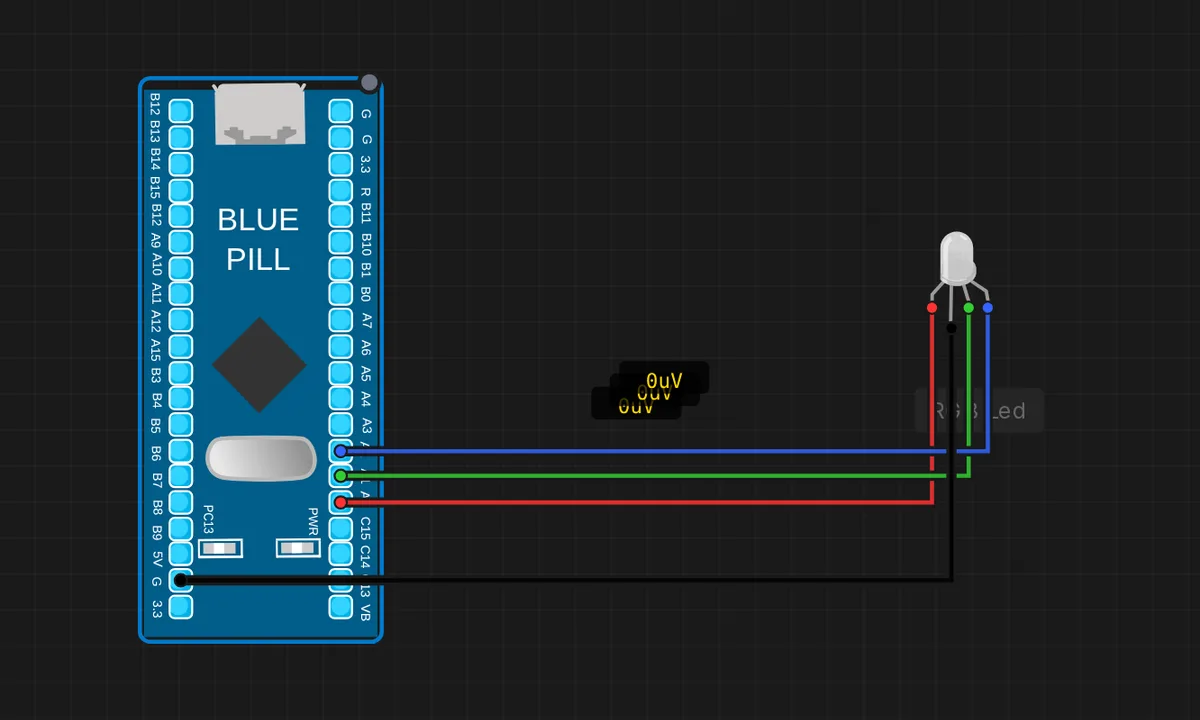
The exact circuit you get when you open this example — already wired, ready to run.
The sketch
// STM32 Blue Pill (F103) — RGB LED color cycle
// R=PA0, G=PA1, B=PA2, common cathode (COM -> GND).
const int PIN_R = PA0, PIN_G = PA1, PIN_B = PA2;

void setup() {
  Serial.begin(115200);
  pinMode(PIN_R, OUTPUT); pinMode(PIN_G, OUTPUT); pinMode(PIN_B, OUTPUT);
}

void show(bool r, bool g, bool b, const char* name) {
  digitalWrite(PIN_R, r); digitalWrite(PIN_G, g); digitalWrite(PIN_B, b);
  Serial.println(name);
  delay(700);
}

void loop() {
  show(true,  false, false, "RED");
  show(false, true,  false, "GREEN");
  show(false, false, true,  "BLUE");
  show(true,  true,  false, "YELLOW");
  show(false, true,  true,  "CYAN");
  show(true,  false, true,  "MAGENTA");
}
How it works
Three pins — PA0 for red, PA1 for green, PA2 for blue — are set as outputs, and a show() helper takes three booleans and a name. Each call writes all three pins, prints the color name to Serial, and holds for 700 ms. The loop walks through red, green, blue, yellow, cyan, magenta — every combination except all-off.
The show() helper keeps the main loop declarative: one line per color instead of six digitalWrite() calls repeated per step. The serial print doubles as a debugging aid — the monitor tells you which color should be on the canvas, so a wiring error is easy to spot.
Before you build it for real
The simulator places the LED with no current-limiting resistors, which a real build absolutely needs: each channel wants its own series resistor (typically 220 Ohm for red, 150 Ohm for green and blue) or the F103’s pins will exceed their current limits and eventually fail. The LED’s forward voltage also differs per color — red is about 2 V, green and blue about 3 V — so at 3.3 V logic, green and blue will look dimmer unless you pick resistor values per channel. A common-cathode LED needs COM to GND; wiring COM to 3.3 V shorts all three channels.
Get the parts
Related examples
FAQ
Why only six colors instead of a full rainbow?
Each pin is a digital output — fully on or off — so the three channels give 2^3 = 8 combinations, one of which is all-off. For smooth gradients and mixed hues you need PWM on the pins, which the F103’s timers support; this example is deliberately pure digital to teach the GPIO basics first.
What does common-cathode mean and why does it matter?
Common-cathode means all three LED cathodes share one pin (COM), which goes to GND, and the anodes are driven HIGH to light. If you buy a common-anode RGB LED instead, the logic inverts and driving a pin HIGH turns the color OFF — you would need to flip every true to false.