
STM32: DS1307 RTC Clock (I2C)
STM32: DS1307 RTC Clock (I2C) is a runnable microcontroller simulation example on SensBench — open the wired circuit, inspect the code, and compile real firmware in your browser, no install needed. Last updated Aug 14, 2026.
FREE SIMULATOR EXAMPLE · INTERMEDIATE
STM32: DS1307 RTC Clock (I2C)
This example reads the current time and date from a DS1307 real-time clock over the STM32 Blue Pill’s I2C1 bus (SCL=PB6, SDA=PB7), printing a formatted line once per second. It shows the full BCD-to-decimal conversion pipeline for the classic RTC chip.
| Board | STM32 Blue Pill (STM32F103C8, Cortex-M3, 72 MHz) |
|---|---|
| Difficulty | intermediate |
| Category | sensors |
| Libraries | None — just the Arduino core |
| Runs in | Sensbench browser simulator — free, no account |
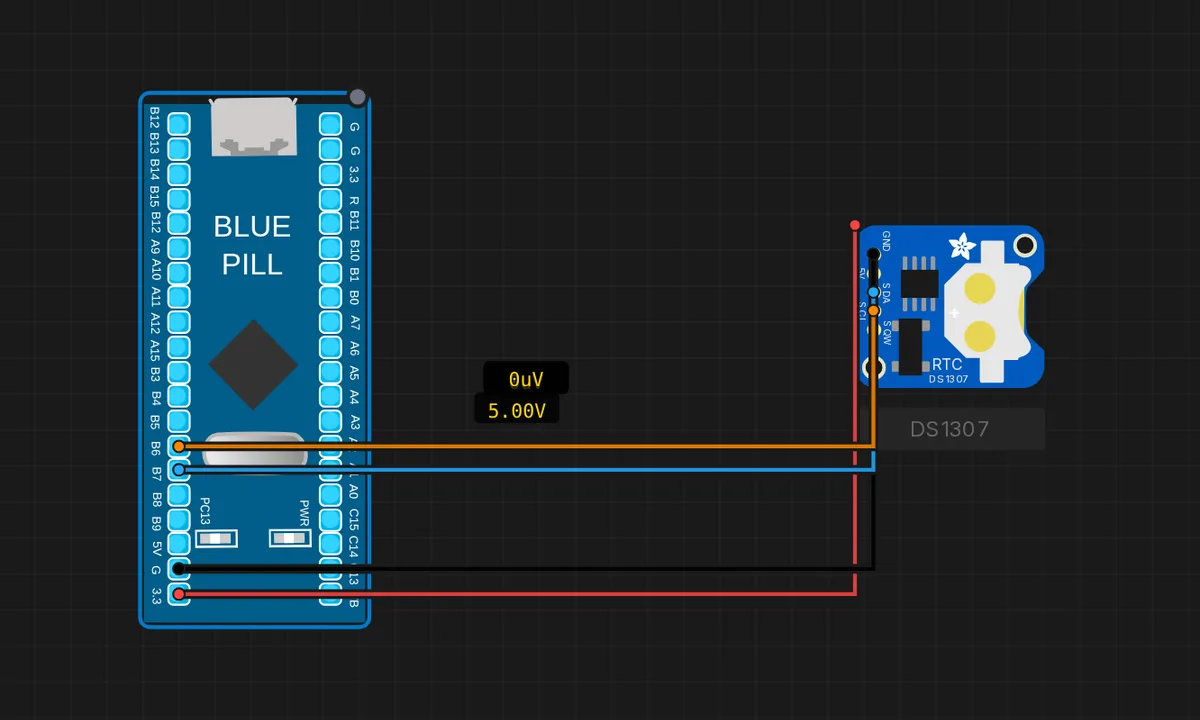
The exact circuit you get when you open this example — already wired, ready to run.
The sketch
// STM32 Blue Pill (F103) — DS1307 RTC over I2C1
// Wiring: SDA -> PB7  |  SCL -> PB6  |  VCC -> 3V3  |  GND -> GND
#include <Wire.h>

const uint8_t DS_ADDR = 0x68;   // 'RTC' is a reserved STM32 HAL macro

uint8_t bcd2dec(uint8_t b) { return (b >> 4) * 10 + (b & 0x0F); }

void setup() {
  Serial.begin(115200);
  Wire.begin();              // I2C1: SCL=PB6, SDA=PB7
  Serial.println("DS1307 RTC ready");
}

void loop() {
  // Read 7 timekeeping registers starting at 0x00.
  Wire.beginTransmission(DS_ADDR); Wire.write(0x00); Wire.endTransmission(false);
  Wire.requestFrom(DS_ADDR, (uint8_t)7);
  uint8_t ss = bcd2dec(Wire.read() & 0x7F);
  uint8_t mm = bcd2dec(Wire.read());
  uint8_t hh = bcd2dec(Wire.read() & 0x3F);
  Wire.read();                       // day-of-week (unused)
  uint8_t dd = bcd2dec(Wire.read());
  uint8_t mo = bcd2dec(Wire.read());
  uint8_t yy = bcd2dec(Wire.read());
  char buf[48];
  sprintf(buf, "Time %02d:%02d:%02d   Date %02d/%02d/20%02d", hh, mm, ss, dd, mo, yy);
  Serial.println(buf);
  delay(1000);
}
How it works
The DS1307 stores time in seven BCD registers starting at 0x00. The sketch requests all seven bytes in one burst, converts each from BCD with bcd2dec(), and masks the control bits — 0x7F off the seconds (clock-halt flag) and 0x3F off the hours (12/24-hour mode). The day-of-week byte is read and discarded.
The formatted output uses sprintf() to build a zero-padded “Time %02d:%02d:%02d Date %02d/%02d/20%02d” line — one clean Serial.println() per second. The sketch ticks once per second in the Serial Monitor, exactly like the RTC itself.
Before you build it for real
A real DS1307 loses time when power drops unless a coin cell is fitted — the simulator’s RTC is fed by the system clock and never resets, which hides this. The chip’s accuracy is about 2 ppm at 25 C but temperature-dependent, drifting minutes per month in an enclosure. And on the F103, the sprintf() call pulls in the stdio library — on real STM32 cores this can add 10-20 KB of flash, which is meaningful on a 64 KB Blue Pill; budget your flash or hand-roll the formatting.
Get the parts
Related examples
FAQ
Why is the constant named DS_ADDR instead of RTC?
The comment explains it: on STM32 cores, RTC is a reserved macro from the HAL library that refers to the chip’s built-in real-time clock peripheral. Naming an I2C address constant RTC would break compilation — a classic STM32 naming trap that does not exist on AVR.
Why does the sketch format with sprintf instead of Serial.print chains?
The time is read as seven separate bytes, but you want one tidy line. sprintf() builds the whole “Time 14:03:22 Date 07/08/2026” string with zero padding in one call, which is shorter and less error-prone than a chain of Serial.print() calls with conditional zero-fill.