
STM32 Blue Pill: SSD1306 OLED (4-pin I2C)
STM32 Blue Pill: SSD1306 OLED (4-pin I2C) is a runnable microcontroller simulation example on SensBench — open the wired circuit, inspect the code, and compile real firmware in your browser, no install needed. Last updated Aug 14, 2026.
FREE SIMULATOR EXAMPLE · INTERMEDIATE
STM32 Blue Pill: SSD1306 OLED (4-pin I2C)
This example drives the cheap 4-pin SSD1306 OLED module (GND/VCC/SCL/SDA) from the STM32 Blue Pill over I2C1 — SDA on PB7, SCL on PB6. It shows “Hello sensbench!” with a half-second counter, using the same Adafruit stack as the sibling OLED examples.
| Board | STM32 Blue Pill (STM32F103C8, Cortex-M3, 72 MHz) |
|---|---|
| Difficulty | intermediate |
| Category | displays |
| Libraries | Adafruit SSD1306, Adafruit GFX Library |
| Runs in | Sensbench browser simulator — free, no account |
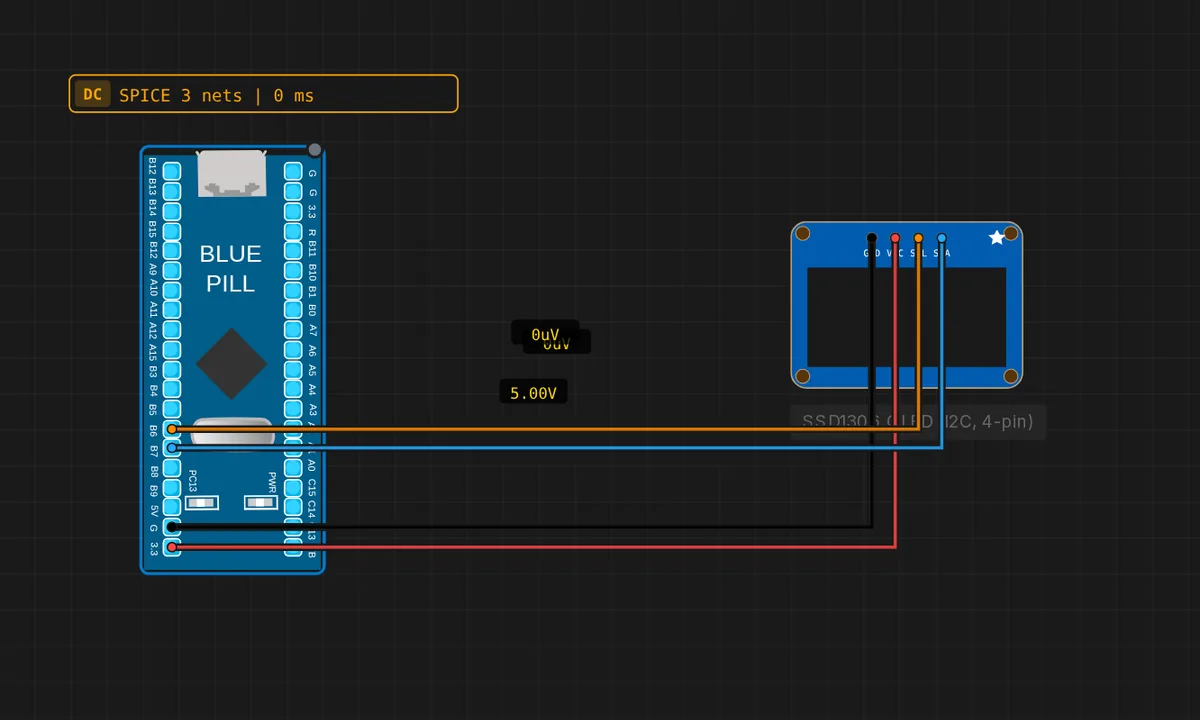
The exact circuit you get when you open this example — already wired, ready to run.
The sketch
// STM32 Blue Pill (F103) — SSD1306 128x64 OLED (4-pin I2C module)
// Wiring: SDA -> PB7  |  SCL -> PB6  |  VCC -> 3V3  |  GND -> GND
#include <Wire.h>
#include <Adafruit_GFX.h>
#include <Adafruit_SSD1306.h>

Adafruit_SSD1306 display(128, 64, &Wire, -1);
int n = 0;

void setup() {
  Serial.begin(115200);
  Wire.begin();
  if (!display.begin(SSD1306_SWITCHCAPVCC, 0x3C)) {
    Serial.println("SSD1306 not found!");
    while (true) delay(10);
  }
  display.clearDisplay();
  Serial.println("OLED ready");
}

void loop() {
  n++;
  display.clearDisplay();
  display.setTextSize(2);
  display.setTextColor(SSD1306_WHITE);
  display.setCursor(0, 0);
  display.println("Hello");
  display.println("sensbench!");
  display.setTextSize(1);
  display.setCursor(0, 48);
  display.print("Count: ");
  display.print(n);
  display.display();
  delay(500);
}
How it works
The 4-pin module’s pin order — GND, VCC, SCL, SDA — is the trap this example exists to teach. The sketch wires SDA to PB7 and SCL to PB6 on the Blue Pill’s I2C1, powers VCC from 3V3, and initializes the panel with display.begin(SSD1306_SWITCHCAPVCC, 0x3C).
The loop redraws the whole frame every 500 ms: “Hello sensbench!” in 2x text plus an incrementing counter in 1x text, blitted atomically with display.display(). The faster refresh (500 ms vs the 1 s in sibling examples) makes the counter feel live, and the framebuffer design means no flicker.
Before you build it for real
The 4-pin module’s label order is GND, VCC, SCL, SDA — not SDA, SCL; reversing the two signal wires is the most common wiring error and the display simply never answers, leaving the sketch parked in the “SSD1306 not found!” loop. The module’s address is 0x3C or 0x3D depending on the back resistor. And the SSD1306 is a 3.3 V part: VCC to 3V3, not 5 V — many modules tolerate 5 V, but the Blue Pill’s logic is 3.3 V and matching the rails is the correct design.
Get the parts
Related examples
FAQ
How is this different from the other OLED example?
The earlier STM32 OLED example used the same SSD1306 panel; this one is the generic 4-pin module variant (GND/VCC/SCL/SDA) wired to the same I2C1 pins. The code is nearly identical — the difference is the module form factor and its fixed wiring order, which is the point of the example.
Why 0x3C for the address?
0x3C is the SSD1306’s default I2C address when the address-select resistor on the module’s back is set for 0x3C. Many modules ship that way; others use 0x3D. If the sketch hangs in the “not found” loop, try 0x3D before suspecting wiring.