
Wheatstone Bridge
Wheatstone Bridge is a runnable microcontroller simulation example on SensBench — open the wired circuit, inspect the code, and compile real firmware in your browser, no install needed. Last updated Aug 14, 2026.
FREE SIMULATOR EXAMPLE · INTERMEDIATE
Wheatstone Bridge
This example reads a four-resistor Wheatstone bridge with the Arduino Uno — two junctions sampled on A0 and A1, with the difference printed in millivolts. It is the differential-measurement circuit behind strain gauges and load cells, where tiny resistance changes matter.
| Board | Arduino Uno (ATmega328P) + analog SPICE circuit |
|---|---|
| Difficulty | intermediate |
| Category | circuits |
| Libraries | None — just the Arduino core |
| Runs in | Sensbench browser simulator — free, no account |
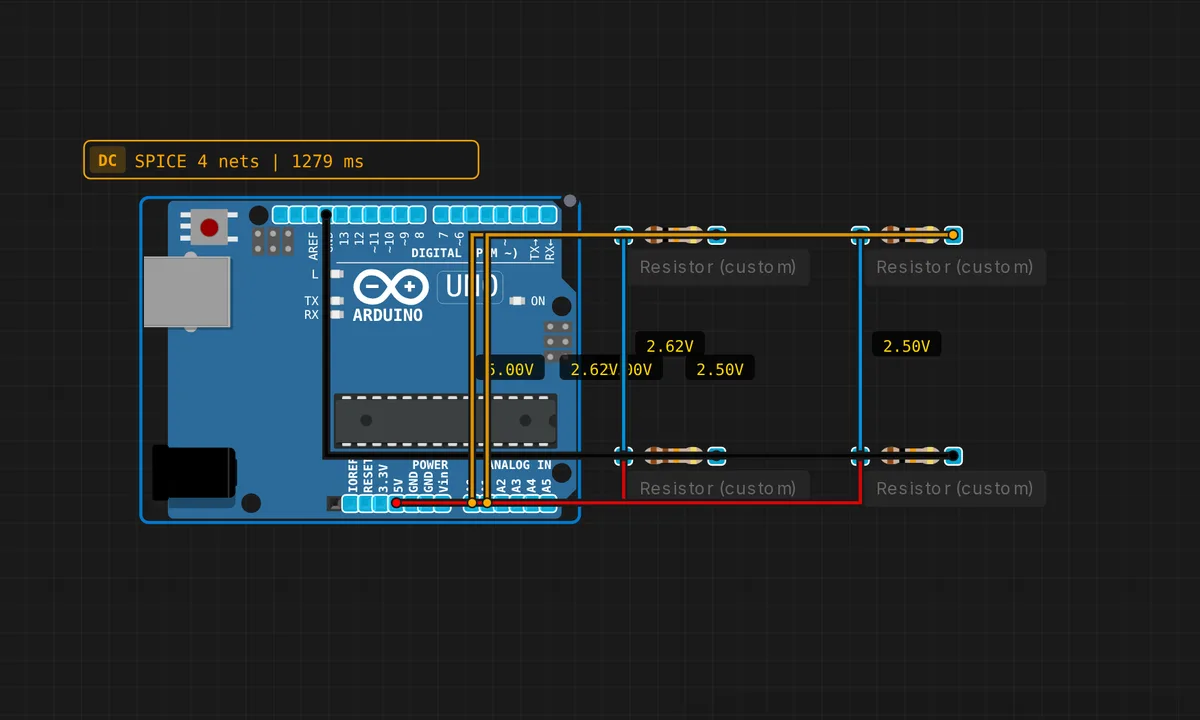
The exact circuit you get when you open this example — already wired, ready to run.
The sketch
// Wheatstone Bridge — detects R imbalance
void setup() { Serial.begin(9600); }
void loop() {
  float vA = analogRead(A0) * 5.0 / 1023.0;
  float vB = analogRead(A1) * 5.0 / 1023.0;
  float diff = vA - vB;
  Serial.print("V_diff = "); Serial.print(diff * 1000, 1); Serial.println(" mV");
  delay(500);
}
How it works
The bridge is two dividers in parallel: R1/R2 form one leg to A0, R3/R4 form the other to A1. When all four resistors are equal, both junctions sit at 2.5 V and the difference is zero. Change one resistor and the imbalance appears as V_A0 - V_A1.
The sketch reads both junctions, converts each to volts, and prints the difference in millivolts every 500 ms. The reading is the bridge’s imbalance signal — the same quantity a strain-gauge amplifier amplifies before the ADC. The 10-bit ADC limits the resolution to about 5 mV per count, which is why real instrumentation adds an instrumentation amplifier in front.
Vary one resistor in the simulator and watch the mV output respond — a few percent change in resistance produces tens of mV at the output, exactly the scale real sensors work at.
Before you build it for real
The bridge’s power lies in balance, and balance dies with resistor tolerance: four 5% resistors can produce a phantom offset of tens of millivolts before you change anything — indistinguishable from a real sensor signal. Real load cells use precision-matched resistors for exactly this reason. The Uno’s 10-bit ADC gives only ~5 mV resolution, so a bridge output of 10 mV is just 2 counts; instrumentation amplifiers exist to bridge that gap. And the two ADC channels have small channel-to-channel offset that shows up as a constant bias in the difference reading.
Get the parts
Related examples
FAQ
Why use four resistors when a divider would do?
The bridge measures a difference: it cancels the common-mode voltage, so tiny resistance changes stand out against a stable baseline. Strain gauges and load cells change resistance by fractions of a percent — too small to resolve on a plain divider, but the bridge’s differential output amplifies them relative to the baseline.
Why does the output read in millivolts?
A balanced bridge outputs 0 V; an imbalance of even 1% in one resistor produces only tens of millivolts across the output. The sketch prints diff × 1000 in mV because the interesting signal is in that range — at full volts it would look like noise.