
Password Lock System using ESP32
Password Lock System using ESP32 is a runnable microcontroller simulation example on SensBench — open the wired circuit, inspect the code, and compile real firmware in your browser, no install needed. Last updated Aug 14, 2026.
FREE SIMULATOR EXAMPLE · INTERMEDIATE
Password Lock System using ESP32
This example runs a password lock on the ESP32 — a 4×4 keypad matrix, an entered-sequence check, and a lock output. The access-control pattern, from keypad scanning to password comparison.
| Board | ESP32 DevKit (Xtensa LX6, 240 MHz) |
|---|---|
| Difficulty | intermediate |
| Category | displays |
| Libraries | None — just the Arduino core |
| Runs in | Sensbench browser simulator — free, no account |
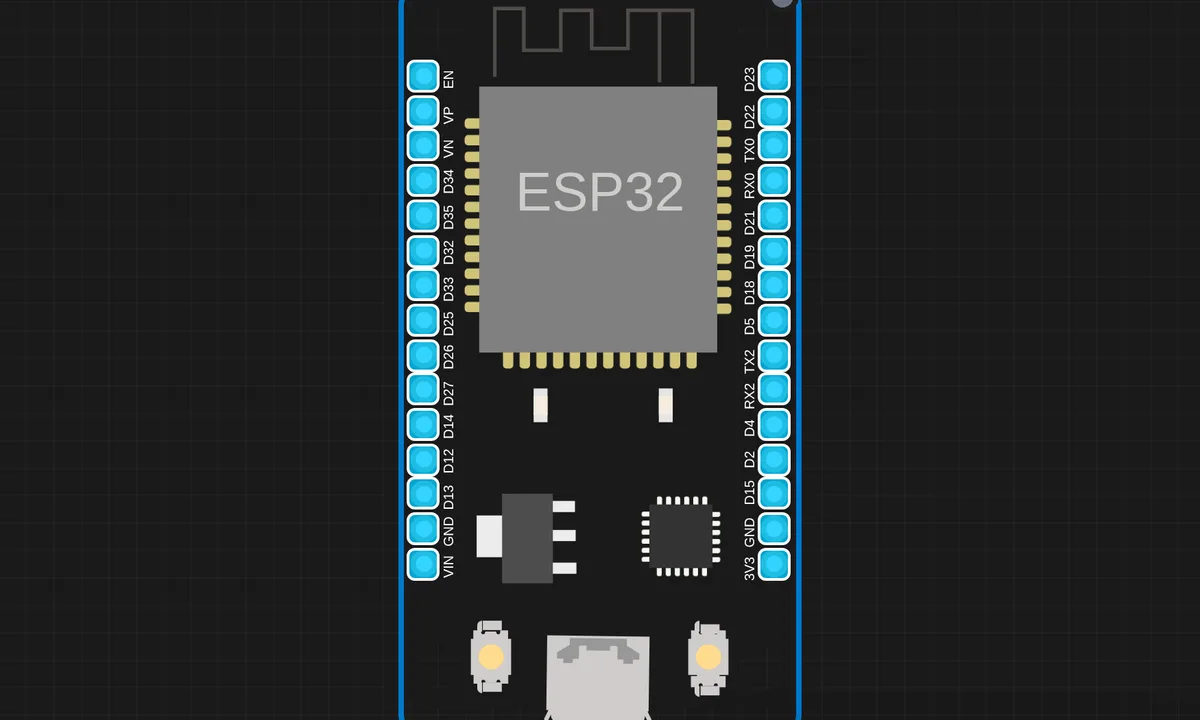
The exact circuit you get when you open this example — already wired, ready to run.
The sketch
# i2c_lcd.py
# Implements a HD44780 character LCD connected via PCF8574 on I2C.
# This was tested with: https://www.wemos.cc/product/d1-mini.html

from lcd_api import LcdApi
from time import sleep_ms

# The PCF8574 has a jumper selectable address: 0x20 - 0x27
DEFAULT_I2C_ADDR = 0x27

# Defines shifts or masks for the various LCD line attached to the PCF8574

MASK_RS = 0x01
MASK_RW = 0x02
MASK_E = 0x04
SHIFT_BACKLIGHT = 3
SHIFT_DATA = 4


class I2cLcd(LcdApi):
    """Implements a HD44780 character LCD connected via PCF8574 on I2C."""

    def __init__(self, i2c, i2c_addr, num_lines, num_columns):
        self.i2c = i2c
        self.i2c_addr = i2c_addr
        self.i2c.writeto(self.i2c_addr, bytearray([0]))
        sleep_ms(20)   # Allow LCD time to powerup
        # Send reset 3 times
        self.hal_write_init_nibble(self.LCD_FUNCTION_RESET)
        sleep_ms(5)    # need to delay at least 4.1 msec
        self.hal_write_init_nibble(self.LCD_FUNCTION_RESET)
        sleep_ms(1)
        self.hal_write_init_nibble(self.LCD_FUNCTION_RESET)
        sleep_ms(1)
        # Put LCD into 4 bit mode
        self.hal_write_init_nibble(self.LCD_FUNCTION)
        sleep_ms(1)
        LcdApi.__init__(self, num_lines, num_columns)
        cmd = self.LCD_FUNCTION
        if num_lines > 1:
            cmd |= self.LCD_FUNCTION_2LINES
        self.hal_write_command(cmd)

    def hal_write_init_nibble(self, nibble):
        """Writes an initialization nibble to the LCD.

        This particular function is only used during initialization.
        """
        byte = ((nibble >> 4) & 0x0f) << SHIFT_DATA
        self.i2c.writeto(self.i2c_addr, bytearray([byte | MASK_E]))
        self.i2c.writeto(self.i2c_addr, bytearray([byte]))

    def hal_backlight_on(self):
        """Allows the hal layer to turn the backlight on."""
        self.i2c.writeto(self.i2c_addr, bytearray([1 << SHIFT_BACKLIGHT]))

    def hal_backlight_off(self):
        """Allows the hal layer to turn the backlight off."""
        self.i2c.writeto(self.i2c_addr, bytearray([0]))

    def hal_write_command(self, cmd):
        """Writes a command to the LCD.

        Data is latched on the falling edge of E.
        """
        byte = ((self.backlight << SHIFT_BACKLIGHT) | (((cmd >> 4) & 0x0f) << SHIFT_DATA))
        self.i2c.writeto(self.i2c_addr, bytearray([byte | MASK_E]))
        self.i2c.writeto(self.i2c_addr, bytearray([byte]))
        byte = ((self.backlight << SHIFT_BACKLIGHT) | ((cmd & 0x0f) << SHIFT_DATA))
        self.i2c.writeto(self.i2c_addr, bytearray([byte | MASK_E]))
        self.i2c.writeto(self.i2c_addr, bytearray([byte]))
        if cmd <= 3:
            # The home and clear commands require a worst case delay of 4.1 msec
            sleep_ms(5)

    def hal_write_data(self, data):
        """Write data to the LCD."""
        byte = (MASK_RS | (self.backlight << SHIFT_BACKLIGHT) | (((data >> 4) & 0x0f) << SHIFT_DATA))
        self.i2c.writeto(self.i2c_addr, bytearray([byte | MASK_E]))
        self.i2c.writeto(self.i2c_addr, bytearray([byte]))
        byte = (MASK_RS | (self.backlight << SHIFT_BACKLIGHT) | ((data & 0x0f) << SHIFT_DATA))
        self.i2c.writeto(self.i2c_addr, bytearray([byte | MASK_E]))
        self.i2c.writeto(self.i2c_addr, bytearray([byte]))


# lcd_api.py
# Provides an API for talking to HD44780 compatible character LCDs.
import time

class LcdApi:
    """Implements the API for talking with HD44780 compatible character LCDs.
    This class only knows what commands to send to the LCD, and not how to get
    them to the LCD.

    It is expected that a derived class will implement the hal_xxx functions.
    """

    # The following constant names were lifted from the avrlib lcd.h
    # header file, however, I changed the definitions from bit numbers
    # to bit masks.
    #
    # HD44780 LCD controller command set

    LCD_CLR = 0x01              # DB0: clear display
    LCD_HOME = 0x02             # DB1: return to home position

    LCD_ENTRY_MODE = 0x04       # DB2: set entry mode
    LCD_ENTRY_INC = 0x02        # --DB1: increment
    LCD_ENTRY_SHIFT = 0x01      # --DB0: shift

    LCD_ON_CTRL = 0x08          # DB3: turn lcd/cursor on
    LCD_ON_DISPLAY = 0x04       # --DB2: turn display on
    LCD_ON_CURSOR = 0x02        # --DB1: turn cursor on
    LCD_ON_BLINK = 0x01         # --DB0: blinking cursor

    LCD_MOVE = 0x10             # DB4: move cursor/display
    LCD_MOVE_DISP = 0x08        # --DB3: move display (0-> move cursor)
    LCD_MOVE_RIGHT = 0x04       # --DB2: move right (0-> left)

    LCD_FUNCTION = 0x20         # DB5: function set
    LCD_FUNCTION_8BIT = 0x10    # --DB4: set 8BIT mode (0->4BIT mode)
    LCD_FUNCTION_2LINES = 0x08  # --DB3: two lines (0->one line)
    LCD_FUNCTION_10DOTS = 0x04  # --DB2: 5x10 font (0->5x7 font)
    LCD_FUNCTION_RESET = 0x30   # See "Initializing by Instruction" section

    LCD_CGRAM = 0x40            # DB6: set CG RAM address
    LCD_DDRAM = 0x80            # DB7: set DD RAM address

    LCD_RS_CMD = 0
    LCD_RS_DATA = 1

    LCD_RW_WRITE = 0
    LCD_RW_READ = 1

    def __init__(self, num_lines, num_columns):
        self.num_lines = num_lines
        if self.num_lines > 4:
            self.num_lines = 4
        self.num_columns = num_columns
        if self.num_columns > 40:
            self.num_columns = 40
        self.cursor_x = 0
        self.cursor_y = 0
        self.implied_newline = False
        self.backlight = True
        self.display_off()
        self.backlight_on()
        self.clear()
        self.hal_write_command(self.LCD_ENTRY_MODE | self.LCD_ENTRY_INC)
        self.hide_cursor()
        self.display_on()

    def clear(self):
        """Clears the LCD display and moves the cursor to the top left
        corner.
        """
        self.hal_write_command(self.LCD_CLR)
        self.hal_write_command(self.LCD_HOME)
        self.cursor_x = 0
        self.cursor_y = 0

    def show_cursor(self):
        """Causes the cursor to be made visible."""
        self.hal_write_command(self.LCD_ON_CTRL | self.LCD_ON_DISPLAY |
                               self.LCD_ON_CURSOR)

    def hide_cursor(self):
        """Causes the cursor to be hidden."""
        self.hal_write_command(self.LCD_ON_CTRL | self.LCD_ON_DISPLAY)

    def blink_cursor_on(self):
        """Turns on the cursor, and makes it blink."""
        self.hal_write_command(self.LCD_ON_CTRL | self.LCD_ON_DISPLAY |
                               self.LCD_ON_CURSOR | self.LCD_ON_BLINK)

    def blink_cursor_off(self):
        """Turns on the cursor, and makes it no blink (i.e. be solid)."""
        self.hal_write_command(self.LCD_ON_CTRL | self.LCD_ON_DISPLAY |
                               self.LCD_ON_CURSOR)

    def display_on(self):
        """Turns on (i.e. unblanks) the LCD."""
        self.hal_write_command(self.LCD_ON_CTRL | self.LCD_ON_DISPLAY)

    def display_off(self):
        """Turns off (i.e. blanks) the LCD."""
        self.hal_write_command(self.LCD_ON_CTRL)

    def backlight_on(self):
        """Turns the backlight on.

        This isn't really an LCD command, but some modules have backlight
        controls, so this allows the hal to pass through the command.
        """
        self.backlight = True
        self.hal_backlight_on()

    def backlight_off(self):
        """Turns the backlight off.

        This isn't really an LCD command, but some modules have backlight
        controls, so this allows the hal to pass through the command.
        """
        self.backlight = False
        self.hal_backlight_off()

    def move_to(self, cursor_x, cursor_y):
        """Moves the cursor position to the indicated position. The cursor
        position is zero based (i.e. cursor_x == 0 indicates first column).
        """
        self.cursor_x = cursor_x
        self.cursor_y = cursor_y
        addr = cursor_x & 0x3f
        if cursor_y & 1:
            addr += 0x40    # Lines 1 & 3 add 0x40
        if cursor_y & 2:    # Lines 2 & 3 add number of columns
            addr += self.num_columns
        self.hal_write_command(self.LCD_DDRAM | addr)

    def putchar(self, char):
        """Writes the indicated character to the LCD at the current cursor
        position, and advances the cursor by one position.
        """
        if char == '\n':
            if self.implied_newline:
                # self.implied_newline means we advanced due to a wraparound,
                # so if we get a newline right after that we ignore it.
                self.implied_newline = False
            else:
                self.cursor_x = self.num_columns
        else:
            self.hal_write_data(ord(char))
            self.cursor_x += 1
        if self.cursor_x >= self.num_columns:
            self.cursor_x = 0
            self.cursor_y += 1
            self.implied_newline = (char != '\n')
        if self.cursor_y >= self.num_lines:
            self.cursor_y = 0
        self.move_to(self.cursor_x, self.cursor_y)

    def putstr(self, string):
        """Write the indicated string to the LCD at the current cursor
        position and advances the cursor position appropriately.
        """
        for char in string:
            self.putchar(char)

    def custom_char(self, location, charmap):
        """Write a character to one of the 8 CGRAM locations, available
        as chr(0) through chr(7).
        """
        location &= 0x7
        self.hal_write_command(self.LCD_CGRAM | (location << 3))
        self.hal_sleep_us(40)
        for i in range(8):
            self.hal_write_data(charmap[i])
            self.hal_sleep_us(40)
        self.move_to(self.cursor_x, self.cursor_y)

    def hal_backlight_on(self):
        """Allows the hal layer to turn the backlight on.

        If desired, a derived HAL class will implement this function.
        """
        pass

    def hal_backlight_off(self):
        """Allows the hal layer to turn the backlight off.

        If desired, a derived HAL class will implement this function.
        """
        pass

    def hal_write_command(self, cmd):
        """Write a command to the LCD.

        It is expected that a derived HAL class will implement this
        function.
        """
        raise NotImplementedError

    def hal_write_data(self, data):
        """Write data to the LCD.

        It is expected that a derived HAL class will implement this
        function.
        """
        raise NotImplementedError

    # This is a default implementation of hal_sleep_us which is suitable
    # for most micropython implementations. For platforms which don't
    # support `time.sleep_us()` they should provide their own implementation
    # of hal_sleep_us in their hal layer and it will be used instead.
    def hal_sleep_us(self, usecs):
        """Sleep for some time (given in microseconds)."""
        time.sleep_us(usecs)  # NOTE this is not part of Standard Python library, specific hal layers will need to override this


# main.py
from machine import Pin, I2C
from time import sleep
from i2c_lcd import I2cLcd

# LCD setup
i2c = I2C(0, scl=Pin(22), sda=Pin(21), freq=400000)
lcd = I2cLcd(i2c, 0x27, 2, 16)

# LEDs
green = Pin(5, Pin.OUT)
red = Pin(4, Pin.OUT)

# Password
PASSWORD = "12ABC8"
entered = ""

# Keypad pins
rows = [13,12,14,27]
cols = [26,25,33,32]

row_pins = [Pin(r, Pin.OUT) for r in rows]
col_pins = [Pin(c, Pin.IN, Pin.PULL_DOWN) for c in cols]

keys = [
    ['1','2','3','A'],
    ['4','5','6','B'],
    ['7','8','9','C'],
    ['*','0','#','D']
]

lcd.clear()
lcd.putstr("Enter Password")

def read_keypad():
    for i, row in enumerate(row_pins):
        row.value(1)
        for j, col in enumerate(col_pins):
            if col.value():
                row.value(0)
                sleep(0.3)
                return keys[i][j]
        row.value(0)
    return None

while True:
    key = read_keypad()
    if key:
        if key == '#':
            lcd.clear()
            if entered == PASSWORD:
                lcd.putstr("Access Granted")
                green.on()
                sleep(2)
                green.off()
            else:
                lcd.putstr("Access Denied")
                red.on()
                sleep(2)
                red.off()

            entered = ""
            lcd.clear()
            lcd.putstr("Enter Password")

        elif key == '*':
            entered = ""
            lcd.clear()
            lcd.putstr("Cleared")
            sleep(1)
            lcd.clear()
            lcd.putstr("Enter Password")

        else:
            entered += key
            lcd.move_to(len(entered)-1, 1)
            lcd.putstr("*")
How it works
The firmware scans the keypad matrix continuously, assembling presses into a candidate string. When the candidate matches the stored password, the lock output engages — an LED and serial confirmation, with a relay or solenoid being the real-world actuator.
The keypad scanning is the hardware lesson: four rows by four columns means eight pins, and the matrix scan identifies exactly one key per press without sixteen pins. The password comparison is the software lesson — plaintext for the demo, hash-based in anything real.
Before you build it for real
The password lives in the firmware as plaintext — anyone who can read the binary can read the password; real locks store a hash and compare hashes. The keypad’s matrix scanning needs debouncing — mechanical keys bounce, and without it one press registers as several. And the lock’s security is only as strong as its output: driving a solenoid needs the same transistor-and-flyback discipline as a relay, and a lock that fails open on power loss is a design decision, not a detail.
Get the parts
Related examples
FAQ
How does the keypad read work?
The keypad is a matrix: rows driven, columns read, and the firmware scans the intersection to identify the pressed key. The password check then compares the entered sequence against the stored one — the classic 4×4 keypad pattern.
Where is the password stored?
In the firmware itself for this demo — a constant in the source. Real systems store a hash instead of the plaintext and keep it in flash, so dumping the firmware does not reveal the secret. The example shows the flow; the storage is the production upgrade.