
Smart Home Automation System
Smart Home Automation System is a runnable microcontroller simulation example on SensBench — open the wired circuit, inspect the code, and compile real firmware in your browser, no install needed. Last updated Aug 14, 2026.
FREE SIMULATOR EXAMPLE · ADVANCED
Smart Home Automation System
This example runs a smart home automation system on the ESP32 — sensors, rule logic and actuators integrated under one firmware. The hub-and-spoke DIY smart home pattern.
| Board | ESP32 DevKit (Xtensa LX6, 240 MHz) |
|---|---|
| Difficulty | advanced |
| Category | communication |
| Libraries | None — just the Arduino core |
| Runs in | Sensbench browser simulator — free, no account |
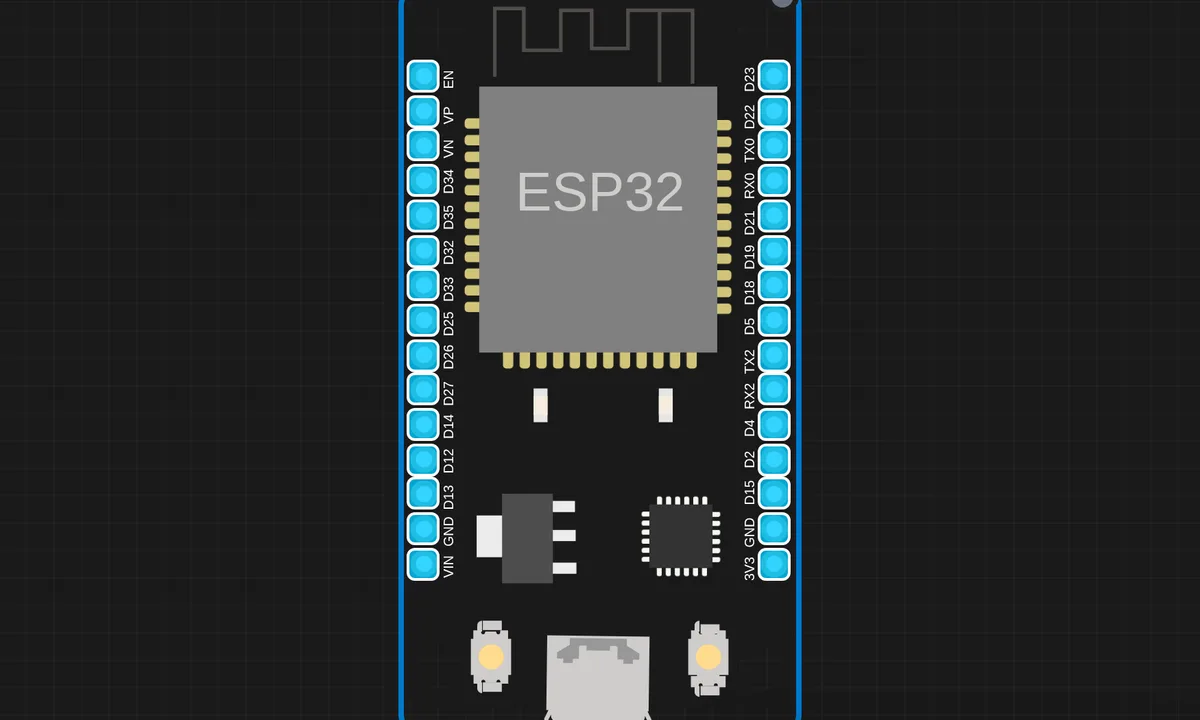
The exact circuit you get when you open this example — already wired, ready to run.
The sketch
# BlynkLib.py
# Copyright (c) 2015-2019 Volodymyr Shymanskyy. See the file LICENSE for copying permission.

__version__ = "1.0.0"

import struct
import time
import sys
import os

try:
    import machine
    gettime = lambda: time.ticks_ms()
    SOCK_TIMEOUT = 0
except ImportError:
    const = lambda x: x
    gettime = lambda: int(time.time() * 1000)
    SOCK_TIMEOUT = 0.05

def dummy(*args):
    pass

MSG_RSP = const(0)
MSG_LOGIN = const(2)
MSG_PING  = const(6)

MSG_TWEET = const(12)
MSG_NOTIFY = const(14)
MSG_BRIDGE = const(15)
MSG_HW_SYNC = const(16)
MSG_INTERNAL = const(17)
MSG_PROPERTY = const(19)
MSG_HW = const(20)
MSG_HW_LOGIN = const(29)
MSG_EVENT_LOG = const(64)

MSG_REDIRECT  = const(41)  # TODO: not implemented
MSG_DBG_PRINT  = const(55) # TODO: not implemented

STA_SUCCESS = const(200)
STA_INVALID_TOKEN = const(9)

DISCONNECTED = const(0)
CONNECTING = const(1)
CONNECTED = const(2)

print("""
    ___  __          __
   / _ )/ /_ _____  / /__
  / _  / / // / _ \\/  '_/
 /____/_/\\_, /_//_/_/\\_\\
        /___/ for Python v""" + __version__ + " (" + sys.platform + ")\n")

class EventEmitter:
    def __init__(self):
        self._cbks = {}

    def on(self, evt, f=None):
        if f:
            self._cbks[evt] = f
        else:
            def D(f):
                self._cbks[evt] = f
                return f
            return D

    def emit(self, evt, *a, **kv):
        if evt in self._cbks:
            self._cbks[evt](*a, **kv)


class BlynkProtocol(EventEmitter):
    def __init__(self, auth, tmpl_id=None, fw_ver=None, heartbeat=50, buffin=1024, log=None):
        EventEmitter.__init__(self)
        self.heartbeat = heartbeat*1000
        self.buffin = buffin
        self.log = log or dummy
        self.auth = auth
        self.tmpl_id = tmpl_id
        self.fw_ver = fw_ver
        self.state = DISCONNECTED
        self.connect()

    def virtual_write(self, pin, *val):
        self._send(MSG_HW, 'vw', pin, *val)

    def send_internal(self, pin, *val):
        self._send(MSG_INTERNAL,  pin, *val)

    def set_property(self, pin, prop, *val):
        self._send(MSG_PROPERTY, pin, prop, *val)

    def sync_virtual(self, *pins):
        self._send(MSG_HW_SYNC, 'vr', *pins)

    def log_event(self, *val):
        self._send(MSG_EVENT_LOG, *val)

    def _send(self, cmd, *args, **kwargs):
        if 'id' in kwargs:
            id = kwargs.get('id')
        else:
            id = self.msg_id
            self.msg_id += 1
            if self.msg_id > 0xFFFF:
                self.msg_id = 1

        if cmd == MSG_RSP:
            data = b''
            dlen = args[0]
        else:
            data = ('\0'.join(map(str, args))).encode('utf8')
            dlen = len(data)

        self.log('<', cmd, id, '|', *args)
        msg = struct.pack("!BHH", cmd, id, dlen) + data
        self.lastSend = gettime()
        self._write(msg)

    def connect(self):
        if self.state != DISCONNECTED: return
        self.msg_id = 1
        (self.lastRecv, self.lastSend, self.lastPing) = (gettime(), 0, 0)
        self.bin = b""
        self.state = CONNECTING
        self._send(MSG_HW_LOGIN, self.auth)

    def disconnect(self):
        if self.state == DISCONNECTED: return
        self.bin = b""
        self.state = DISCONNECTED
        self.emit('disconnected')

    def process(self, data=None):
        if not (self.state == CONNECTING or self.state == CONNECTED): return
        now = gettime()
        if now - self.lastRecv > self.heartbeat+(self.heartbeat//2):
            return self.disconnect()
        if (now - self.lastPing > self.heartbeat//10 and
            (now - self.lastSend > self.heartbeat or
             now - self.lastRecv > self.heartbeat)):
            self._send(MSG_PING)
            self.lastPing = now

        if data != None and len(data):
            self.bin += data

        while True:
            if len(self.bin) < 5:
                break

            cmd, i, dlen = struct.unpack("!BHH", self.bin[:5])
            if i == 0: return self.disconnect()

            self.lastRecv = now
            if cmd == MSG_RSP:
                self.bin = self.bin[5:]

                self.log('>', cmd, i, '|', dlen)
                if self.state == CONNECTING and i == 1:
                    if dlen == STA_SUCCESS:
                        self.state = CONNECTED
                        dt = now - self.lastSend
                        info = ['ver', __version__, 'h-beat', self.heartbeat//1000, 'buff-in', self.buffin, 'dev', sys.platform+'-py']
                        if self.tmpl_id:
                            info.extend(['tmpl', self.tmpl_id])
                            info.extend(['fw-type', self.tmpl_id])
                        if self.fw_ver:
                            info.extend(['fw', self.fw_ver])
                        self._send(MSG_INTERNAL, *info)
                        try:
                            self.emit('connected', ping=dt)
                        except TypeError:
                            self.emit('connected')
                    else:
                        if dlen == STA_INVALID_TOKEN:
                            self.emit("invalid_auth")
                            print("Invalid auth token")
                        return self.disconnect()
            else:
                if dlen >= self.buffin:
                    print("Cmd too big: ", dlen)
                    return self.disconnect()

                if len(self.bin) < 5+dlen:
                    break

                data = self.bin[5:5+dlen]
                self.bin = self.bin[5+dlen:]

                args = list(map(lambda x: x.decode('utf8'), data.split(b'\0')))

                self.log('>', cmd, i, '|', ','.join(args))
                if cmd == MSG_PING:
                    self._send(MSG_RSP, STA_SUCCESS, id=i)
                elif cmd == MSG_HW or cmd == MSG_BRIDGE:
                    if args[0] == 'vw':
                        self.emit("V"+args[1], args[2:])
                        self.emit("V*", args[1], args[2:])
                elif cmd == MSG_INTERNAL:
                    self.emit("internal:"+args[0], args[1:])
                elif cmd == MSG_REDIRECT:
                    self.emit("redirect", args[0], int(args[1]))
                else:
                    print("Unexpected command: ", cmd)
                    return self.disconnect()

import socket

class Blynk(BlynkProtocol):
    def __init__(self, auth, **kwargs):
        self.insecure = kwargs.pop('insecure', False)
        self.server = kwargs.pop('server', 'blynk.cloud')
        self.port = kwargs.pop('port', 80 if self.insecure else 443)
        BlynkProtocol.__init__(self, auth, **kwargs)
        self.on('redirect', self.redirect)

    def redirect(self, server, port):
        self.server = server
        self.port = port
        self.disconnect()
        self.connect()

    def connect(self):
        print('Connecting to %s:%d...' % (self.server, self.port))
        s = socket.socket()
        s.connect(socket.getaddrinfo(self.server, self.port)[0][-1])
        try:
            s.setsockopt(socket.IPPROTO_TCP, socket.TCP_NODELAY, 1)
        except:
            pass
        if self.insecure:
            self.conn = s
        else:
            try:
                import ussl
                ssl_context = ussl
            except ImportError:
                import ssl
                ssl_context = ssl.create_default_context()
            self.conn = ssl_context.wrap_socket(s, server_hostname=self.server)
        try:
            self.conn.settimeout(SOCK_TIMEOUT)
        except:
            s.settimeout(SOCK_TIMEOUT)
        BlynkProtocol.connect(self)

    def _write(self, data):
        #print('<', data)
        self.conn.write(data)
        # TODO: handle disconnect

    def run(self):
        data = b''
        try:
            data = self.conn.read(self.buffin)
            #print('>', data)
        except KeyboardInterrupt:
            raise
        except socket.timeout:
            # No data received, call process to send ping messages when needed
            pass
        except: # TODO: handle disconnect
            return
        self.process(data)


# simple_home_automation_with_blynk_and _micropython.py
'''Copyright (c) 2026 Kritish Mohapatra'''


import network # Library for network functionalities (Wi-Fi)
from machine import Pin # Library for controlling GPIO pins
import BlynkLib # Library for Blynk IoT platform communication
from time import sleep # Library for time delays
import dht # Library for DHT11 sensor communication

# Wi-Fi Credentials (replace with your own)
wifissid = "abcdef" # Your Wi-Fi SSID
wifipass = "@9090" # Your Wi-Fi password

# Blynk Authorization Token (replace with your Blynk app's token)
auth = "pottiIr9atOFmbvwsqTp7lTrYtje"

# LED Pin Configuration


# Connect to Wi-Fi
sta_if = network.WLAN(network.STA_IF)  #Create a Wi-Fi station interface object
sta_if.active(True) # Activate the Wi-Fi interface
sta_if.connect(wifissid, wifipass) # Connect to the Wi-Fi network

while not sta_if.isconnected(): # Wait until connected to Wi-Fi
    pass

print("Connected to Wi-Fi:", sta_if.ifconfig()) # Print the Wi-Fi connection details

# Initialize Blynk Connection
blynk = BlynkLib.Blynk(auth, insecure=True) # Create a Blynk object with the auth token

# Create LED Object
led1=Pin(16, Pin.OUT) # Initialize LED 1 on pin 16 (D0), set as output
led2=Pin(5, Pin.OUT) # Initialize LED 2 on pin 5 (D1), set as output
led3=Pin(4, Pin.OUT) # Initialize LED 3 on pin 4 (D2), set as output
led4=Pin(0, Pin.OUT) # Initialize LED 4 on pin 0 (D3), set as output
sensor=dht.DHT11(Pin(14)) # Initialize DHT11 sensor on pin 14 (D5)

led1.value(1) # Turn off LED 1 initially (active low)
led2.value(1) # Turn off LED 2 initially (active low)
led3.value(1) # Turn off LED 3 initially (active low)
led4.value(1) # Turn off LED 4 initially (active low)


# Virtual Pin V1 Handler (LED 1 control)
@blynk.on("V1")

def v0_handler(value):
    # Convert string value to integer (handle potential errors)
    try:
        led1.value(not int(value[0])) # Toggle LED 1 based on Blynk button state
    except ValueError:
        print("Invalid value received:", value)
        return

@blynk.on("V2")

def v2_handler(value):
    # Convert string value to integer (handle potential errors)
    try:
        led2.value(not int(value[0]))
    except ValueError:
        print("Invalid value received:", value)
        return

@blynk.on("V3")

def v3_handler(value):
    # Convert string value to integer (handle potential errors)
    try:
        led3.value(not int(value[0]))
    except ValueError:
        print("Invalid value received:", value)
        return
@blynk.on("V4")

def v4_handler(value):
    # Convert string value to integer (handle potential errors)
    try:
        led4.value(not int(value[0]))
    except ValueError:
        print("Invalid value received:", value)
        return
@blynk.on("V5")
# Create Blynk gauge widget
def write_value(pin, value):
# This function is not used for input, but required by blynk on decorator
    pass


# Main Loop (run Blynk processes)
while True:
    blynk.run() # Run Blynk processes (handle incoming and outgoing data)
    sensor.measure()  # Measure temperature and humidity
    temperature = sensor.temperature() # Get the temperature value
    #print(temperature)
    blynk.virtual_write(5, temperature)  # Send temperature to Blynk virtual pin V5
How it works
The firmware integrates multiple sensors and actuators under one rule engine: readings feed conditions, conditions trigger outputs, and the communication layer reports the state. The project’s size reflects the integration — each subsystem is simple, the coordination is the product.
The rule evaluation is the automation core — threshold comparisons and state logic deciding what each actuator does. The serial output logs the system’s decisions, so the automation’s reasoning is auditable line by line.
Before you build it for real
The rules are hard-coded — changing a threshold means reflashing, which is why real systems move rules to a config file or a connected hub. The actuator safety story is per-load: relays and motors each need their driver and flyback protection, and a smart home that switches mains needs isolation that a breadboard cannot provide. And single-point failure: one ESP32 as the hub means the whole house’s automation dies with one board — the architecture trade-off every DIY hub makes.
Get the parts
Related examples
FAQ
What does this automation system control?
The classic set: lights, fans and sensors coordinated by a central firmware. The ESP32 reads the sensors, applies the rules, and switches the actuators — the hub-and-spoke model of every DIY smart home.
Why is the code so large?
Because a real automation system is many small systems: sensor drivers, rule evaluation, actuator control and a communication layer each take their share. The 11 KB of source is what “automation” actually costs in firmware.