
ATtiny85: Button + LED
ATtiny85: Button + LED is a runnable microcontroller simulation example on SensBench — open the wired circuit, inspect the code, and compile real firmware in your browser, no install needed. Last updated Aug 14, 2026.
FREE SIMULATOR EXAMPLE · BEGINNER
ATtiny85: Button + LED
This example lights an LED on the ATtiny85’s PB1 whenever you press a button on PB0 — using the chip’s internal pull-up, so the only external wiring is two wires to ground. It is the tiny AVR’s button mirror, ready for the smallest breadboards.
| Board | ATtiny85 (8-pin AVR, 8 MHz internal) |
|---|---|
| Difficulty | beginner |
| Category | basics |
| Libraries | None — just the Arduino core |
| Runs in | Sensbench browser simulator — free, no account |
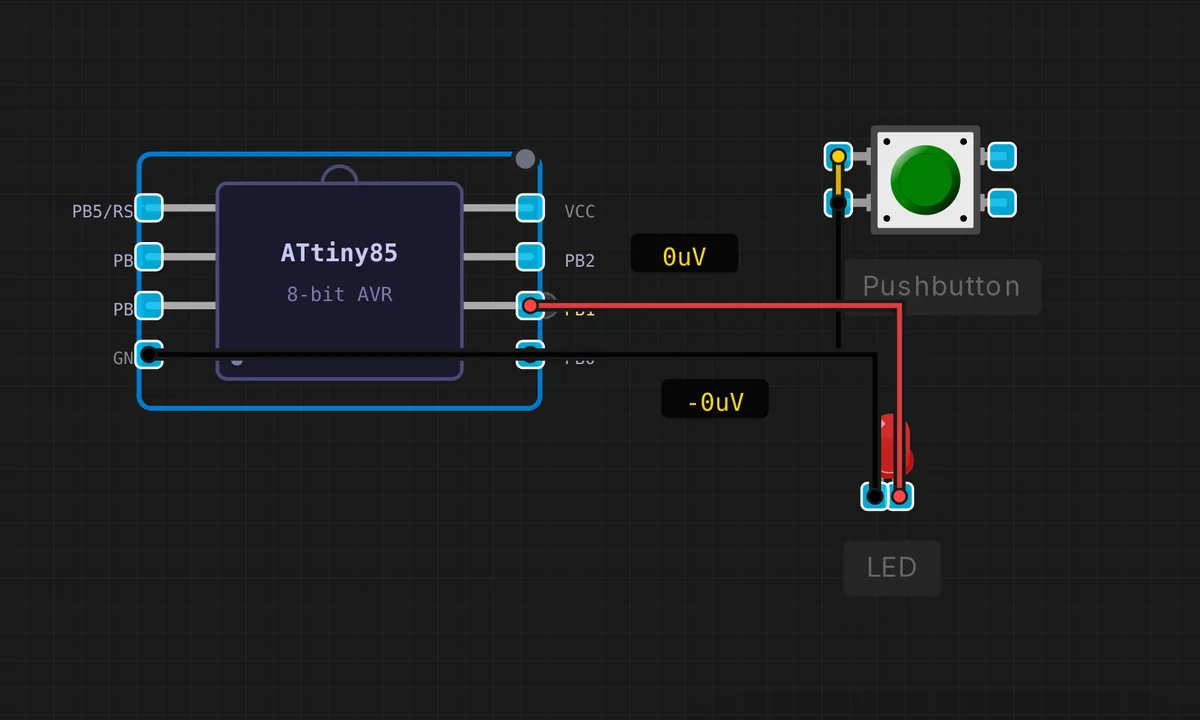
The exact circuit you get when you open this example — already wired, ready to run.
The sketch
// ATtiny85 — Button on PB0, LED on PB1
// Button wiring: one leg to PB0, other leg to GND
// INPUT_PULLUP means HIGH = released, LOW = pressed

void setup() {
  pinMode(0, INPUT_PULLUP);  // PB0 — button with internal pull-up
  pinMode(1, OUTPUT);         // PB1 — LED
}

void loop() {
  bool pressed = (digitalRead(0) == LOW);
  digitalWrite(1, pressed ? HIGH : LOW);
}
How it works
The sketch sets PB0 as INPUT_PULLUP and PB1 as output. The loop reads the button and mirrors it to the LED in two instructions: pressed = (digitalRead(0) == LOW), then digitalWrite(1, pressed ? HIGH : LOW). No delay, no debounce — the LED tracks the button state with microsecond latency.
The internal pull-up means the button wiring is just two wires: one leg of the button to PB0, the other to GND. The sketch’s comments spell this out because it is the one wiring detail every ATtiny85 button project repeats. The missing debounce is deliberate — a mirror needs none; a counter would.
Before you build it for real
The ATtiny85’s internal pull-up is about 30 kOhm and weaker than dedicated pull-ups — fine for a button on a clean breadboard, marginal with long wires or noisy environments. There is no debounce in this sketch: if you evolve it into a counter, contact bounce (5-20 ms) will register phantom presses. And the chip’s pins are not protected against 5 V abuse: on a Digispark running at 5 V, everything is fine, but mixing 3.3 V logic levels into the same circuit can leave the inputs undefined, and the chip has no hardware serial for debugging — a stuck LED means untangling wires, not reading an error.
Get the parts
Related examples
FAQ
Why does the button use INPUT_PULLUP instead of an external resistor?
The ATtiny85 has internal pull-up resistors on every I/O pin, and INPUT_PULLUP enables the one on PB0. The button connects PB0 to GND, so a press reads LOW. With only 8 pins, saving an external resistor and a breadboard lane matters — the internal pull-up is one of the tiny chip’s best features.
Which physical pins are PB0 and PB1?
On the DIP-8 package, PB0 is physical pin 5 and PB1 is physical pin 6. On a Digispark board they are labeled differently — PB0 is usually the pin near the USB connector, and the board prints its own numbering. Always check the board’s silk screen: the ATtiny85 core numbers pins by the AVR port, but the breakout board may relabel them.