
ATtiny85: NTC Temperature Sensor
ATtiny85: NTC Temperature Sensor is a runnable microcontroller simulation example on SensBench — open the wired circuit, inspect the code, and compile real firmware in your browser, no install needed. Last updated Aug 14, 2026.
FREE SIMULATOR EXAMPLE · INTERMEDIATE
ATtiny85: NTC Temperature Sensor
This example reads temperature from an NTC thermistor on the ATtiny85’s PB3 (ADC3) and blinks an LED on PB1 faster as the temperature rises — from once per second at 0 C to ten times per second at 100 C. Temperature telemetry with zero output pins beyond the LED.
| Board | ATtiny85 (8-pin AVR, 8 MHz internal) |
|---|---|
| Difficulty | intermediate |
| Category | sensors |
| Libraries | None — just the Arduino core |
| Runs in | Sensbench browser simulator — free, no account |
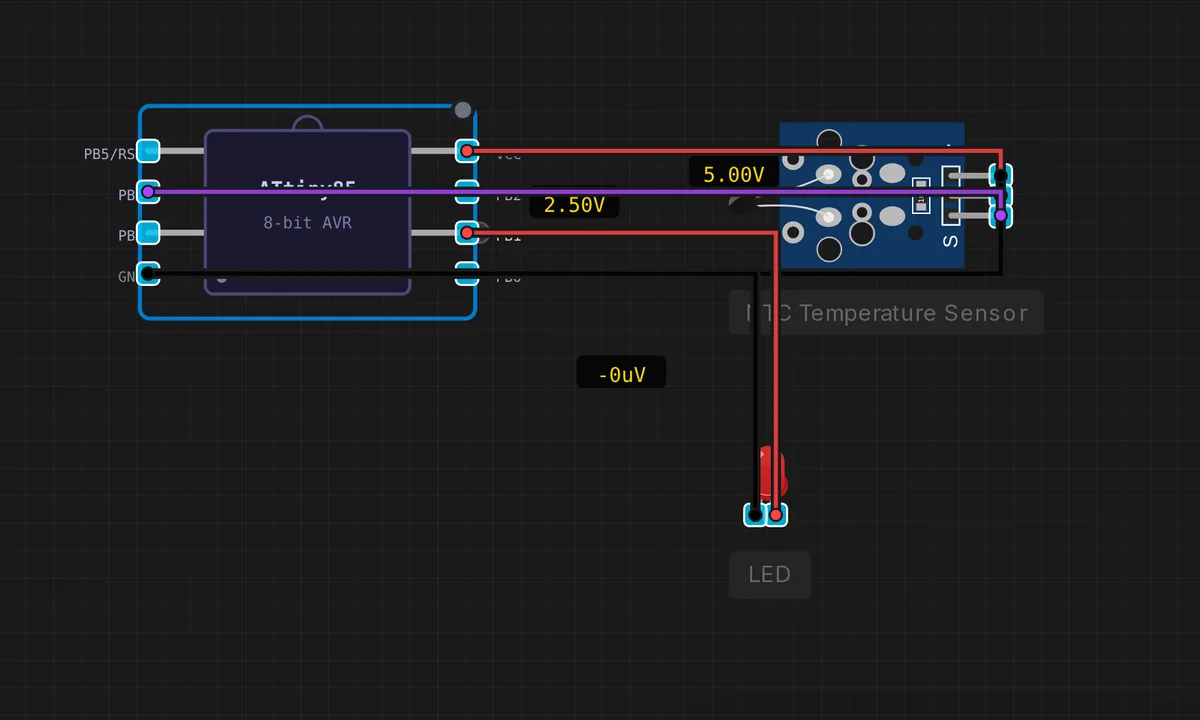
The exact circuit you get when you open this example — already wired, ready to run.
The sketch
// ATtiny85 — NTC Thermistor on PB3 (ADC3)
// Wiring: NTC between VCC and PB3, 10k resistor between PB3 and GND
// LED on PB1: blinks faster when temperature increases

#define NTC_PIN  3   // PB3 = ADC3
#define LED_PIN  1   // PB1

const float VCC        = 5.0;
const float SERIES_R   = 10000.0;
const float NOM_R      = 10000.0;   // NTC nominal resistance at 25°C
const float NOM_TEMP   = 25.0;
const float B_COEFF    = 3950.0;

float readTemperature() {
  int raw = analogRead(NTC_PIN);
  // R_NTC sits on the LOW side, so raw/1023 = R_NTC / (R_NTC + SERIES_R):
  //   R_NTC = SERIES_R / (1023/raw - 1)
  float resistance = SERIES_R / (1023.0 / raw - 1.0);
  float steinhart = resistance / NOM_R;
  steinhart = log(steinhart) / B_COEFF;
  steinhart += 1.0 / (NOM_TEMP + 273.15);
  return (1.0 / steinhart) - 273.15;
}

void setup() {
  pinMode(LED_PIN, OUTPUT);
}

void loop() {
  float temp = readTemperature();
  // Blink delay: 1000ms at 0°C down to 100ms at 100°C
  int blinkDelay = (int)(1000.0 - temp * 9.0);
  blinkDelay = constrain(blinkDelay, 100, 1000);

  digitalWrite(LED_PIN, HIGH);
  delay(blinkDelay / 2);
  digitalWrite(LED_PIN, LOW);
  delay(blinkDelay / 2);
}
How it works
The temperature math is the same Steinhart-Hart pipeline as the Pico NTC example, but the divider orientation differs: the thermistor is on the high side, so R_NTC = SERIES_R / (1023.0/raw - 1). The sketch reads PB3 (ADC3), computes resistance, applies the B-parameter equation, and returns degrees Celsius.
The output is the clever part: blinkDelay = 1000 - temp * 9, constrained to 100-1000 ms. At 0 C the LED blinks once per second; at 100 C it blinks ten times per second. The constrain() call clips the extremes, and the LED toggles with half the delay on each phase — a temperature readout with zero output hardware beyond the LED already on the bench.
Before you build it for real
The ATtiny85’s ADC is 10-bit but its reference is the supply rail, so every millivolt of rail sag directly shifts the reading — a USB-powered Digispark under load can read several degrees off. The VCC = 5.0 constant is a hard-coded assumption: change the supply and the formula goes wrong. And this sketch computes log() — on the ATtiny85 that’s the AVR math library, which is slow and flash-hungry (several KB); on a chip with 8 KB of flash, budget carefully. The NTC also self-heats: keep the divider current low or the thermistor warms itself and the blink rate lies.
Get the parts
Related examples
FAQ
Why is the NTC on the low side of the divider?
The divider is VCC to NTC to ADC3 to 10k resistor to GND — the thermistor sits between VCC and the ADC pin, with the fixed 10k below it. That arrangement makes the math clean: raw/1023 = R_NTC / (R_NTC + SERIES_R), and the comment shows the derived formula. Either orientation works; this one puts the thermistor on the high side.
Why blink instead of printing the temperature?
The ATtiny85 has no hardware serial, so a text readout means bit-banged SoftwareSerial or an extra pin. Blinking the LED at a rate proportional to temperature is the classic zero-IO telemetry: no extra parts, readable at a glance, and the code to decode it is trivial.