
ATtiny85: PWM LED Fade
ATtiny85: PWM LED Fade is a runnable microcontroller simulation example on SensBench — open the wired circuit, inspect the code, and compile real firmware in your browser, no install needed. Last updated Aug 14, 2026.
FREE SIMULATOR EXAMPLE · INTERMEDIATE
ATtiny85: PWM LED Fade
This example fades an LED smoothly in and out on the ATtiny85 using analogWrite() on PB1 — the chip’s OC0B hardware PWM output from Timer0. It is the tiny AVR’s version of the classic Arduino fade, with the timer details that matter on this specific chip.
| Board | ATtiny85 (8-pin AVR, 8 MHz internal) |
|---|---|
| Difficulty | intermediate |
| Category | basics |
| Libraries | None — just the Arduino core |
| Runs in | Sensbench browser simulator — free, no account |
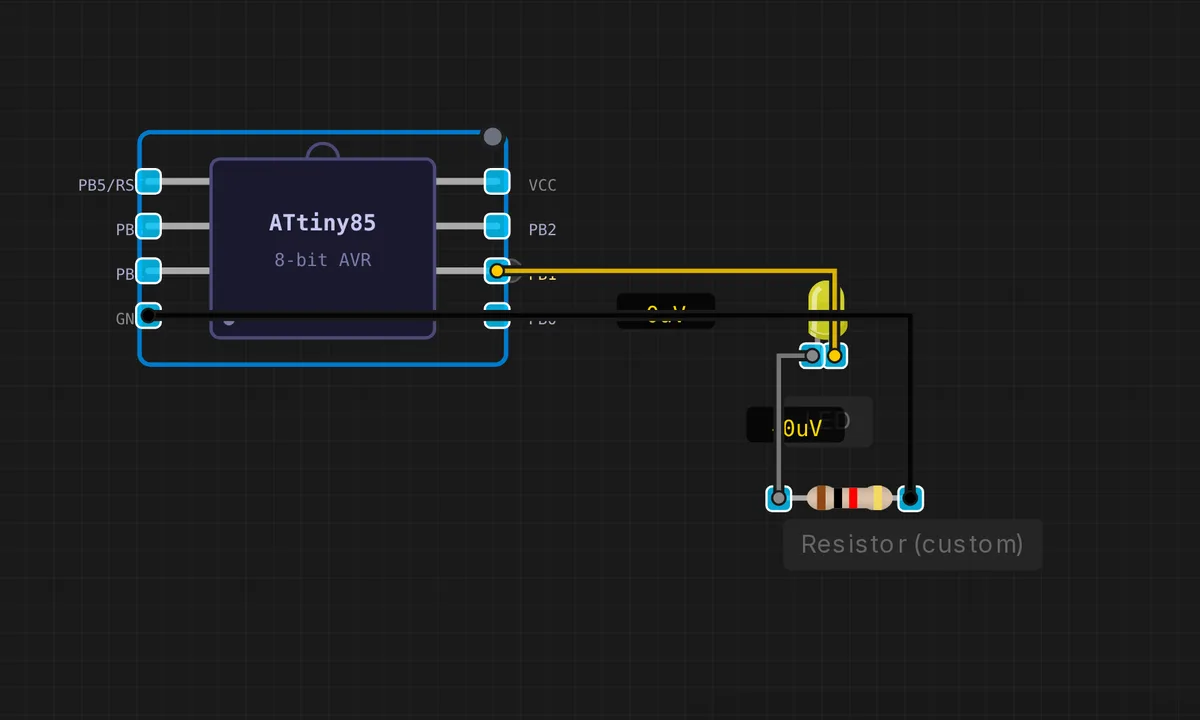
The exact circuit you get when you open this example — already wired, ready to run.
The sketch
// ATtiny85 — PWM LED fade on PB1 (OC0B / Timer0)
// analogWrite() uses Timer0 on the ATtiny85

void setup() {
  pinMode(1, OUTPUT);  // PB1 = OC0B (PWM capable)
}

void loop() {
  // Fade in
  for (int brightness = 0; brightness <= 255; brightness++) {
    analogWrite(1, brightness);
    delay(6);
  }
  // Fade out
  for (int brightness = 255; brightness >= 0; brightness--) {
    analogWrite(1, brightness);
    delay(6);
  }
  delay(200);
}
How it works
The sketch uses analogWrite(1, brightness) on PB1 — the ATtiny85’s OC0B output from Timer0. The fade-in loop steps brightness from 0 to 255 with a 6 ms delay per step, then the fade-out loop walks it back down. analogWrite() is really pulse-width modulation: the pin switches at ~490 Hz with a duty cycle proportional to the value, and the LED’s persistence of vision smooths the pulses into brightness.
The two loops share one pattern — count, write, delay — and the 200 ms pause between cycles frames each fade. Timer0 is the same timer the Arduino core uses for millis(), so a real ATtiny85 running this sketch has slightly affected timing functions; the emulator models the PWM accurately but the interplay with delay() stays within a millisecond.
Before you build it for real
The ATtiny85 has only two hardware PWM channels (PB0 and PB1) — try to fade an LED on PB2 and you get a hard on/off or bit-banged software PWM. Timer0 is shared with millis(), so changing the PWM frequency with analogWriteFrequency() also changes the system clock’s tick rate — delays get wrong, and code that depends on timing breaks silently. A real LED still needs its 220 Ohm series resistor even with PWM; the average current is lower, but the peak through the pin is the same. And the 6 ms per-step delay means a full fade cycle is about 3 seconds — fine here, but the same pattern with 40 LEDs becomes a usability problem on any chip.
Get the parts
Related examples
FAQ
Why PB1 specifically for PWM?
The ATtiny85 has only two hardware PWM channels: OC0A on PB0 and OC0B on PB1, both driven by Timer0. analogWrite() on the ATtiny85 core maps to Timer0, so PB1 is the natural choice here. Other pins cannot do hardware PWM — only bit-banged software PWM with worse accuracy.
What does the 6 ms delay do?
It paces the fade: 256 steps at 6 ms each takes about 1.5 seconds to fade in and another 1.5 seconds out. Without the delay the fade would complete in microseconds. The 200 ms pause at the end gives the eye a beat before the cycle restarts.