
ESP32-C3: DHT22 Temperature & Humidity
ESP32-C3: DHT22 Temperature & Humidity is a runnable microcontroller simulation example on SensBench — open the wired circuit, inspect the code, and compile real firmware in your browser, no install needed. Last updated Aug 14, 2026.
FREE SIMULATOR EXAMPLE · BEGINNER
ESP32-C3: DHT22 Temperature & Humidity
This example reads temperature and humidity from a DHT22 wired to GPIO3 of the ESP32-C3 and prints both values to the Serial Monitor every two seconds. It runs the same Adafruit DHT sensor library you would install on real hardware, so everything you learn here transfers directly to a physical build.
| Board | ESP32-C3 (RISC-V single-core, 160 MHz) |
|---|---|
| Difficulty | beginner |
| Category | sensors |
| Libraries | DHT sensor library, Adafruit Unified Sensor |
| Runs in | Sensbench browser simulator — free, no account |
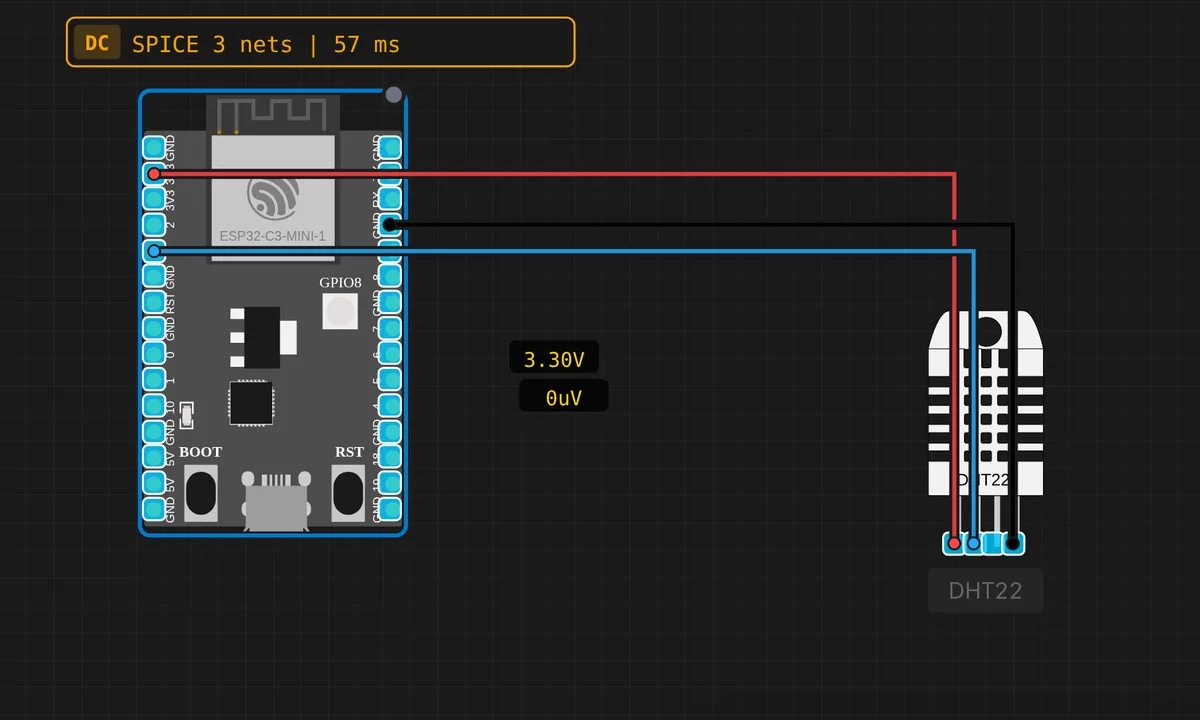
The exact circuit you get when you open this example — already wired, ready to run.
The sketch
// ESP32-C3 — DHT22 Temperature & Humidity Sensor
// Requires: Adafruit DHT sensor library
// Wiring: DATA → GPIO3  |  VCC → 3V3  |  GND → GND

#include <DHT.h>

#define DHT_PIN  3    // GPIO 3
#define DHT_TYPE DHT22

DHT dht(DHT_PIN, DHT_TYPE);


void setup() {
  Serial.begin(115200);
  dht.begin();
  delay(2000);
  Serial.println("ESP32-C3 DHT22 ready!");
}

void loop() {
  delay(2000);

  float h = dht.readHumidity();
  float t = dht.readTemperature();

  if (isnan(h) || isnan(t)) {
    Serial.println("DHT22: waiting for sensor...");
    return;
  }
  Serial.printf("Temp: %.1f C   Humidity: %.1f %%\n", t, h);
}
How it works
The DHT22 speaks a single-wire protocol with strict microsecond timing — and you never touch any of it. The Adafruit DHT object does the bit-banging: dht.begin() once in setup(), then dht.readHumidity() and dht.readTemperature() in the loop. The two #defines at the top, DHT_PIN 3 and DHT_TYPE DHT22, are the only lines you touch when porting.
The delay(2000) calls are not decorative. The DHT22 needs about a second to boot after power-up — hence the delay in setup() — and it refuses to be sampled faster than once every two seconds, hence the one in loop(). Poll faster and the library returns NaN, which is exactly what the isnan() guard catches: a failed checksum or timing hiccup prints “waiting for sensor” and tries again next cycle instead of showing garbage.
Worth noticing: nothing in this sketch is C3-specific. The ESP32-C3 is a RISC-V single-core part at 160 MHz, but the Arduino core hides that completely — this exact code compiles for a classic Xtensa ESP32 by changing one pin number. GPIO3 happens to be an ADC-capable pin on the C3, but here it is used as a plain digital input, which is all the sensor needs.
Before you build it for real
On a real build, the DATA line wants a 10 kΩ pull-up to 3V3 — DHT22 breakout modules include one, a bare sensor does not, and the simulator never tells the difference. If every read on hardware comes back NaN, that resistor is suspect number one. Second, respect the two-second sampling limit: poll faster and you get stale or NaN data, with no error to warn you. And keep the sensor on 3V3 — powering it from 5 V puts 5 V logic on the data line, into a pin that is not 5 V tolerant.
Get the parts
Related examples
FAQ
Why is there a delay(2000) in setup() as well as in loop()?
They guard two different timings. The one in setup() gives the sensor time to boot — a DHT22 needs about a second after power-on before it answers a read request. The one in loop() respects the two-second minimum sampling period between readings. They look redundant; neither is.
Is this code different from the classic ESP32 version?
Only the pin number. The ESP32-C3 is a RISC-V single-core part at 160 MHz, but the Arduino core and the DHT library hide all of that — the same sketch compiles for a classic Xtensa ESP32 by changing DHT_PIN and nothing else.