
ESP32-C3: PIR Motion Detector
ESP32-C3: PIR Motion Detector is a runnable microcontroller simulation example on SensBench — open the wired circuit, inspect the code, and compile real firmware in your browser, no install needed. Last updated Aug 14, 2026.
FREE SIMULATOR EXAMPLE · BEGINNER
ESP32-C3: PIR Motion Detector
This example watches a PIR motion sensor on GPIO7 of the ESP32-C3 and lights the onboard LED on GPIO8 the moment motion starts. The Serial Monitor logs each event with a millisecond timestamp and a running count, then prints “Still.” when the sensor clears — edge detection, not polling spam.
| Board | ESP32-C3 (RISC-V single-core, 160 MHz) |
|---|---|
| Difficulty | beginner |
| Category | sensors |
| Libraries | None — just the Arduino core |
| Runs in | Sensbench browser simulator — free, no account |
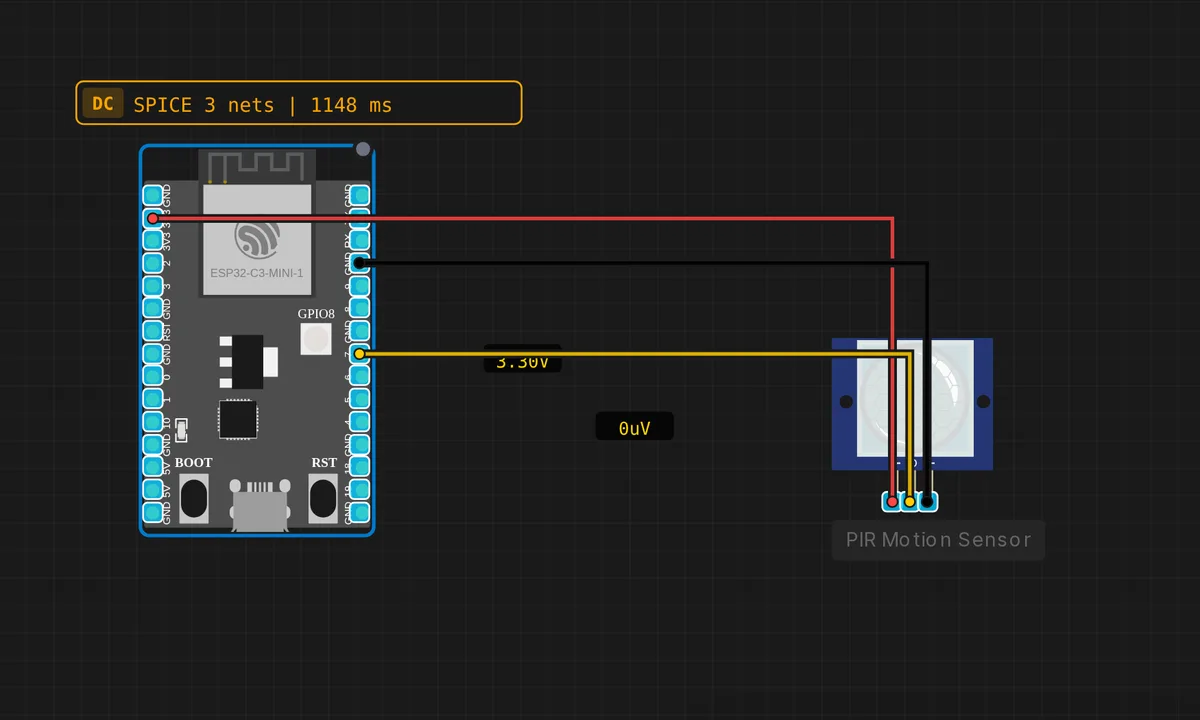
The exact circuit you get when you open this example — already wired, ready to run.
The sketch
// ESP32-C3 — PIR Motion Sensor
// Wiring: OUT → GPIO7  |  VCC → 3V3  |  GND → GND

#define PIR_PIN  7
#define LED_PIN  8  // onboard LED on GPIO8

bool prevMotion = false;
unsigned long count = 0;

void setup() {
  Serial.begin(115200);
  pinMode(PIR_PIN, INPUT);
  pinMode(LED_PIN, OUTPUT);
  Serial.println("ESP32-C3 PIR Motion Sensor");
  delay(2000); // warm-up
  Serial.println("Ready!");
}

void loop() {
  bool motion = (digitalRead(PIR_PIN) == HIGH);
  if (motion && !prevMotion) {
    count++;
    Serial.printf("[%lu ms] MOTION! (count=%lu)\n", millis(), count);
    digitalWrite(LED_PIN, HIGH);
  } else if (!motion && prevMotion) {
    Serial.println("Still.");
    digitalWrite(LED_PIN, LOW);
  }
  prevMotion = motion;
  delay(100);
}
How it works
A PIR sensor outputs a plain digital level — HIGH when its pyroelectric element sees infrared change — so the entire interface is digitalRead(PIR_PIN) every 100 ms. The interesting part is the prevMotion flag: comparing the current read to the previous one lets the sketch fire exactly once when motion starts and once when it stops, instead of printing on every pass through the loop.
Each rising edge bumps count, stamps the event with millis(), and drives the onboard LED on GPIO8 — so the board itself shows state even with the Serial Monitor closed. The falling edge prints “Still.” and turns the LED off. Two edges, two messages, and you can reconstruct the whole session from the log.
Polling at 100 ms is a deliberate choice, not laziness. A PIR holds its output high for seconds after each trigger, so an interrupt would add complexity without catching anything the poll misses. For a sensor this slow, a loop and a flag is the right tool — and the delay(2000) in setup() is a small nod to warm-up before “Ready!” prints.
Before you build it for real
Two realities the simulator hides. First, the sketch warms up for two seconds; a real PIR needs 30–60 seconds after power-on before its readings mean anything, and it will happily false-trigger the whole time. Second, the common HC-SR501 is specified for a 4.5–12 V supply — this circuit runs it from 3V3, which works in simulation and sometimes on the bench, but range and sensitivity fall off below spec; run it from 5 V instead, and note the OUT pin is 3.3 V logic either way, so GPIO7 stays safe. GPIO8 driving the onboard LED is fine, but remember it is a strapping pin on the C3 — never hang anything on it that pulls hard at boot.
Get the parts
Related examples
FAQ
Why does it fire MOTION! right after boot on real hardware?
Real PIR sensors false-trigger during warm-up — the pyroelectric element takes 30 to 60 seconds to stabilize after power-on. The sketch’s two-second delay is enough for the simulator; on hardware, extend it or simply ignore events for the first minute.
Can I use an interrupt instead of polling?
You can — attachInterrupt() on RISING works — but it buys very little here. The sensor holds its output high for seconds after each trigger, so a 100 ms poll catches every event with far simpler code. Save interrupts for signals faster than your loop.