
ESP32-C3: RGB LED
ESP32-C3: RGB LED is a runnable microcontroller simulation example on SensBench — open the wired circuit, inspect the code, and compile real firmware in your browser, no install needed. Last updated Aug 14, 2026.
FREE SIMULATOR EXAMPLE · BEGINNER
ESP32-C3: RGB LED
This example cycles an RGB LED through red, green, blue, yellow, cyan, magenta and white — 600 ms each — then 300 ms of dark, repeating every 4.5 seconds on GPIO6, GPIO7 and GPIO8 of the ESP32-C3. The Serial Monitor names each color as it lights, so you can follow the cycle without watching the canvas.
| Board | ESP32-C3 (RISC-V single-core, 160 MHz) |
|---|---|
| Difficulty | beginner |
| Category | basics |
| Libraries | None — just the Arduino core |
| Runs in | Sensbench browser simulator — free, no account |
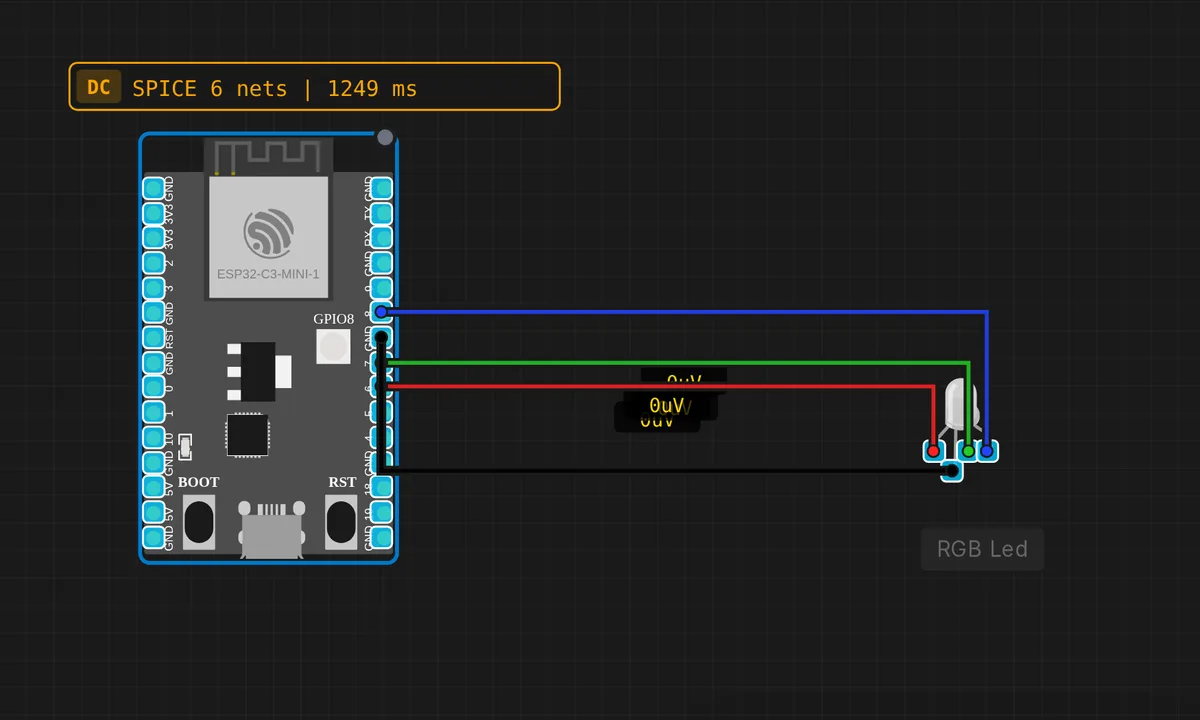
The exact circuit you get when you open this example — already wired, ready to run.
The sketch
// ESP32-C3 — RGB LED color cycle
// R=GPIO6  G=GPIO7  B=GPIO8

#define R_PIN 6
#define G_PIN 7
#define B_PIN 8

void setup() {
  pinMode(R_PIN, OUTPUT);
  pinMode(G_PIN, OUTPUT);
  pinMode(B_PIN, OUTPUT);
  Serial.begin(115200);
  Serial.println("ESP32-C3 RGB LED demo");
}

void setRGB(bool r, bool g, bool b) {
  digitalWrite(R_PIN, r ? HIGH : LOW);
  digitalWrite(G_PIN, g ? HIGH : LOW);
  digitalWrite(B_PIN, b ? HIGH : LOW);
}

void loop() {
  setRGB(1,0,0); Serial.println("RED");   delay(600);
  setRGB(0,1,0); Serial.println("GREEN"); delay(600);
  setRGB(0,0,1); Serial.println("BLUE");  delay(600);
  setRGB(1,1,0); Serial.println("YELLOW");delay(600);
  setRGB(0,1,1); Serial.println("CYAN");  delay(600);
  setRGB(1,0,1); Serial.println("MAGENTA");delay(600);
  setRGB(1,1,1); Serial.println("WHITE"); delay(600);
  setRGB(0,0,0); Serial.println("OFF");   delay(300);
}
How it works
Three GPIOs, one per channel: red on GPIO6, green on GPIO7, blue on GPIO8. The setRGB(bool r, bool g, bool b) helper writes all three with plain digitalWrite(), so mixing is purely binary — yellow is red+green both fully on, white is all three, and there is no brightness in between.
The loop is a color table written longhand: seven setRGB() calls, each paired with a Serial.println() naming the color and a delay(600) to hold it, then 300 ms of off to mark the cycle boundary. Want red to hold longer? Duplicate its line. The structure makes experiments that direct.
Eight combinations (2³) is the ceiling for digital driving. Smooth fades and the full 16-million-color palette need PWM on each channel — a different example — but for learning pin mapping and active-high logic, binary mixing is exactly what you want.
Before you build it for real
First question on real hardware: common cathode or common anode? This sketch assumes common cathode — shared leg to GND, HIGH lights a channel. Wire a common-anode module (shared leg to 3V3) and every color inverts: white becomes off, red becomes cyan. Second, the canvas shows no series resistors — real channels each need one, and not the same value: the red die drops ~2 V while green and blue drop ~3 V, so identical resistors give unbalanced brightness. Start at 220 Ω and trim per channel. And note GPIO8 is a strapping pin — an LED with a resistor is fine, a hard tie to GND is not.
Get the parts
Related examples
FAQ
Why does white look pinkish or bluish on my real LED?
The three dies have different forward voltages and wildly different efficiencies — red usually wins. With identical resistors the currents are unequal, so the mix shifts. Trim each channel’s resistor value, or move to PWM and balance with duty cycle instead.
How do I get more than eight colors?
Drive the channels with PWM instead of digitalWrite(). On the ESP32 Arduino core that means the ledc functions — 8-bit duty per channel gives 256 intensity steps, and 256³ is the 16.7-million-color palette you see in the smooth-fade examples.