
[2× Pico W] Bidirectional Digital Handshake
[2× Pico W] Bidirectional Digital Handshake is a runnable microcontroller simulation example on SensBench — open the wired circuit, inspect the code, and compile real firmware in your browser, no install needed. Last updated Aug 14, 2026.
FREE SIMULATOR EXAMPLE · BEGINNER
[2× Pico W] Bidirectional Digital Handshake
This example runs a bidirectional handshake between two Raspberry Pi Picos: Pico A toggles a data line on GP15 and waits for Pico B to acknowledge on GP14, with both boards logging every event to their Serial Monitors. It is the smallest reliable request-confirm protocol you can build with two wires.
| Board | 2× Raspberry Pi Pico (two boards, UART cross-wired) |
|---|---|
| Difficulty | beginner |
| Category | communication |
| Libraries | None — just the Arduino core |
| Runs in | Sensbench browser simulator — free, no account |
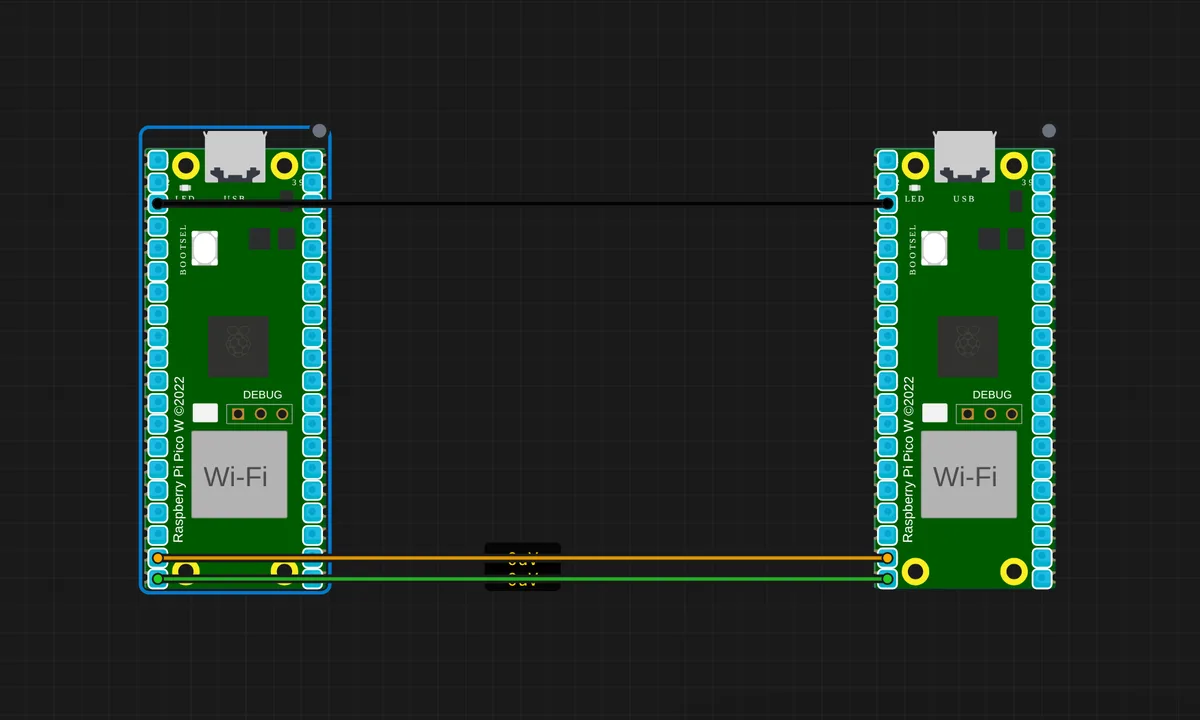
The exact circuit you get when you open this example — already wired, ready to run.
The sketch
// Pico A — sender + ack listener
//
// Wiring to Pico B:
//   A.GP15 (DATA out) ──> B.GP15 (DATA in)
//   A.GP14 (ACK in)   <── B.GP14 (ACK out)
//   A.GND             ─── B.GND
//
// Every second, A toggles GP15 and waits up to 200 ms for B's ack
// pulse on GP14. Both events get logged to Serial.

const int DATA_OUT = 15;
const int ACK_IN   = 14;

void setup() {
  Serial.begin(115200);
  pinMode(DATA_OUT, OUTPUT);
  pinMode(ACK_IN,   INPUT);
  pinMode(LED_BUILTIN, OUTPUT);
  delay(300);
  Serial.println("Pico A — handshake ready.");
}

uint32_t counter   = 0;
int      lastAck   = LOW;
bool     dataState = false;

void loop() {
  // Toggle the data line every second
  dataState = !dataState;
  digitalWrite(DATA_OUT, dataState ? HIGH : LOW);
  digitalWrite(LED_BUILTIN, dataState ? HIGH : LOW);
  counter++;
  Serial.print("[A] sent #");
  Serial.print(counter);
  Serial.print(" DATA=");
  Serial.println(dataState ? "HIGH" : "LOW");

  // Watch for an ack pulse from B for up to 200 ms
  uint32_t deadline = millis() + 200;
  bool acked = false;
  while (millis() < deadline) {
    int v = digitalRead(ACK_IN);
    if (v != lastAck) {
      lastAck = v;
      acked = true;
      Serial.print("[A] ack edge (ACK=");
      Serial.print(v ? "HIGH" : "LOW");
      Serial.println(")");
      break;
    }
  }
  if (!acked) Serial.println("[A] no ack within 200 ms");

  delay(800);
}
How it works
Pico A toggles GP15 (data) every second, then polls GP14 (ack) for up to 200 ms watching for any edge. The companion Pico B reads GP15 and pulses GP14 on every transition. The edge detection on A — if (v != lastAck) — treats any change as an acknowledgment, so the timing of B’s pulse does not need to match A’s polling window precisely.
Both boards log every event to their own Serial Monitors: A prints “sent #n DATA=HIGH” and “ack edge”, B prints the received state and its ack pulse. Reading the two consoles side by side shows the full round-trip — send, receive, acknowledge — which is the demo’s teaching point. The 800 ms pause after the ack window paces the cycle to about one handshake per second.
Before you build it for real
The ack-wait uses a busy polling loop with a deadline — while (millis() < deadline) — which blocks Pico A's loop for up to 200 ms per handshake. On real hardware with other tasks (sensor reads, display updates), that blocking window stalls everything else; a state-machine or interrupt-driven approach is the production fix. The ack edge is detected as any change, so electrical noise on GP14 can fake an acknowledgment — the simulator's clean wires hide this. And both boards are 3.3 V logic, so the direct wires are safe; mixing in a 5 V board requires level shifting.
Get the parts
Related examples
FAQ
What is a handshake in this context?
A handshake is a two-sided confirmation: Pico A toggles the data line and waits for Pico B to acknowledge on a separate ack line. The ack pulse proves the message was not just sent, but received — the difference between shouting into the dark and hearing a reply.
Why two lines instead of one?
One line can carry either data or acknowledgment, but not both at the same time without a protocol. Two dedicated lines keep the demo trivial: GP15 carries the data toggle, GP14 carries the ack. Real protocols often multiplex onto fewer wires with timing rules — this example shows the simplest reliable form.