
[2× Pico W] Serial1 Passthrough (UART0)
[2× Pico W] Serial1 Passthrough (UART0) is a runnable microcontroller simulation example on SensBench — open the wired circuit, inspect the code, and compile real firmware in your browser, no install needed. Last updated Aug 14, 2026.
FREE SIMULATOR EXAMPLE · INTERMEDIATE
[2× Pico W] Serial1 Passthrough (UART0)
This example wires two Raspberry Pi Picos together over UART0: Pico A sends PING #n every second on its hardware serial and watches for the reply from Pico B, echoing every round-trip to the USB console. It is the minimal two-board UART link.
| Board | 2× Raspberry Pi Pico (two boards, UART cross-wired) |
|---|---|
| Difficulty | intermediate |
| Category | communication |
| Libraries | None — just the Arduino core |
| Runs in | Sensbench browser simulator — free, no account |
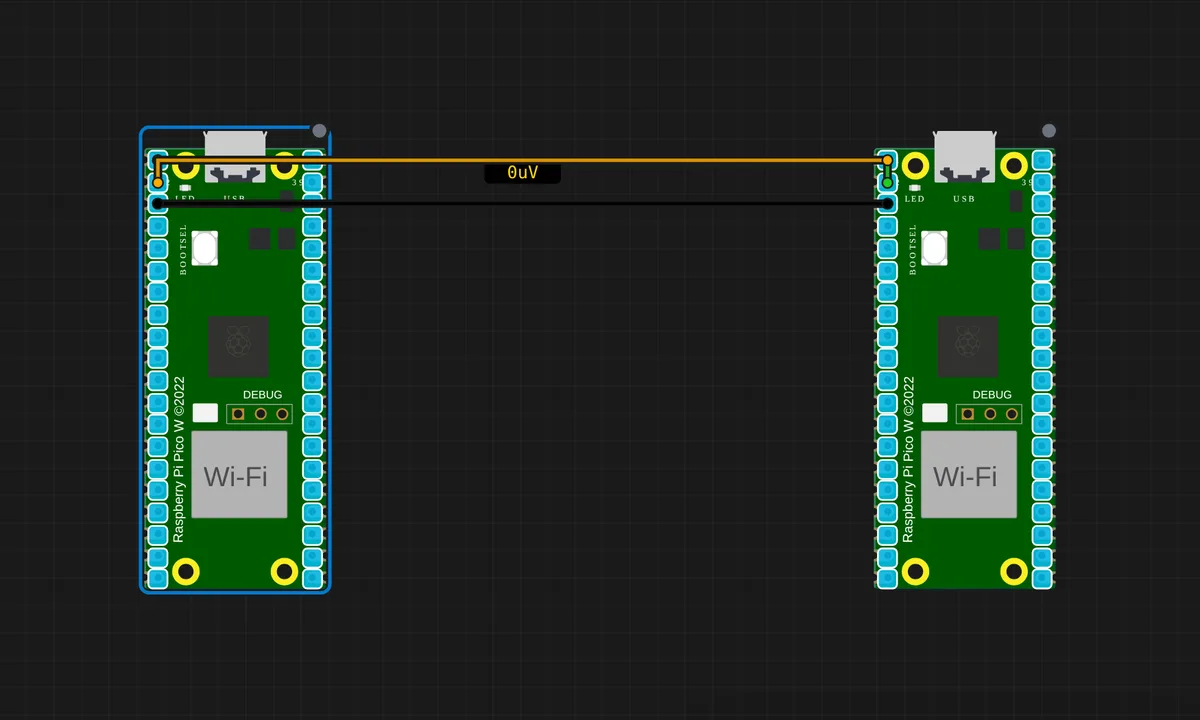
The exact circuit you get when you open this example — already wired, ready to run.
The sketch
// Pico A — Serial1 ping/pong sender
//
// Wiring to Pico B:
//   A.GP0 (TX) ──> B.GP1 (RX)
//   A.GP1 (RX) <── B.GP0 (TX)
//   A.GND     ──── B.GND
//
// Open the Serial Monitor on Pico A to see PONG replies coming back.

void setup() {
  Serial.begin(115200);   // USB-CDC console
  Serial1.begin(9600);    // UART0 on GP0(TX)/GP1(RX)
  pinMode(LED_BUILTIN, OUTPUT);
  delay(500);
  Serial.println("Pico A ready — sending PING every second.");
}

unsigned long lastSend = 0;
uint32_t counter = 0;
String rx = "";

void loop() {
  // Send a PING every 1 s
  if (millis() - lastSend >= 1000) {
    lastSend = millis();
    counter++;
    Serial1.print("PING #");
    Serial1.println(counter);
    digitalWrite(LED_BUILTIN, HIGH);
  }

  // Echo any reply from Pico B onto the USB console
  while (Serial1.available()) {
    char c = (char)Serial1.read();
    if (c == '\n') {
      Serial.print("[A] got: ");
      Serial.println(rx);
      rx = "";
      digitalWrite(LED_BUILTIN, LOW);
    } else if (c != '\r') {
      rx += c;
    }
  }
}
How it works
Pico A sends PING #n every second on Serial1 (UART0, GP0 TX) and listens for replies on GP1 RX. The loop is a classic non-blocking pair: a millis() check fires the periodic send, and a while (Serial1.available()) drains the receive buffer, accumulating characters into a String until a newline completes the message.
The wiring is TX-to-RX crossed: A.GP0 (TX) to B.GP1 (RX), A.GP1 (RX) to B.GP0 (TX), with grounds tied. The companion Pico B sketch echoes every received line back. Pico A’s onboard LED flashes on send and clears on reply — a hardware-level ping indicator you can watch without reading the terminal.
Before you build it for real
The classic UART wiring mistake is TX-to-TX: the link only works crossed — A’s TX feeds B’s RX and vice versa. Both grounds must be tied, or the levels have no reference. The String accumulation in the receive path is fine for short lines but grows memory on heap; on a long-running logger, build the buffer with a fixed char array instead to avoid fragmentation. The 9600/115200 split also trips people: Serial1 and Serial are independent channels with independent baud rates, and they stay that way.
Get the parts
Related examples
FAQ
What is Serial1 on the Pico?
Serial is the Pico’s USB-CDC console — the virtual serial port over USB. Serial1 is the real hardware UART0 on GP0 (TX) and GP1 (RX). This example uses Serial for the human-facing console and Serial1 for the machine-to-machine link between the two Picos.
Why 9600 baud on Serial1 but 115200 on Serial?
The USB console can handle 115200 easily — it is a virtual port with USB-speed bandwidth. The hardware UART over breadboard wires is happier at 9600, a speed every UART handles cleanly and tolerates wiring capacitance. Both ends must agree exactly on the Serial1 baud rate.