
ESP32: 7-Segment Counter
ESP32: 7-Segment Counter is a runnable microcontroller simulation example on SensBench — open the wired circuit, inspect the code, and compile real firmware in your browser, no install needed. Last updated Aug 14, 2026.
FREE SIMULATOR EXAMPLE · BEGINNER
ESP32: 7-Segment Counter
This example counts 0 to 9 on a single 7-segment display, stepping every 700 ms, with seven GPIOs driving the seven segments directly — a=12, b=13, c=14, d=25, e=26, f=27, g=32. No driver chip, no library: just a lookup table and digitalWrite. The Serial Monitor prints each digit as it lights.
| Board | ESP32 DevKit (Xtensa LX6, 240 MHz) |
|---|---|
| Difficulty | beginner |
| Category | displays |
| Libraries | None — just the Arduino core |
| Runs in | Sensbench browser simulator — free, no account |
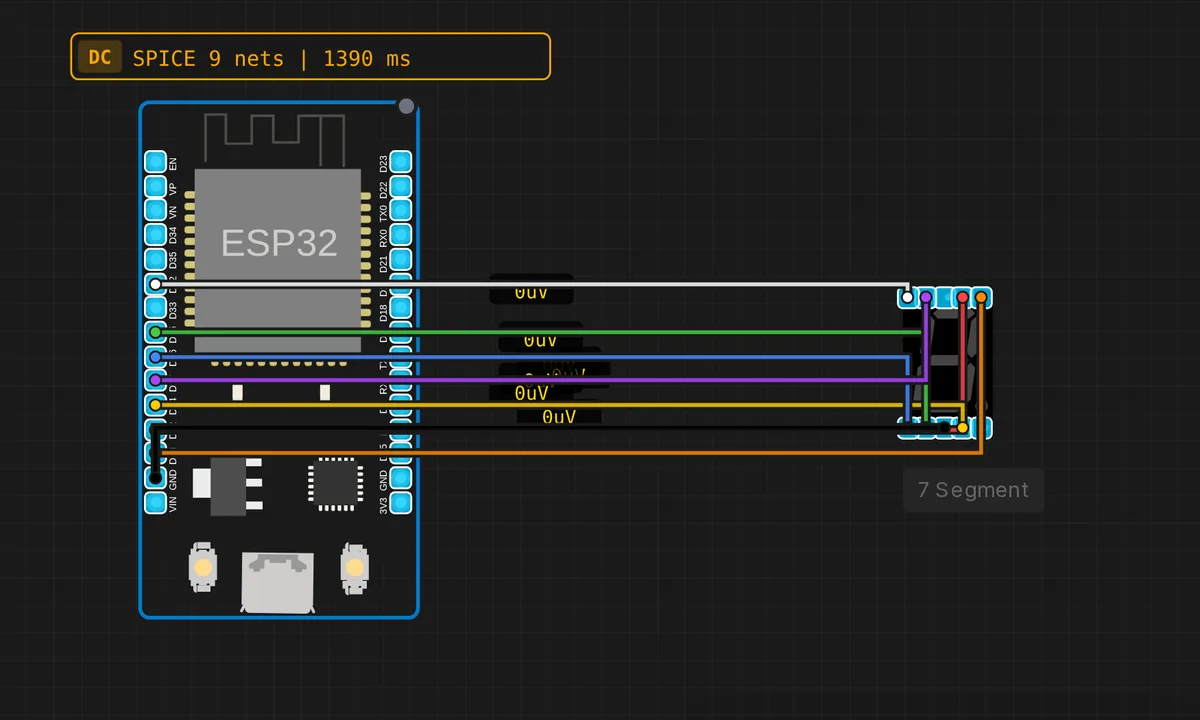
The exact circuit you get when you open this example — already wired, ready to run.
The sketch
// ESP32 — 7-Segment Display Counter 0-9
// Segments: a=12, b=13, c=14, d=25, e=26, f=27, g=32


const int SEG[7] = {12, 13, 14, 25, 26, 27, 32};

const bool DIGITS[10][7] = {
  {1,1,1,1,1,1,0}, // 0
  {0,1,1,0,0,0,0}, // 1
  {1,1,0,1,1,0,1}, // 2
  {1,1,1,1,0,0,1}, // 3
  {0,1,1,0,0,1,1}, // 4
  {1,0,1,1,0,1,1}, // 5
  {1,0,1,1,1,1,1}, // 6
  {1,1,1,0,0,0,0}, // 7
  {1,1,1,1,1,1,1}, // 8
  {1,1,1,1,0,1,1}, // 9
};


void showDigit(int d) {
  for (int i = 0; i < 7; i++)
    digitalWrite(SEG[i], DIGITS[d][i] ? HIGH : LOW);
}

void setup() {
  for (int i = 0; i < 7; i++) pinMode(SEG[i], OUTPUT);
  Serial.begin(115200);
  Serial.println("ESP32 7-Segment Counter");
}

void loop() {
  for (int d = 0; d <= 9; d++) {
    showDigit(d);
    Serial.print("Digit: "); Serial.println(d);
    delay(700);
  }
}
How it works
The whole driver is a truth table. DIGITS[10][7] holds one row per digit and one column per segment — 1 means lit — and showDigit() walks the SEG[] pin array writing each bit with digitalWrite(). Want a custom character, like the letter E? Add the row; the code does not care whether the pattern is a digit.
The pin choices are deliberate. Every pin in SEG[] — 12, 13, 14, 25, 26, 27, 32 — is a fully output-capable GPIO on the ESP32, and they are ordered so the wiring on the canvas runs neatly around the display. The sketch spends seven pins to avoid needing any external hardware at all.
Timing is a plain blocking delay(700) inside a for loop in loop(). Crude, but honest: with nothing else to do, blocking code is the simplest correct option, and the Serial.print() pair mirrors each digit so you can verify the table against what you see lit.
Before you build it for real
The simulator lights segments for free; real LEDs want one resistor per segment — about 220 ohm — or every lit segment pulls current straight from its GPIO. Light an 8 and that is seven segments at once, well over 100 mA through pins whose combined budget is a fraction of that. Two more hardware gotchas: the sketch assumes a common-cathode display (HIGH lights a segment), and GPIO12 is a strapping pin — if it reads high at reset, the ESP32 picks the wrong flash voltage and refuses to boot. A segment through a resistor is usually harmless, but if the board only boots with the display unplugged, move that segment to another pin.
Get the parts
Related examples
FAQ
Is this a common-cathode or common-anode display?
Common cathode: the shared pin goes to GND and writing a segment HIGH lights it, which matches the 1s in the DIGITS table. If your real module is common anode, the logic inverts — write !DIGITS[d][i] in showDigit() and tie the common pin to 3V3.
How do I drive a multi-digit display?
By multiplexing: all digits share the same seven segment lines, and you switch each digit’s common pin on one at a time, fast enough that persistence of vision merges them into a steady readout. You need one extra GPIO per digit and a timer instead of delay(). It is the standard next step after this example.