
ESP32: BMP280 Weather Station
ESP32: BMP280 Weather Station is a runnable microcontroller simulation example on SensBench — open the wired circuit, inspect the code, and compile real firmware in your browser, no install needed. Last updated Aug 14, 2026.
FREE SIMULATOR EXAMPLE · INTERMEDIATE
ESP32: BMP280 Weather Station
This example reads temperature and barometric pressure from a BMP280 over I2C — SDA on GPIO21, SCL on GPIO22 — and prints temperature, pressure in hPa and a computed altitude to the Serial Monitor every two seconds. It uses Adafruit’s BMP280 library, the same one you would install for real hardware.
| Board | ESP32 DevKit (Xtensa LX6, 240 MHz) |
|---|---|
| Difficulty | intermediate |
| Category | sensors |
| Libraries | Adafruit BMP280 Library, Adafruit Unified Sensor, Adafruit BusIO |
| Runs in | Sensbench browser simulator — free, no account |
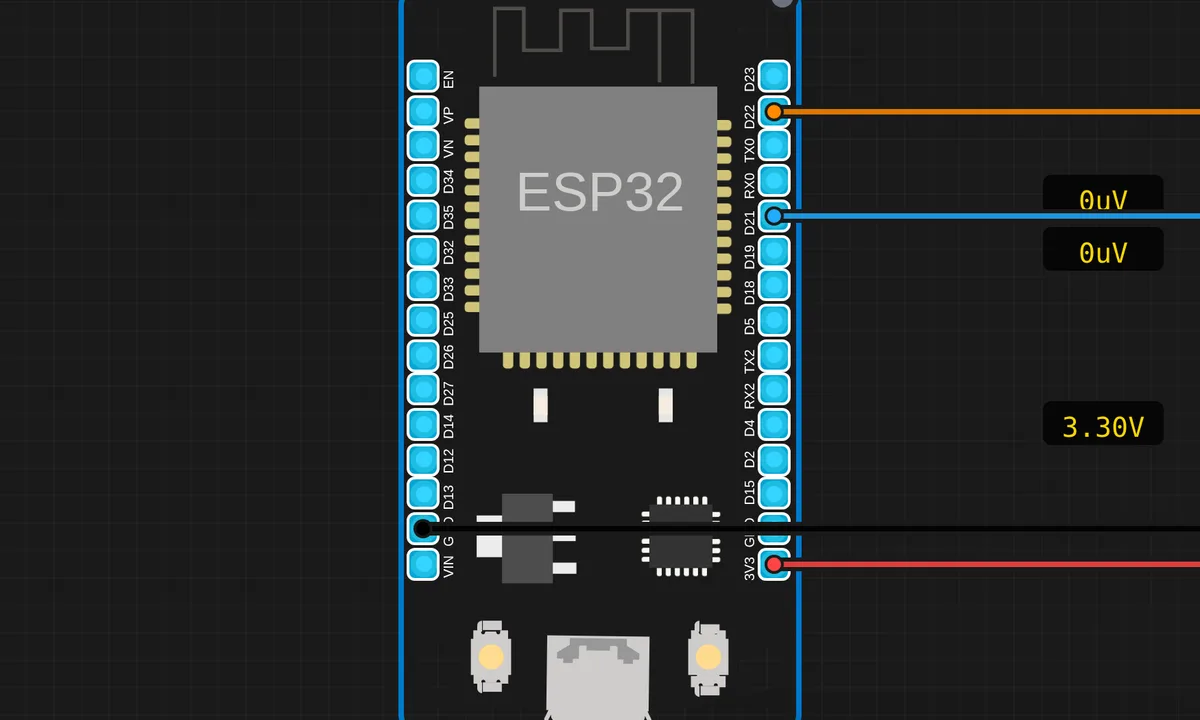
The exact circuit you get when you open this example — already wired, ready to run.
The sketch
// ESP32 — BMP280 Barometric Pressure & Temperature (I2C)
// Requires: Adafruit BMP280 Library, Adafruit Unified Sensor
// Wiring: SDA → D21  |  SCL → D22  |  VCC → 3V3  |  GND → GND

#include <Wire.h>
#include <Adafruit_BMP280.h>

Adafruit_BMP280 bmp;

void setup() {
  Serial.begin(115200);
  Wire.begin(21, 22);
  if (!bmp.begin(0x76)) {
    Serial.println("BMP280 not found! Check wiring.");
    while (true) delay(10);
  }
  bmp.setSampling(Adafruit_BMP280::MODE_NORMAL,
                  Adafruit_BMP280::SAMPLING_X2,
                  Adafruit_BMP280::SAMPLING_X16,
                  Adafruit_BMP280::FILTER_X16,
                  Adafruit_BMP280::STANDBY_MS_500);
  Serial.println("BMP280 ready!");
}

void loop() {
  float tempC    = bmp.readTemperature();
  float pressure = bmp.readPressure() / 100.0F; // hPa
  float altitude = bmp.readAltitude(1013.25);    // m

  Serial.printf("Temp: %.2f C  Pressure: %.2f hPa  Altitude: %.1f m\n",
                tempC, pressure, altitude);
  delay(2000);
}
How it works
Wire.begin(21, 22) puts the I2C bus on the BMP280’s pins — SDA on GPIO21, SCL on GPIO22 — then bmp.begin(0x76) probes that address. If nothing answers, the sketch prints “BMP280 not found!” and parks in while (true): it fails loud at boot instead of feeding you garbage readings all afternoon.
The setSampling() call is where the quality comes from: normal (continuous) mode, temperature oversampled ×2, pressure ×16, an IIR filter at ×16, and a 500 ms standby between measurements. Pressure is a noisy signal — that heavy oversampling plus filtering is why the altitude number does not jitter between reads.
In the loop, bmp.readPressure() / 100.0F converts pascals to hPa, and bmp.readAltitude(1013.25) derives altitude from standard sea-level pressure. One Serial.printf() with %.2f formatting prints all three values on a line, then a two-second delay matches the sensor’s standby rhythm.
Before you build it for real
Two addresses, one gotcha: BMP280 modules ship at 0x76 or 0x77 depending on the SDO pin, and this sketch hard-codes 0x76. On real hardware a “BMP280 not found!” means try 0x77 — or run an I2C scanner first. Second, feed it 3V3, not 5 V: the bare chip is a 3.3 V part, and only modules with an onboard regulator survive 5 V. And the altitude line is only as honest as the 1013.25 hPa reference — pass your local sea-level pressure from a weather report if you want metres that mean something.
Get the parts
Related examples
FAQ
Why does it say "BMP280 not found!"?
The library probed I2C address 0x76 and got no reply. On real hardware, first check SDA and SCL are not swapped, then try 0x77 — modules set their address via the SDO pin. The sketch parks in a while(true) loop on failure, so a missing sensor fails loud at boot instead of feeding you silent garbage later.
BMP280 vs BME280 — does it matter?
Same package, same bus, same registers for pressure and temperature; the BME280 adds a humidity channel. This sketch is written against the BMP280 driver — for a BME280, switch to Adafruit’s BME280 library, because the humidity registers need their own code path.