
ESP32: Pure ESP-IDF Blink
ESP32: Pure ESP-IDF Blink is a runnable microcontroller simulation example on SensBench — open the wired circuit, inspect the code, and compile real firmware in your browser, no install needed. Last updated Aug 14, 2026.
FREE SIMULATOR EXAMPLE · INTERMEDIATE
ESP32: Pure ESP-IDF Blink
This example blinks the ESP32’s onboard LED on GPIO2 with zero Arduino code: a pure ESP-IDF project built on app_main(), the GPIO driver API and FreeRTOS delays. Press play and the LED toggles once a second while tagged, leveled log lines scroll through the monitor. It is the smallest possible program that proves you can live without setup() and loop().
| Board | ESP32 DevKit (Xtensa LX6, 240 MHz) |
|---|---|
| Difficulty | intermediate |
| Category | basics |
| Libraries | None — pure ESP-IDF project, no Arduino core |
| Runs in | Sensbench browser simulator — free, no account |
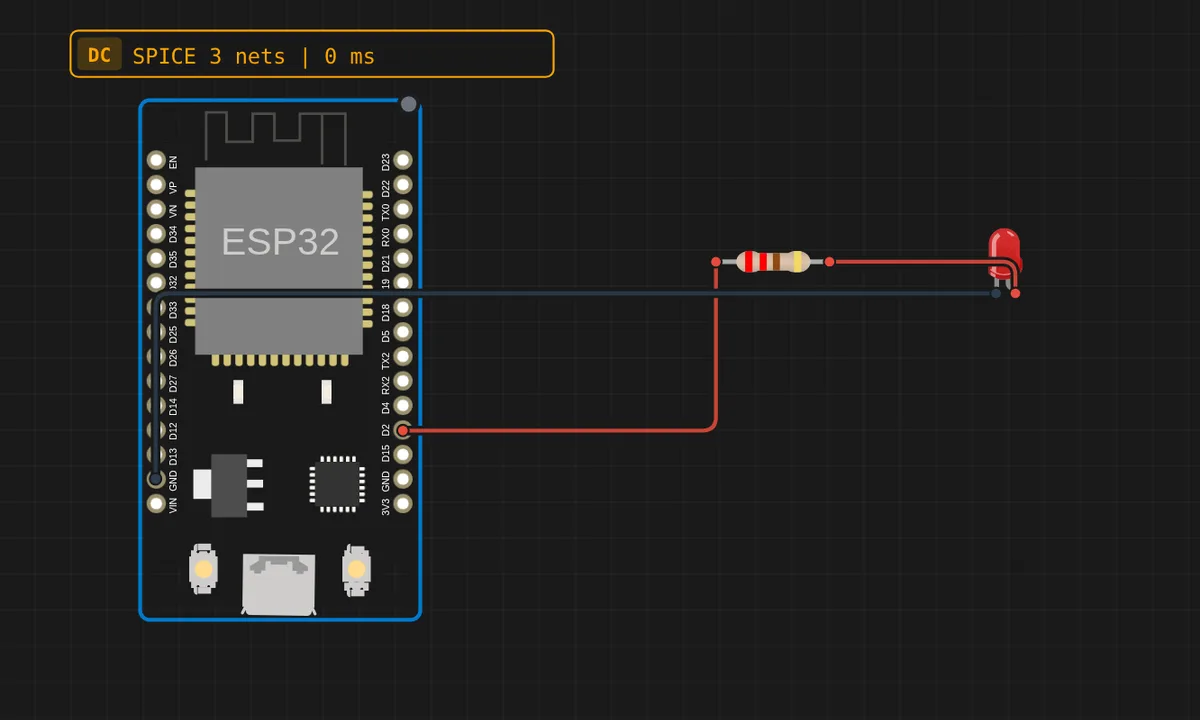
The exact circuit you get when you open this example — already wired, ready to run.
The sketch
// Pure ESP-IDF blink — no Arduino core, just IDF APIs.
// app_main() is the ESP-IDF entry point (instead of setup()/loop()).
#include <stdio.h>
#include "freertos/FreeRTOS.h"
#include "freertos/task.h"
#include "driver/gpio.h"
#include "esp_log.h"

#define LED_PIN GPIO_NUM_2

static const char *TAG = "blink";

void app_main(void)
{
    ESP_LOGI(TAG, "ESP-IDF blink starting");
    gpio_reset_pin(LED_PIN);
    gpio_set_direction(LED_PIN, GPIO_MODE_OUTPUT);

    int level = 0;
    while (1) {
        level = !level;
        gpio_set_level(LED_PIN, level);
        ESP_LOGI(TAG, "LED %s", level ? "on" : "off");
        vTaskDelay(pdMS_TO_TICKS(1000));
    }
}
How it works
Start at the entry point, because that is the whole difference. app_main() is where ESP-IDF hands you control — it runs as a FreeRTOS task and is even allowed to return. Arduino’s setup() and loop() are not something the silicon needs; the Arduino core defines its own app_main() and calls your two functions from it. Writing IDF means taking that layer back: no hidden loop is calling you, so this sketch makes its own with while (1).
The GPIO calls are the un-wrapped versions of pinMode() and digitalWrite(): gpio_reset_pin() returns GPIO2 to its power-on state, clearing whatever the bootloader left configured, gpio_set_direction(LED_PIN, GPIO_MODE_OUTPUT) sets the pad direction, and gpio_set_level() drives it. More typing, but every decision is now explicit — pull-ups, open-drain and drive strength become options you choose instead of defaults you never saw.
Two more IDF habits worth stealing. vTaskDelay(pdMS_TO_TICKS(1000)) yields the task for a second — it is what Arduino’s delay() calls underneath, except here you say so and the scheduler is free to run something else meanwhile. And ESP_LOGI(TAG, ...) replaces Serial.println() with leveled logging: every line carries a severity and the “blink” tag, and IDF can filter output by tag and level at runtime — try doing that with print statements.
Before you build it for real
The simulator blinks happily where real silicon argues. GPIO2 is a strapping pin: the bootloader samples it at reset when picking the boot mode, and the safe rule is that nothing external may hold it low — an LED is a harmless load, but a button wired to GND is the classic way to make a board refuse to boot with an error message that never mentions the pin. Second, vTaskDelay() takes ticks, not milliseconds: always wrap the number in pdMS_TO_TICKS() exactly like this sketch does, because the tick rate is a sdkconfig option and code passing a raw 1000 blinks at a different speed on every differently-configured project.
Get the parts
Related examples
FAQ
Where did setup() and loop() go?
They were never part of the chip — they are Arduino core conventions, called from an app_main() the core defines for you. In ESP-IDF you write app_main() yourself and structure the program however you like: one loop, a set of FreeRTOS tasks, or code that runs once and returns.
Can I mix IDF calls into an Arduino sketch?
Yes. Arduino-ESP32 is built on top of ESP-IDF, so gpio_set_level(), ESP_LOGI() and the rest of the IDF API are all callable from a .ino file. Plenty of projects start as Arduino and drop in IDF calls exactly where they need the control.