
ESP32: PIR Motion Detector
ESP32: PIR Motion Detector is a runnable microcontroller simulation example on SensBench — open the wired circuit, inspect the code, and compile real firmware in your browser, no install needed. Last updated Aug 14, 2026.
FREE SIMULATOR EXAMPLE · BEGINNER
ESP32: PIR Motion Detector
This example watches a PIR motion sensor on GPIO5 and lights the DevKit’s blue onboard LED on GPIO2 whenever someone moves. The Serial Monitor logs each detection with a millisecond timestamp and a running count — and because it logs on the change, not on every poll, one event means one line.
| Board | ESP32 DevKit (Xtensa LX6, 240 MHz) |
|---|---|
| Difficulty | beginner |
| Category | sensors |
| Libraries | None — just the Arduino core |
| Runs in | Sensbench browser simulator — free, no account |
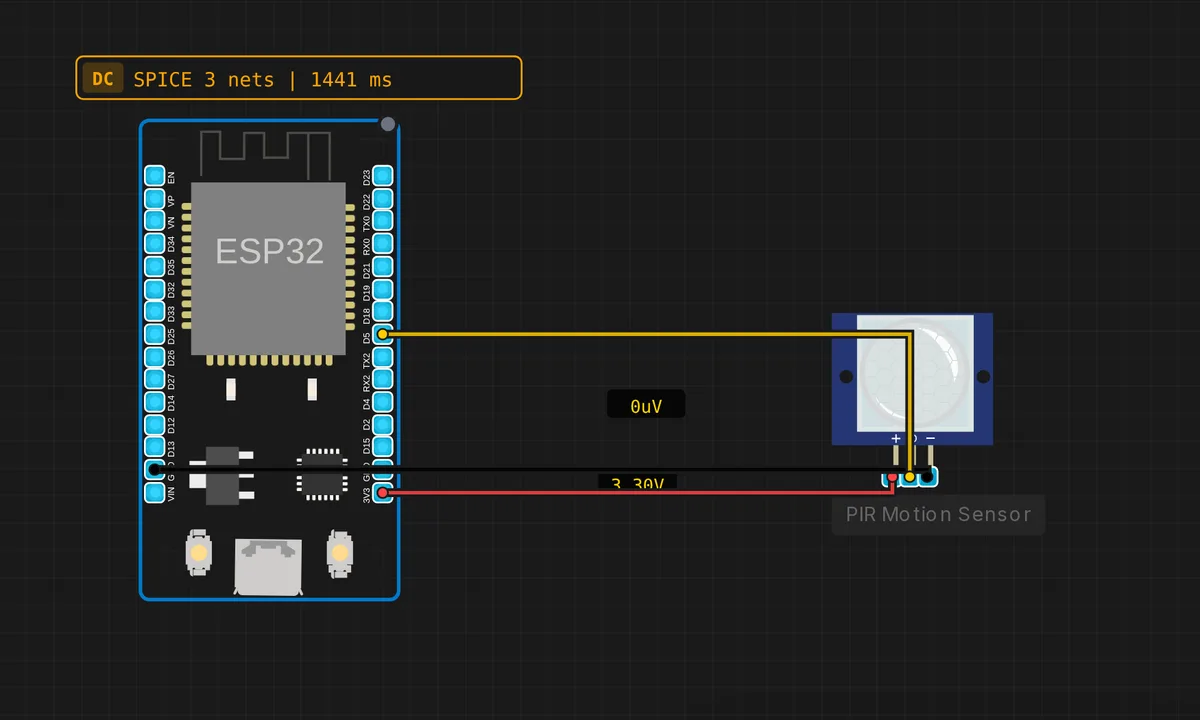
The exact circuit you get when you open this example — already wired, ready to run.
The sketch
// ESP32 — PIR Motion Sensor
// Wiring: OUT → D5  |  VCC → 3V3  |  GND → GND


#define PIR_PIN 5
#define LED_PIN 2   // built-in blue LED on ESP32 DevKit

bool prevMotion = false;
unsigned long detections = 0;


void setup() {
  Serial.begin(115200);
  pinMode(PIR_PIN, INPUT);
  pinMode(LED_PIN, OUTPUT);
  Serial.println("ESP32 PIR Motion Sensor");
  delay(2000); // warm-up
  Serial.println("Ready!");
}

void loop() {
  bool motion = (digitalRead(PIR_PIN) == HIGH);
  if (motion && !prevMotion) {
    detections++;
    Serial.printf("[%lu ms] Motion detected! (count: %lu)\n",
                  millis(), detections);
    digitalWrite(LED_PIN, HIGH);
  } else if (!motion && prevMotion) {
    Serial.println("No motion.");
    digitalWrite(LED_PIN, LOW);
  }
  prevMotion = motion;
  delay(100);
}
How it works
The PIR’s OUT pin lands on GPIO5 as a plain digital input — the sensor’s onboard circuitry has already done the hard analog work, so digitalRead(PIR_PIN) is either HIGH (motion) or LOW (quiet). GPIO2 drives the DevKit’s blue onboard LED as a local, wiring-free alarm light.
The structure that matters is the edge detection: motion && !prevMotion fires only on the rising edge, so one physical event produces exactly one Serial line — with a millis() timestamp and a running detections counter — instead of a flood of repeats every 100 ms. The matching !motion && prevMotion branch catches the falling edge, prints “No motion.” and drops the LED. Steady state prints nothing, and the log stays clean.
Before you build it for real
Real PIR modules need 30–60 seconds to stabilise at power-on — the sketch’s 2-second delay is polite, but expect a burst of false triggers in the first minute on hardware. The HC-SR501 is spec’d for a 5 V supply (its output is 3.3 V logic, so GPIO5 stays safe); running it off 3V3 as in this wiring is fine in the simulator but gives unreliable range on the bench. And the module carries two trim pots — sensitivity and retrigger delay — that no line of code can override; if it re-triggers constantly, reach for a screwdriver, not delay().
Get the parts
Related examples
FAQ
Why does it trigger when nobody is moving?
Three usual suspects: the module is still inside its 30–60 second warm-up, a moving heat source (sunlight through a window, a radiator, a pet) is in the sensor’s view, or the sensitivity pot is wound all the way up. PIR sensors see changes in infrared energy, not shapes — anything warm that moves counts.
Why log only on transitions instead of every 100 ms?
Because a PIR holds its output HIGH for seconds after each detection — plain polling would spam the Serial Monitor with hundreds of identical lines per event. Edge detection gives you exactly one timestamped entry per intrusion, which is what an alarm log or people-counter actually wants.