
ESP32 LEDC PWM RGB
ESP32 LEDC PWM RGB is a runnable microcontroller simulation example on SensBench — open the wired circuit, inspect the code, and compile real firmware in your browser, no install needed. Last updated Aug 14, 2026.
FREE SIMULATOR EXAMPLE · INTERMEDIATE
ESP32 LEDC PWM RGB
This example fades an RGB LED through the full color wheel using the ESP32’s LEDC PWM peripheral: three channels at 5 kHz with 8-bit resolution on GPIO16, 17 and 18. Hue advances five degrees every 30 ms, so one complete rainbow lap takes a little over two seconds.
| Board | ESP32 DevKit (Xtensa LX6, 240 MHz) |
|---|---|
| Difficulty | intermediate |
| Category | circuits |
| Libraries | None — just the Arduino core |
| Runs in | Sensbench browser simulator — free, no account |
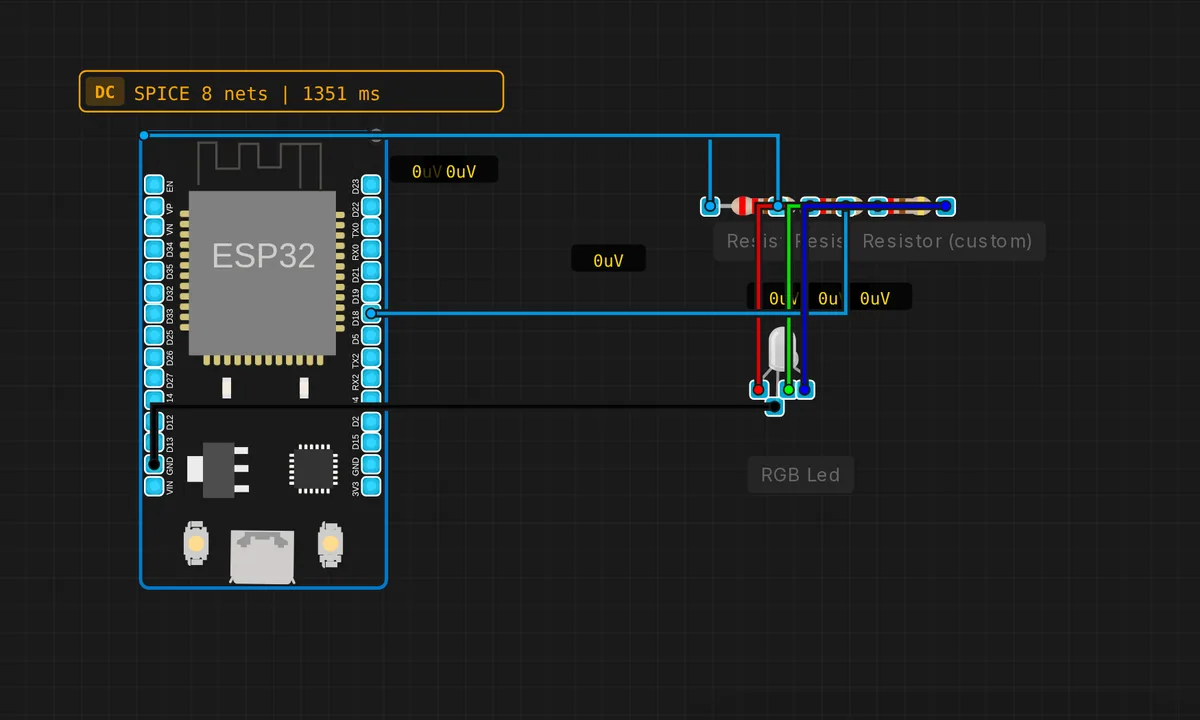
The exact circuit you get when you open this example — already wired, ready to run.
The sketch
// ESP32 LEDC PWM — RGB LED color cycling
#define R_PIN 16
#define G_PIN 17
#define B_PIN 18
void setup() {
  ledcAttach(R_PIN, 5000, 8);
  ledcAttach(G_PIN, 5000, 8);
  ledcAttach(B_PIN, 5000, 8);
}
void loop() {
  for(int h=0; h<360; h+=5) {
    float r,g,b;
    // HSV to RGB (S=1, V=1)
    int i = h/60; float f = h/60.0-i;
    switch(i%6) {
      case 0: r=1; g=f;   b=0;   break;
      case 1: r=1-f; g=1; b=0;   break;
      case 2: r=0; g=1;   b=f;   break;
      case 3: r=0; g=1-f; b=1;   break;
      case 4: r=f; g=0;   b=1;   break;
      case 5: r=1; g=0;   b=1-f; break;
    }
    ledcWrite(R_PIN, (int)(r*255));
    ledcWrite(G_PIN, (int)(g*255));
    ledcWrite(B_PIN, (int)(b*255));
    delay(30);
  }
}
How it works
ledcAttach(pin, 5000, 8) is the modern Arduino-ESP32 API: one call binds the pin to an LEDC channel, sets a 5 kHz carrier and gives 8-bit duty resolution — values 0 to 255. The old two-step ledcSetup() and ledcAttachPin() dance is gone; the channel is chosen for you. 5 kHz is far above visible flicker, so the eye sees pure blended color.
The color math is a compact HSV-to-RGB conversion with saturation and value pinned at 1 — a full-color rainbow, no pastels. Hue walks 0 to 355 in steps of five; the switch (i % 6) works out which 60-degree wedge of the wheel you are in and computes r, g and b as floats between 0 and 1, scaled by 255 on the way into ledcWrite().
Everything runs on a blocking delay(30): 72 steps per lap times 30 ms is the roughly 2.2-second cycle you see. There is no reason for a timer here — the LED is the only job. And because LEDC generates the pulses in hardware, the color never glitches while the CPU is busy doing the math.
Before you build it for real
Three traps wait on a real board. The sketch assumes a common-cathode LED — common pin to GND, higher duty means brighter; on a common-anode module everything inverts and 255 is off. Second, use one resistor per color leg (~220 ohm): red, green and blue have different forward voltages, and a single shared resistor on the common pin leaves the channels unevenly bright. Third, the core version: ledcAttach() only exists in Arduino-ESP32 core 3.x. On 2.x the same sketch needs ledcSetup() plus ledcAttachPin(), and ledcWrite() takes a channel, not a pin — if it will not compile in your IDE, that is why.
Get the parts
Related examples
FAQ
My LED shows inverted colors or stays white. What is wrong?
Almost always a common-anode module: its common pin goes to 3V3 and a higher duty cycle pulls the leg lower, so the colors invert. Either rewire with a common-cathode LED and the common pin to GND, or write 255 - value to each channel.
ledcAttach is not declared in this scope — why?
You are compiling against Arduino-ESP32 core 2.x, where the LEDC API is the older ledcSetup(channel, freq, resolution) plus ledcAttachPin(pin, channel). Update to core 3.x in the Boards Manager to use this sketch as-is; the simulator already speaks the 3.x API.