
ESP32-CAM + ILI9341 Live Preview
ESP32-CAM + ILI9341 Live Preview is a runnable microcontroller simulation example on SensBench — open the wired circuit, inspect the code, and compile real firmware in your browser, no install needed. Last updated Aug 14, 2026.
FREE SIMULATOR EXAMPLE · INTERMEDIATE
ESP32-CAM + ILI9341 Live Preview
This example decodes live webcam frames on the ESP32-CAM and paints them on a 320×240 ILI9341 TFT as a 160×120 preview centered at pixel (80, 60). A status bar above the image tracks fps, frame counter, decode failures and null frame buffers. Click Camera in the canvas header, grant permission, and your webcam feed appears on the simulated display.
| Board | ESP32-CAM (Xtensa LX6, 240 MHz) + OV2640 camera |
|---|---|
| Difficulty | intermediate |
| Category | displays |
| Libraries | Adafruit GFX Library, Adafruit BusIO, Adafruit ILI9341 |
| Runs in | Sensbench browser simulator — free, no account |
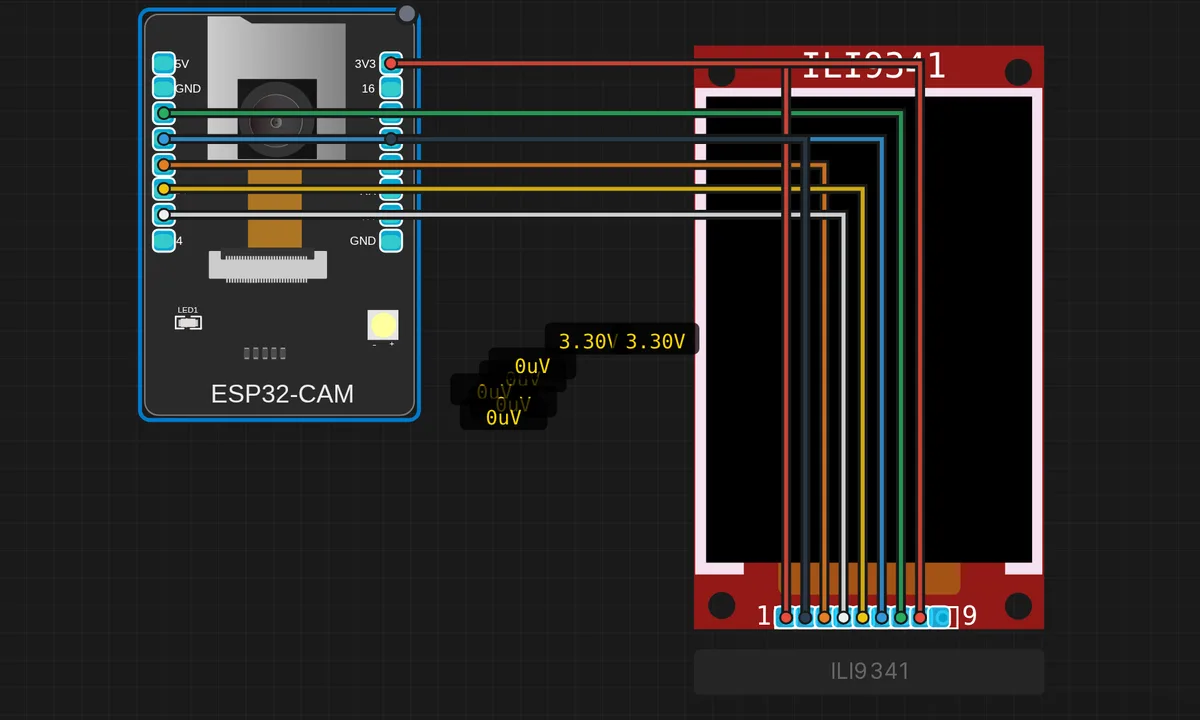
The exact circuit you get when you open this example — already wired, ready to run.
The sketch
// ESP32-CAM live webcam preview on ILI9341 320×240 TFT
// Click "Camera" in the canvas header → grant permission → see your
// face on the TFT.
//
// Wiring (already done by this example's diagram):
//   ILI9341 ↔ ESP32-CAM
//   CS  → 15   RST → 2    D/C → 14
//   MOSI→ 13   SCK → 12   MISO unused

#include "esp_camera.h"
#include "img_converters.h"   // jpg2rgb565 — built into esp32-camera
#include <SPI.h>
#include <Adafruit_GFX.h>
#include <Adafruit_ILI9341.h>

// Camera pins (AI-Thinker)
#define PWDN_GPIO_NUM     32
#define RESET_GPIO_NUM    -1
#define XCLK_GPIO_NUM      0
#define SIOD_GPIO_NUM     26
#define SIOC_GPIO_NUM     27
#define Y9_GPIO_NUM       35
#define Y8_GPIO_NUM       34
#define Y7_GPIO_NUM       39
#define Y6_GPIO_NUM       36
#define Y5_GPIO_NUM       21
#define Y4_GPIO_NUM       19
#define Y3_GPIO_NUM       18
#define Y2_GPIO_NUM        5
#define VSYNC_GPIO_NUM    25
#define HREF_GPIO_NUM     23
#define PCLK_GPIO_NUM     22

// TFT pins
#define TFT_CS    15
#define TFT_DC    14
#define TFT_RST    2
#define TFT_MOSI  13
#define TFT_SCK   12

SPIClass tftSPI(VSPI);
Adafruit_ILI9341 tft = Adafruit_ILI9341(&tftSPI, TFT_DC, TFT_CS, TFT_RST);

// 160×120 preview centered in the 320×240 TFT. After the worker
// added batched spi_batch WS messages, transferring 38 KB/frame is
// no longer the dominant cost in the emulator.
#define PREVIEW_W 160
#define PREVIEW_H 120
#define PREVIEW_X  80
#define PREVIEW_Y  60
static uint8_t rgbBuf[PREVIEW_W * PREVIEW_H * 2];

#define STATUS_REFRESH_EVERY 5

uint32_t frame_count = 0, decode_fails = 0, null_fb = 0;
unsigned long start_ms = 0;

void draw_status_bar(uint32_t bytes_in, bool decoded) {
  tft.fillRect(0, 0, 320, PREVIEW_Y, ILI9341_BLACK);
  tft.setTextSize(1);
  tft.setTextColor(ILI9341_WHITE, ILI9341_BLACK);
  tft.setCursor(8, 6);
  tft.print("SENSBENCH ESP32-CAM live preview");
  tft.setCursor(8, 22);
  tft.printf("frame %4u   %4u B   %s",
             (unsigned)frame_count, (unsigned)bytes_in,
             decoded ? "decode OK   " : "decode FAIL ");
  unsigned long elapsed = millis() - start_ms;
  float fps = elapsed > 0 ? (1000.0f * frame_count) / (float)elapsed : 0.0f;
  tft.setCursor(8, 38);
  tft.printf("fps %4.1f   fails %u   nulls %u",
             fps, (unsigned)decode_fails, (unsigned)null_fb);
  tft.fillCircle(308, 14, 6,
    (frame_count & 1) ? ILI9341_GREEN : ILI9341_DARKGREEN);
}

void setup() {
  Serial.begin(115200);
  delay(500);
  Serial.println("=== ESP32-CAM + ILI9341 live preview ===");

  tftSPI.begin(TFT_SCK, -1, TFT_MOSI, TFT_CS);
  tft.begin();
  tft.setRotation(1);
  tft.fillScreen(ILI9341_NAVY);
  tft.setTextSize(3);
  tft.setTextColor(ILI9341_WHITE);
  tft.setCursor(20, 10); tft.print("SENSBENCH");
  tft.setTextSize(1);
  tft.setCursor(20, 38);
  tft.setTextColor(ILI9341_CYAN);
  tft.print("ESP32-CAM live preview");

  camera_config_t cfg = {};
  cfg.ledc_channel = LEDC_CHANNEL_0;
  cfg.ledc_timer   = LEDC_TIMER_0;
  cfg.pin_d0 = Y2_GPIO_NUM; cfg.pin_d1 = Y3_GPIO_NUM;
  cfg.pin_d2 = Y4_GPIO_NUM; cfg.pin_d3 = Y5_GPIO_NUM;
  cfg.pin_d4 = Y6_GPIO_NUM; cfg.pin_d5 = Y7_GPIO_NUM;
  cfg.pin_d6 = Y8_GPIO_NUM; cfg.pin_d7 = Y9_GPIO_NUM;
  cfg.pin_xclk = XCLK_GPIO_NUM;  cfg.pin_pclk = PCLK_GPIO_NUM;
  cfg.pin_vsync = VSYNC_GPIO_NUM; cfg.pin_href = HREF_GPIO_NUM;
  cfg.pin_sccb_sda = SIOD_GPIO_NUM;
  cfg.pin_sccb_scl = SIOC_GPIO_NUM;
  cfg.pin_pwdn = PWDN_GPIO_NUM;
  cfg.pin_reset = RESET_GPIO_NUM;
  cfg.xclk_freq_hz = 20000000;
  cfg.pixel_format = PIXFORMAT_JPEG;
  cfg.frame_size   = FRAMESIZE_QVGA;
  cfg.jpeg_quality = 12;
  cfg.fb_count     = 1;
  cfg.fb_location  = CAMERA_FB_IN_DRAM;

  esp_err_t err = esp_camera_init(&cfg);
  if (err != ESP_OK) {
    tft.setCursor(20, 100);
    tft.setTextColor(ILI9341_RED);
    tft.setTextSize(2);
    tft.printf("camera_init FAIL 0x%x", err);
    while (1) delay(1000);
  }

  tft.setCursor(20, 100);
  tft.setTextColor(ILI9341_GREEN);
  tft.print("camera_init OK");
  tft.setCursor(20, 130);
  tft.setTextColor(ILI9341_YELLOW);
  tft.print("Waiting for webcam frames...");
  tft.setCursor(20, 150);
  tft.print("Click 'Camera' in the toolbar.");

  start_ms = millis();
  delay(800);
  tft.fillScreen(ILI9341_BLACK);
}

void loop() {
  camera_fb_t* fb = esp_camera_fb_get();
  if (!fb) {
    null_fb++;
    delay(50);
    return;
  }
  frame_count++;
  size_t fb_len = fb->len;
  bool ok = jpg2rgb565(fb->buf, fb->len, rgbBuf, JPG_SCALE_2X);
  esp_camera_fb_return(fb);
  if (ok) {
    tft.drawRGBBitmap(PREVIEW_X, PREVIEW_Y,
                      (uint16_t*)rgbBuf, PREVIEW_W, PREVIEW_H);
  } else {
    decode_fails++;
    tft.fillRect(PREVIEW_X, PREVIEW_Y,
                 PREVIEW_W, PREVIEW_H, ILI9341_DARKGREY);
    tft.drawLine(PREVIEW_X, PREVIEW_Y,
                 PREVIEW_X + PREVIEW_W, PREVIEW_Y + PREVIEW_H, ILI9341_RED);
    tft.drawLine(PREVIEW_X + PREVIEW_W, PREVIEW_Y,
                 PREVIEW_X, PREVIEW_Y + PREVIEW_H, ILI9341_RED);
  }
  // Throttled status-bar redraw — text writes hit SPI too.
  if (frame_count % STATUS_REFRESH_EVERY == 0) {
    draw_status_bar((uint32_t)fb_len, ok);
  }
}
How it works
Frames arrive as JPEG: the camera config sets PIXFORMAT_JPEG at FRAMESIZE_QVGA with quality 12, so each esp_camera_fb_get() returns a compressed buffer of a few kilobytes rather than 150 KB of raw pixels. The sketch decodes it in place with jpg2rgb565() from img_converters.h using JPG_SCALE_2X — the decoder writes a half-resolution RGB565 bitmap straight into a static 38,400-byte buffer, so there is no per-frame heap allocation. Then esp_camera_fb_return() hands the frame back to the driver immediately, before any SPI work happens.
The display side is built for throughput. The TFT hangs off a dedicated SPIClass on VSPI (SCK 12, MOSI 13, CS 15, D/C 14, RST 2), and one drawRGBBitmap() call pushes the whole 38 KB frame. The status bar is deliberately throttled to every fifth frame (STATUS_REFRESH_EVERY) because text writes go over the same SPI bus and would otherwise tax every frame. Failed decodes are not hidden either: the preview area goes grey with a red X and the decode_fails counter ticks up, so you see pipeline problems instead of staring at a frozen image.
Two config choices are worth copying. CAMERA_FB_IN_DRAM with fb_count = 1 keeps the frame buffer in internal RAM — no PSRAM dependency — at the cost of double buffering. And if esp_camera_init() fails, the error code is drawn on the TFT in red rather than only appearing on serial, which matters on a board you often run headless.
Before you build it for real
Real AI-Thinker hardware makes these pin choices expensive. The TFT’s five pins — GPIO 12, 13, 14, 15 and 2 — are exactly the pins the onboard microSD slot uses in SD_MMC mode, so this wiring and SD card logging are mutually exclusive on one board. Worse, GPIO12 is the flash-voltage strapping pin: it must read LOW at reset or the chip configures its flash for 1.8 V and refuses to boot. TFT SCK idles low, so you will usually get away with it — but any module that pulls the line up at power-on will brick your boot in a way no error message explains. Budget for a solid 5 V supply too: the OV2640 plus a TFT backlight browns out weak USB-serial adapters.
Get the parts
Related examples
FAQ
Why is the preview 160×120 when the screen is 320×240?
Because JPG_SCALE_2X decodes at half resolution. A full-size RGB565 frame would be a 150 KB buffer plus twice the SPI traffic; at half scale the buffer is 38,400 bytes and a single drawRGBBitmap() stays fast enough for a fluid preview. It is a deliberate trade — this example is about the capture-decode-render pipeline, not pixel count.
Do I need PSRAM to run this on a real ESP32-CAM?
No — CAMERA_FB_IN_DRAM keeps the QVGA JPEG buffer in internal RAM, which is exactly why it fits. The AI-Thinker module does have PSRAM, so if you want larger frame sizes or fb_count = 2 for smoother capture, switch to CAMERA_FB_IN_PSRAM. At QVGA, DRAM with one buffer is the simpler, safer choice.