
ESP32-S3 Blink LED
ESP32-S3 Blink LED is a runnable microcontroller simulation example on SensBench — open the wired circuit, inspect the code, and compile real firmware in your browser, no install needed. Last updated Aug 14, 2026.
FREE SIMULATOR EXAMPLE · BEGINNER
ESP32-S3 Blink LED
This example blinks an external red LED on GPIO4 of the ESP32-S3 DevKitC-1 — the board’s own LED is a WS2812 RGB on GPIO48, so the blink goes through a breadboard LED with a 220 Ohm resistor. It is the S3’s toolchain check, serial output included.
| Board | ESP32-S3 (Xtensa LX7 dual-core, 240 MHz) |
|---|---|
| Difficulty | beginner |
| Category | basics |
| Libraries | None — just the Arduino core |
| Runs in | Sensbench browser simulator — free, no account |
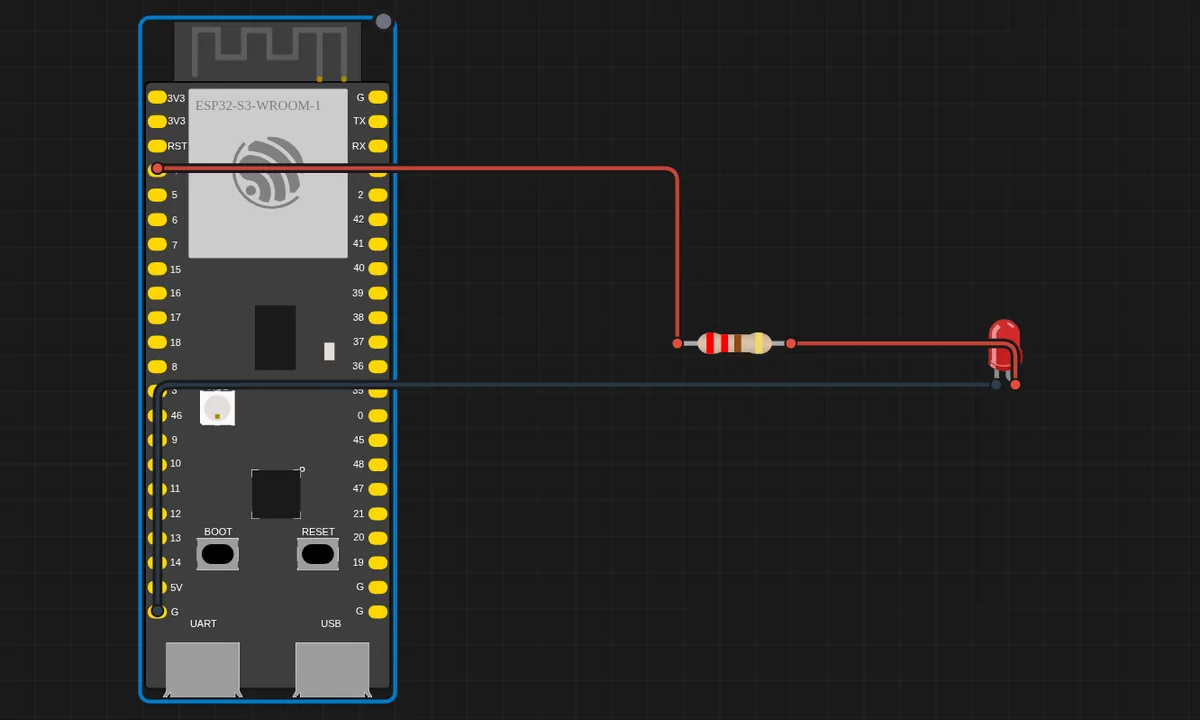
The exact circuit you get when you open this example — already wired, ready to run.
The sketch
// ESP32-S3 Blink LED
// The DevKitC-1 has no plain built-in LED (its on-board LED is an RGB
// WS2812 on GPIO48), so we blink an external LED wired to GPIO4.

#define LED_PIN 4   // External red LED through a 220 Ohm resistor

void setup() {
  Serial.begin(115200);
  pinMode(LED_PIN, OUTPUT);
  Serial.println("ESP32-S3 Blink ready!");
}

void loop() {
  digitalWrite(LED_PIN, HIGH);
  Serial.println("LED ON");
  delay(500);

  digitalWrite(LED_PIN, LOW);
  Serial.println("LED OFF");
  delay(500);
}
How it works
The sketch sets GPIO4 as output and toggles it with 500 ms delays while printing the state to Serial at 115200. The comment explains the board reality: the S3 DevKitC-1 has no plain built-in LED — its onboard RGB is a WS2812 on GPIO48 that needs a driver library, so the blink targets an external LED instead.
The serial output on every transition is the S3’s native USB peripheral at work: the LX7’s built-in USB CDC replaces the classic UART bridge chip, so the same Serial calls ride a different physical path than on older ESP32s — invisible in code, real in the pin budget.
Before you build it for real
The S3 DevKitC-1’s onboard LED is a WS2812, not a plain GPIO LED — code written for other boards’ built-in LEDs does nothing here. GPIO48 needs the NeoPixel-style protocol, a different exercise entirely. The external LED needs its series resistor (the simulator skips it; real silicon burns without it). And the S3’s GPIO4 is safe, but the chip has strapping pins (GPIO0, GPIO45, GPIO46) you must respect in real designs — the blink pin choice here is deliberately boring.
Get the parts
Related examples
FAQ
Why is there no built-in LED on the S3 DevKitC-1?
The DevKitC-1’s only onboard LED is an addressable WS2812 RGB on GPIO48 — useless for a plain blink sketch. The example wires an external LED to GPIO4 with the standard 220 Ohm resistor, which also proves the breadboard wiring works, not just the firmware.
Does the code work on a classic ESP32 too?
Yes — the sketch is plain Arduino GPIO code. GPIO4 is a safe choice on both parts (no strapping, no ADC-only restrictions), so the only change when porting is the board selection in the tools menu.