
LCD 20×4 Display
LCD 20x4 Display is a runnable microcontroller simulation example on SensBench — open the wired circuit, inspect the code, and compile real firmware in your browser, no install needed. Last updated Aug 14, 2026.
FREE SIMULATOR EXAMPLE · INTERMEDIATE
LCD 20×4 Display
This example drives a 20×4 character LCD from an Arduino in 4-bit mode and fills all four rows: three static lines from setup(), then a live uptime counter on the last row that ticks once per second. Six GPIO pins and one library call per line of text — the LiquidCrystal library does all the HD44780 timing for you.
| Board | Arduino Uno (ATmega328P, 16 MHz, 5 V logic) |
|---|---|
| Difficulty | intermediate |
| Category | displays |
| Libraries | LiquidCrystal |
| Runs in | Sensbench browser simulator — free, no account |
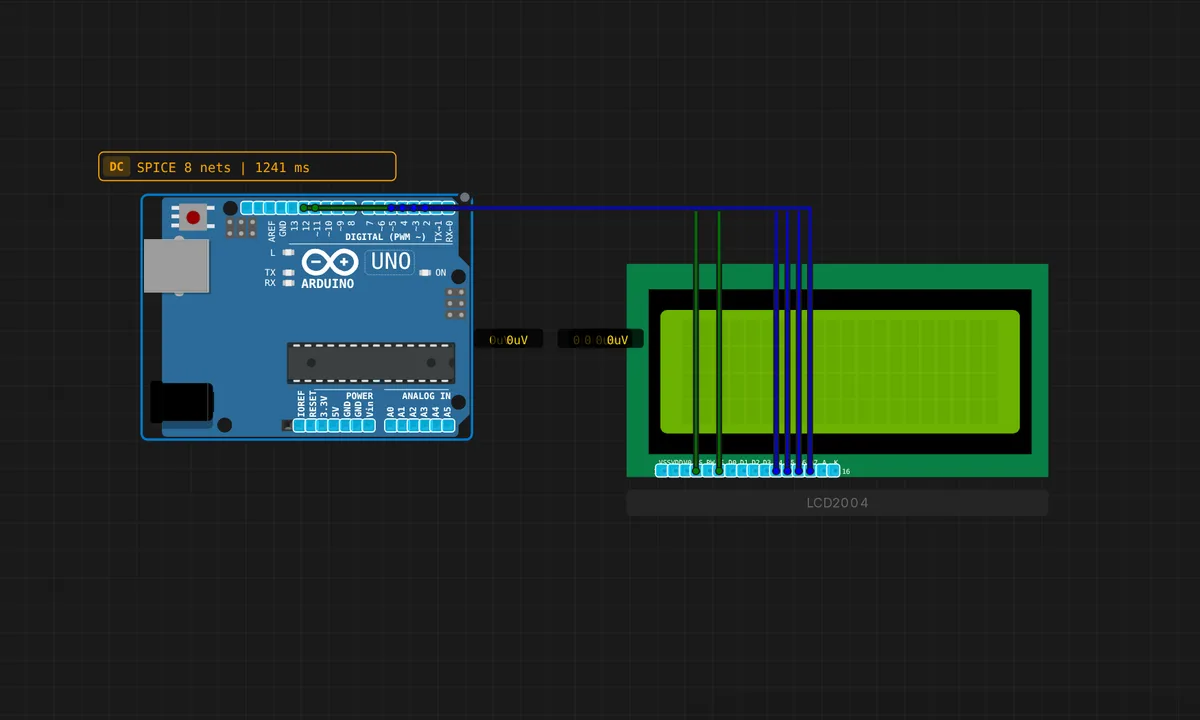
The exact circuit you get when you open this example — already wired, ready to run.
The sketch
// LiquidCrystal Library - Hello World
// Demonstrates the use a 20x4 LCD display

#include <LiquidCrystal.h>

// initialize the library by associating any needed LCD interface pin
// with the arduino pin number it is connected to
const int rs = 12, en = 11, d4 = 5, d5 = 4, d6 = 3, d7 = 2;
LiquidCrystal lcd(rs, en, d4, d5, d6, d7);

void setup() {
  // set up the LCD's number of columns and rows:
  lcd.begin(20, 4);
  // Print a message to the LCD.
  lcd.print("Hello, Arduino!");
  lcd.setCursor(0, 1);
  lcd.print("sensbench Emulator");
  lcd.setCursor(0, 2);
  lcd.print("LCD 2004 Test");
}

void loop() {
  // set the cursor to column 0, line 3
  lcd.setCursor(0, 3);
  // print the number of seconds since reset:
  lcd.print("Uptime: ");
  lcd.print(millis() / 1000);
}
How it works
The constructor LiquidCrystal lcd(rs, en, d4, d5, d6, d7) maps to pins 12, 11, 5, 4, 3 and 2 — this is 4-bit mode, where the HD44780 controller accepts each byte as two 4-bit nibbles, so you spend 6 GPIO pins instead of 10. RS selects between the command and character registers and EN latches each nibble. Notice RW is not in the constructor: the library assumes you have tied RW to GND and only ever write to the display.
lcd.begin(20, 4) tells the library the geometry so cursor math works, then setup() fills rows 0-2 with three setCursor() + print() pairs. Rows and columns are zero-indexed — row 3 is the fourth line, which is where the uptime goes.
The loop() rewrites row 3 with millis() / 1000 on every pass — there is no delay() at all. It gets away with it because each HD44780 character write takes about 40 µs and the value only changes once a second. One subtlety worth stealing: the uptime string only ever gets longer, so no stale digits survive. The day you print values that shrink, pad with spaces or clear the row first, or a stray ‘9’ will haunt your display forever.
Before you build it for real
The classic real-hardware outcome: wire everything perfectly, upload, and see nothing — or two rows of black blocks. That is the contrast pin, V0, which the simulator sets for you but real glass does not: it wants a ~10k potentiometer as a voltage divider, wiper to V0. Also tie RW to GND — the LiquidCrystal constructor used here has no RW parameter, and a floating RW makes the display randomly unreadable. The good news is levels: the HD44780 is a native 5 V part, so it matches the Uno’s 5 V logic with no level shifter. Watch the backlight too — the LED on the A/K pins draws 20-30 mA, so feed it through a resistor rather than a GPIO pin.
Get the parts
Related examples
FAQ
I only see one or two rows of solid blocks — is the code wrong?
Almost certainly not — blocks mean the LCD is powered but the contrast is wrong. Turn the potentiometer on the V0 pin until characters appear. If blocks persist through the whole contrast sweep, re-check that RS, EN and the four data lines match the sketch’s pin order: 12, 11, 5, 4, 3, 2.
Can I get those six GPIO pins back?
Yes — a PCF8574 I2C backpack soldered to the LCD drops the interface to two pins (A4/SDA and A5/SCL on the Uno) using the LiquidCrystal_I2C library. Updates get slower, but for a mostly-static display like this one you will never notice.