
Mega: Serial LED Control
Mega: Serial LED Control is a runnable microcontroller simulation example on SensBench — open the wired circuit, inspect the code, and compile real firmware in your browser, no install needed. Last updated Aug 14, 2026.
FREE SIMULATOR EXAMPLE · INTERMEDIATE
Mega: Serial LED Control
This example turns the Arduino Mega 2560 into a serial-controlled LED panel: type 1 through 8 in the Serial Monitor to toggle individual LEDs on pins 2–9, ‘a’ to light all eight, ‘x’ to kill them all, with every action echoed back at 9600 baud.
| Board | Arduino Mega 2560 (ATmega2560, 16 MHz) |
|---|---|
| Difficulty | intermediate |
| Category | communication |
| Libraries | None — just the Arduino core |
| Runs in | Sensbench browser simulator — free, no account |
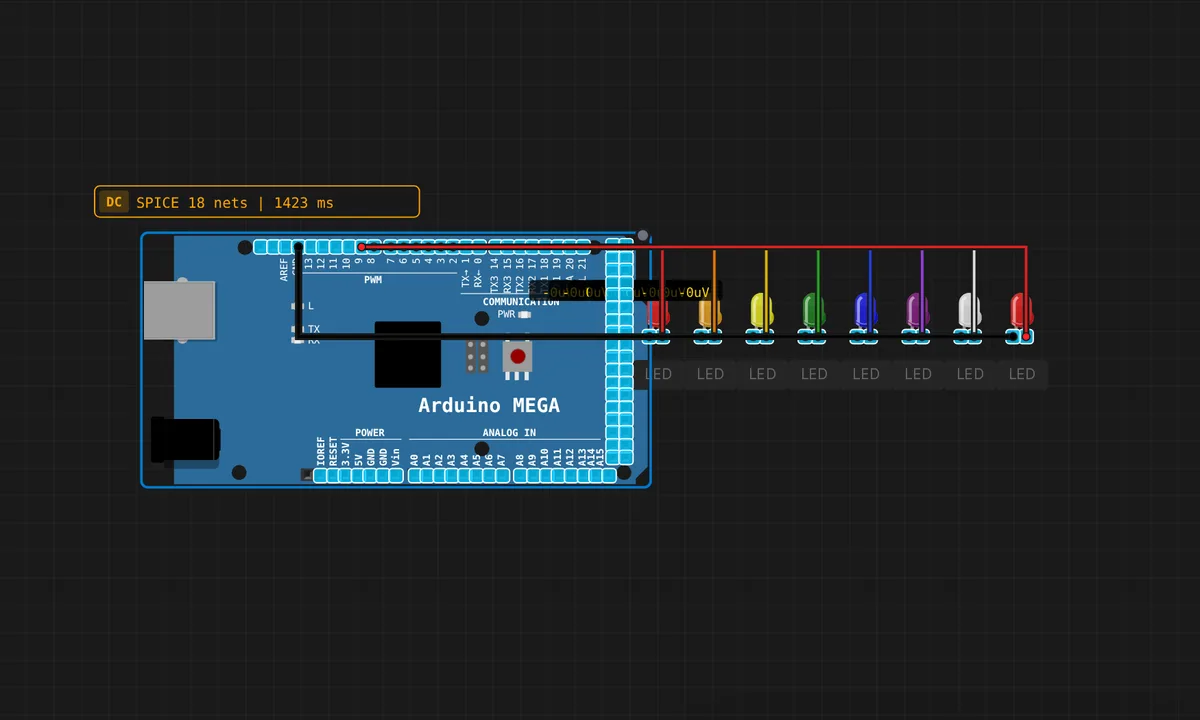
The exact circuit you get when you open this example — already wired, ready to run.
The sketch
// Arduino Mega — Serial-controlled LEDs
// Send '1' through '8' to toggle individual LEDs on pins 2-9
// Send 'a' to turn all on, 'x' to turn all off

const int LEDS[] = {2, 3, 4, 5, 6, 7, 8, 9};
const int N = 8;
bool states[8] = {false};

void setup() {
  for (int i = 0; i < N; i++) {
    pinMode(LEDS[i], OUTPUT);
  }
  Serial.begin(9600);
  Serial.println("=== Mega LED Controller ===");
  Serial.println("Send 1-8 to toggle LEDs");
  Serial.println("Send 'a' = all ON, 'x' = all OFF");
}

void loop() {
  if (Serial.available()) {
    char c = Serial.read();
    if (c >= '1' && c <= '8') {
      int idx = c - '1';
      states[idx] = !states[idx];
      digitalWrite(LEDS[idx], states[idx] ? HIGH : LOW);
      Serial.print("LED "); Serial.print(idx+1);
      Serial.println(states[idx] ? " ON" : " OFF");
    } else if (c == 'a') {
      for (int i = 0; i < N; i++) { states[i] = true; digitalWrite(LEDS[i], HIGH); }
      Serial.println("All LEDs ON");
    } else if (c == 'x') {
      for (int i = 0; i < N; i++) { states[i] = false; digitalWrite(LEDS[i], LOW); }
      Serial.println("All LEDs OFF");
    }
  }
}
How it works
The sketch keeps a bool states[8] array alongside the pin array, so each LED’s on/off status survives between commands — that is what makes toggling possible. setup() configures pins 2–9 as outputs and prints a help menu so the person at the terminal knows the protocol.
loop() polls Serial.available() and reads one byte with Serial.read(). For digits ‘1’–’8′ the expression c - '1' converts the ASCII character straight into an array index — character arithmetic, no lookup table — then flips the state bit and writes the pin. The ‘a’ and ‘x’ commands loop across all eight pins at once and confirm over serial, so the terminal always echoes what the LEDs are doing.
Before you build it for real
On a real bench, wire a 220 Ω resistor in series with every LED — eight channels at 20 mA each can reach 160 mA, most of the ATmega2560’s 200 mA chip budget, and the ‘a’ command lights all eight at once. The serial side has its own trap: this sketch reads one byte per loop iteration, so it never sees line endings as errors — they are simply ignored characters — but it also means pasting “123” fires three commands instantly. Set the Serial Monitor to 9600 baud to match Serial.begin() or you will read garbage.
Get the parts
Related examples
FAQ
Why does nothing happen when I type 9 or 0?
The parser only accepts the characters ‘1’ through ‘8’, plus ‘a’ and ‘x’ — everything else, including ‘9’, ‘0’ and newline characters, falls through the if-chain and is silently discarded. Multi-digit input like “10” is read as two separate bytes, not the number ten.
How do I make it respond to whole words like "on"?
You would need to buffer bytes into a String or char array until a newline arrives, then compare — this sketch deliberately reads one byte per loop, which is the simplest parser that works. Buffering input is the natural next example once this one makes sense.