
microSD Card (ESP32)
microSD Card (ESP32) is a runnable microcontroller simulation example on SensBench — open the wired circuit, inspect the code, and compile real firmware in your browser, no install needed. Last updated Aug 14, 2026.
FREE SIMULATOR EXAMPLE · INTERMEDIATE
microSD Card (ESP32)
This example reads and writes files on a microSD card from the ESP32 over VSPI — CS 5, MOSI 23, MISO 19, SCK 18. Root listing, a log.txt round trip, and the proof printed at 115200 baud.
| Board | ESP32 DevKit (Xtensa LX6, 240 MHz) + microSD SPI module |
|---|---|
| Difficulty | intermediate |
| Category | communication |
| Libraries | None — just the Arduino core |
| Runs in | Sensbench browser simulator — free, no account |
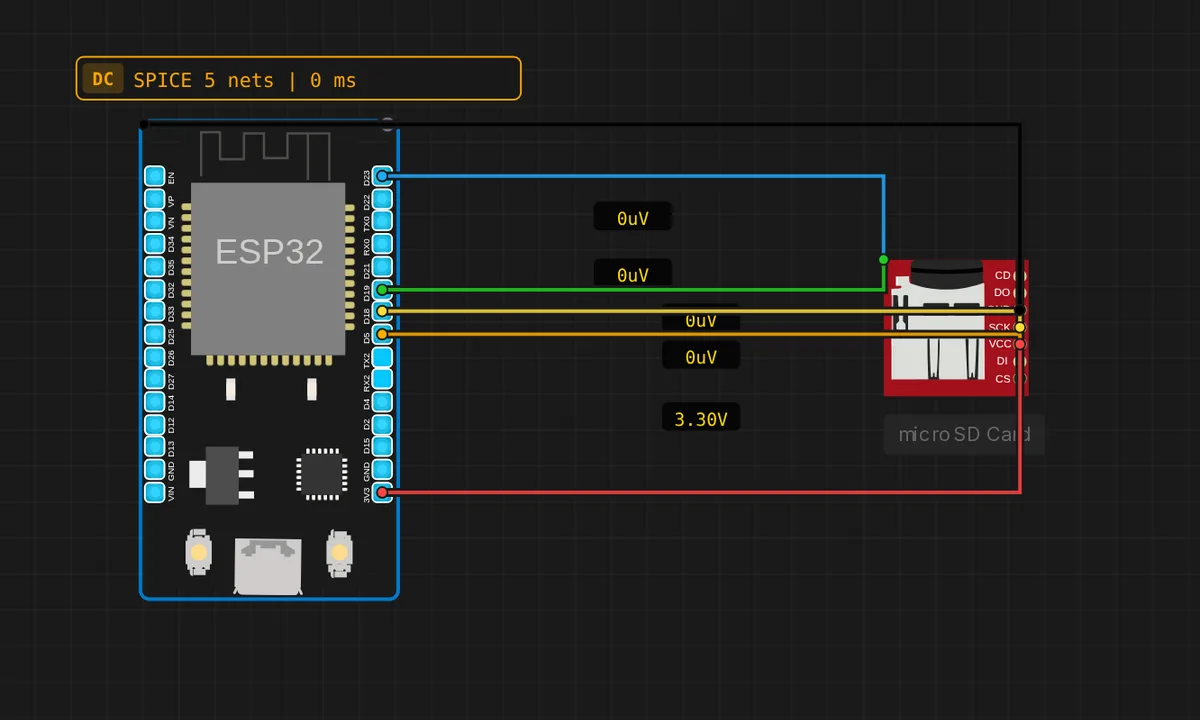
The exact circuit you get when you open this example — already wired, ready to run.
The sketch
/ microSD card over SPI (ESP32, VSPI default)
// Wiring: CS->5  MOSI->23  MISO->19  SCK->18  VCC->3V3  GND->GND
//
// The card already holds this project's files (auto-copied, free). Paid users
// can add their own files via the component's "SD Card" panel. Open the Serial
// Monitor (115200 baud) to watch it list the card, then write and read a file.
#include <SPI.h>
#include <SD.h>

void listRoot() {
  File root = SD.open("/");
  Serial.println("Files on card:");
  File entry = root.openNextFile();
  while (entry) {
    Serial.printf("  %s  %u bytes\n", entry.name(), (unsigned) entry.size());
    entry.close();
    entry = root.openNextFile();
  }
  root.close();
}

void setup() {
  Serial.begin(115200);
  delay(1200);
  Serial.println("microSD demo - ESP32");

  if (!SD.begin()) {  // default VSPI, CS = GPIO5
    Serial.println("SD.begin() FAILED - check the wiring");
    return;
  }
  Serial.println("Card ready.");
  listRoot();

  File w = SD.open("/log.txt", FILE_WRITE);
  if (w) {
    w.println("hello from SENSBENCH");
    w.close();
    Serial.println("Wrote /log.txt");
  }
  File r = SD.open("/log.txt");
  if (r) {
    Serial.print("Read back: ");
    while (r.available()) Serial.write(r.read());
    r.close();
  }
  Serial.println("Done.");
}

void loop() {}
How it works
The sketch mounts the card on VSPI — CS 5, MOSI 23, MISO 19, SCK 18 — lists the root, writes log.txt, reads it back, and prints the result. The 3.3 V logic matches the module’s native levels directly: no level shifters needed, which is the ESP32’s advantage over 5 V boards for SD work.
The SD library’s FAT layer is platform-identical, so the only ESP32-specific knowledge is the bus: VSPI pins. The write-read round trip printed to Serial is the same verification pattern as the Uno example — same library, different silicon, different pins.
Before you build it for real
The ESP32’s flash shares pins with HSPI — using the wrong SPI bus for the card can contend with the chip’s own program memory, which is why VSPI is the SD standard. SD cards are 3.3 V parts: the ESP32 matches natively, but the module’s regulator expects 3.3 V in — feeding 5 V to a bare card socket destroys it. And the ESP32’s ADC2 channels conflict with WiFi in the same way its buses can conflict with flash — a reminder that this chip’s peripherals are a shared resource map, not independent silos.
Get the parts
Related examples
FAQ
Why VSPI instead of the default SPI?
The classic ESP32 has two hardware SPI controllers — HSPI and VSPI — and VSPI (CS 5, MOSI 23, MISO 19, SCK 18) is the standard choice for SD cards because it avoids the pins the flash chip uses on HSPI. The comment names the mapping explicitly.
Why 115200 baud here but 9600 on the Uno?
The ESP32’s serial handles 115200 effortlessly, so the file listing streams at full speed. The Uno example stays at 9600 for its AVR timing comfort — the baud choice is a platform habit, not an SD requirement.