
Nano: Button + LED
Nano: Button + LED is a runnable microcontroller simulation example on SensBench — open the wired circuit, inspect the code, and compile real firmware in your browser, no install needed. Last updated Aug 14, 2026.
FREE SIMULATOR EXAMPLE · BEGINNER
Nano: Button + LED
This example lights the Arduino Nano’s built-in LED on pin 13 while you hold a pushbutton wired to pin 2 — press for on, release for off, no latching. The response is effectively instant because the loop contains no delay at all. A one-line banner on the Serial Monitor at 9600 baud confirms the sketch is running.
| Board | Arduino Nano (ATmega328P, 16 MHz) |
|---|---|
| Difficulty | beginner |
| Category | basics |
| Libraries | None — just the Arduino core |
| Runs in | Sensbench browser simulator — free, no account |
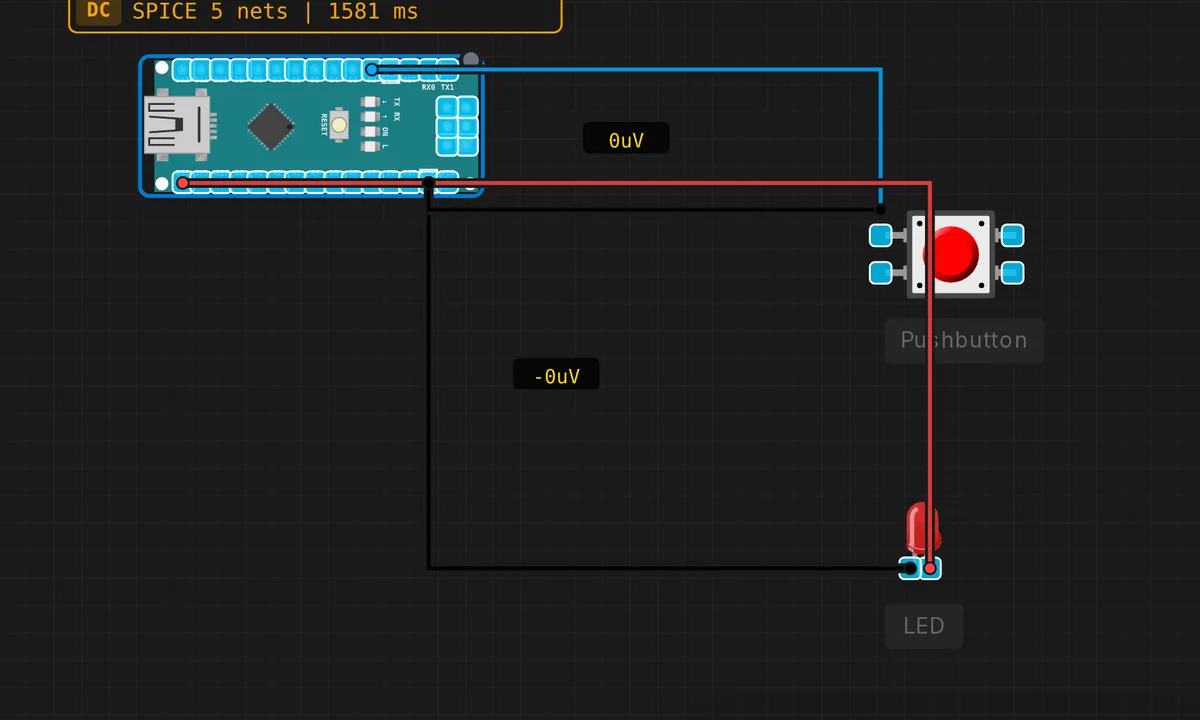
The exact circuit you get when you open this example — already wired, ready to run.
The sketch
// Arduino Nano — Button controls LED

const int BTN = 2;
const int LED = 13;

void setup() {
  pinMode(BTN, INPUT_PULLUP);
  pinMode(LED, OUTPUT);
  Serial.begin(9600);
  Serial.println("Button LED ready — press button on pin 2");
}

void loop() {
  bool pressed = digitalRead(BTN) == LOW;
  digitalWrite(LED, pressed ? HIGH : LOW);
}
How it works
The button pin is configured as pinMode(BTN, INPUT_PULLUP), which enables the ATmega328P’s internal pull-up resistor — roughly 20–50 kΩ to 5 V. That means the button’s other leg goes to GND, and the pin reads LOW when pressed. The sketch makes that inverted logic explicit: pressed = digitalRead(BTN) == LOW.
The loop is two lines: read the button, write the LED. There is no delay() anywhere, so the Nano re-evaluates the button tens of thousands of times per second and the LED tracks the switch in real time. Lighting an LED also needs no debouncing — a few milliseconds of contact bounce is invisible on a lamp. It only becomes a bug when you start counting presses.
Before you build it for real
Wire the button between pin 2 and GND — not to 5 V. With INPUT_PULLUP the pin is already held high; a button wired to 5 V reads HIGH whether pressed or not, and if that pin is ever an output, pressing it shorts the rail. Second trap on real builds: declare the pin as plain INPUT with no pull-up and no external resistor and the input floats — the LED flickers from stray noise. The simulator’s button is ideal; a real tactile switch on a breadboard is not.
Get the parts
Related examples
FAQ
Why does the LED turn on when the pin reads LOW?
Because INPUT_PULLUP holds the pin at 5 V until the button connects it to ground — pressed pulls the line LOW, so the sketch treats LOW as pressed. It feels backwards for one day, then you never think about it again: nearly every Arduino button circuit works this way.
Do I need to debounce this button?
Not for driving an LED — bounce just makes the LED stutter for a few microseconds, invisible to the eye. The moment you count presses or toggle state per press you do need debouncing, either 20–50 ms in software or a small capacitor across the switch.