
[Pi 4] RGB LED Color Cycle
[Pi 4] RGB LED Color Cycle is a runnable microcontroller simulation example on SensBench — open the wired circuit, inspect the code, and compile real firmware in your browser, no install needed. Last updated Aug 14, 2026.
FREE SIMULATOR EXAMPLE · INTERMEDIATE
[Pi 4] RGB LED Color Cycle
This example cycles a common-cathode RGB LED through seven colors — red, green, blue, yellow, cyan, magenta, white — on the Raspberry Pi 4 using digital on/off on GPIO17/27/22. The gpiozero RGBLED object with pwm=False makes each color a simple tuple.
| Board | Raspberry Pi 4 Model B (Cortex-A72, QEMU-emulated Linux) |
|---|---|
| Difficulty | intermediate |
| Category | basics |
| Libraries | None — just the Arduino core |
| Runs in | Sensbench browser simulator — free, no account |
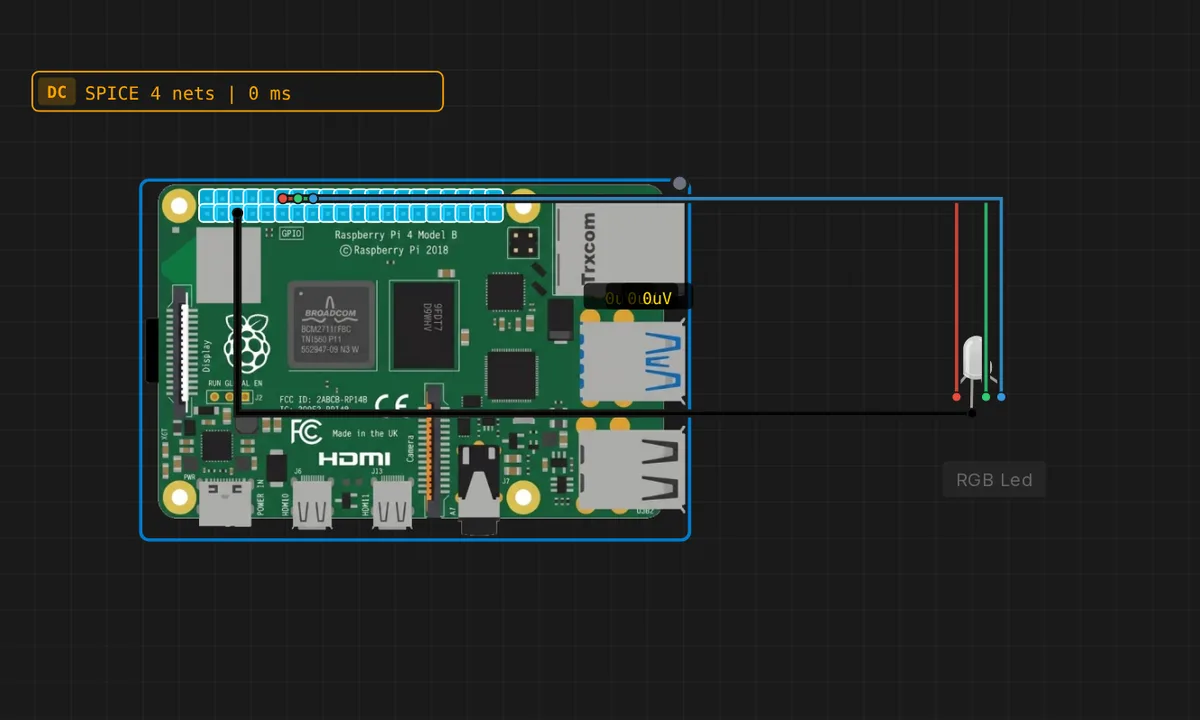
The exact circuit you get when you open this example — already wired, ready to run.
The Python script
#!/usr/bin/env python3
# Raspberry Pi 4 - RGB LED color cycle (digital, 7 colors)
# Wiring: R->GPIO17, G->GPIO27, B->GPIO22, COM->GND (common cathode).
# pwm=False -> each channel is plain on/off, so no PWM is needed.
from gpiozero import RGBLED
from time import sleep

rgb = RGBLED(red=17, green=27, blue=22, pwm=False)
colors = [
    ("red",     (1, 0, 0)),
    ("green",   (0, 1, 0)),
    ("blue",    (0, 0, 1)),
    ("yellow",  (1, 1, 0)),
    ("cyan",    (0, 1, 1)),
    ("magenta", (1, 0, 1)),
    ("white",   (1, 1, 1)),
]
print("Cycling RGB colors - Ctrl-C to stop")
try:
    while True:
        for name, value in colors:
            rgb.color = value
            print(name)
            sleep(1)
except KeyboardInterrupt:
    rgb.off()
    print("Stopped")
How it works
The script creates RGBLED(red=17, green=27, blue=22, pwm=False) — three pins, digital mode — and a list of seven named (color, value) pairs. The loop assigns rgb.color = value for each entry and sleeps a second, printing the color name so the terminal tracks the canvas.
With pwm=False, each color is a single tuple of three ones and zeros: red is (1,0,0), white is (1,1,1). The list-of-tuples structure means adding a color is one line — the pattern that turns a hard-coded sequence into a data-driven one.
Before you build it for real
A common-cathode RGB LED has four legs and a very specific wiring order — the longest leg is COM (to GND), and the three anodes go to the pins through three separate series resistors. Wiring the wrong leg as COM, or skipping a resistor, either darkens a channel or lets it draw far more than the Pi’s 16 mA per pin budget. The Pi can happily drive three LEDs at 10 mA each, but the 3.3 V rail is shared — add a display or a WiFi adapter and the combined current can sag the rail. And the colors will look different on a real LED: red’s ~2 V forward drop vs green/blue’s ~3 V means the white will be slightly off-white at 3.3 V logic.
Get the parts
Related examples
FAQ
Why pwm=False?
gpiozero’s RGBLED defaults to PWM so it can produce smooth gradients. Setting pwm=False switches each channel to plain on/off — each color component is either fully on or fully off. That gives exactly 2^3 = 8 combinations, and with the all-off state skipped, seven colors — including white.
Why is white included here but not in the Arduino RGB examples?
The Arduino example skipped all-off but also did not show white (1,1,1). Both are valid choices; this script keeps white because a common-cathode LED with all three channels on at full brightness is a clean, impressive white — and it makes the 7-color count feel complete.