
[Pi 5] PIR Motion Alarm
[Pi 5] PIR Motion Alarm is a runnable microcontroller simulation example on SensBench — open the wired circuit, inspect the code, and compile real firmware in your browser, no install needed. Last updated Aug 14, 2026.
FREE SIMULATOR EXAMPLE · INTERMEDIATE
[Pi 5] PIR Motion Alarm
This example turns the Raspberry Pi 5 into a motion alarm: a PIR sensor on GPIO4 lights an LED on GPIO17 whenever movement is detected, with every trigger printed to the terminal. Run the Python script, trigger the PIR on the canvas, and the alarm responds within 200 ms.
| Board | Raspberry Pi 5 (Cortex-A76 + RP1 southbridge, QEMU-emulated Linux) |
|---|---|
| Difficulty | intermediate |
| Category | sensors |
| Libraries | None — just the Arduino core |
| Runs in | Sensbench browser simulator — free, no account |
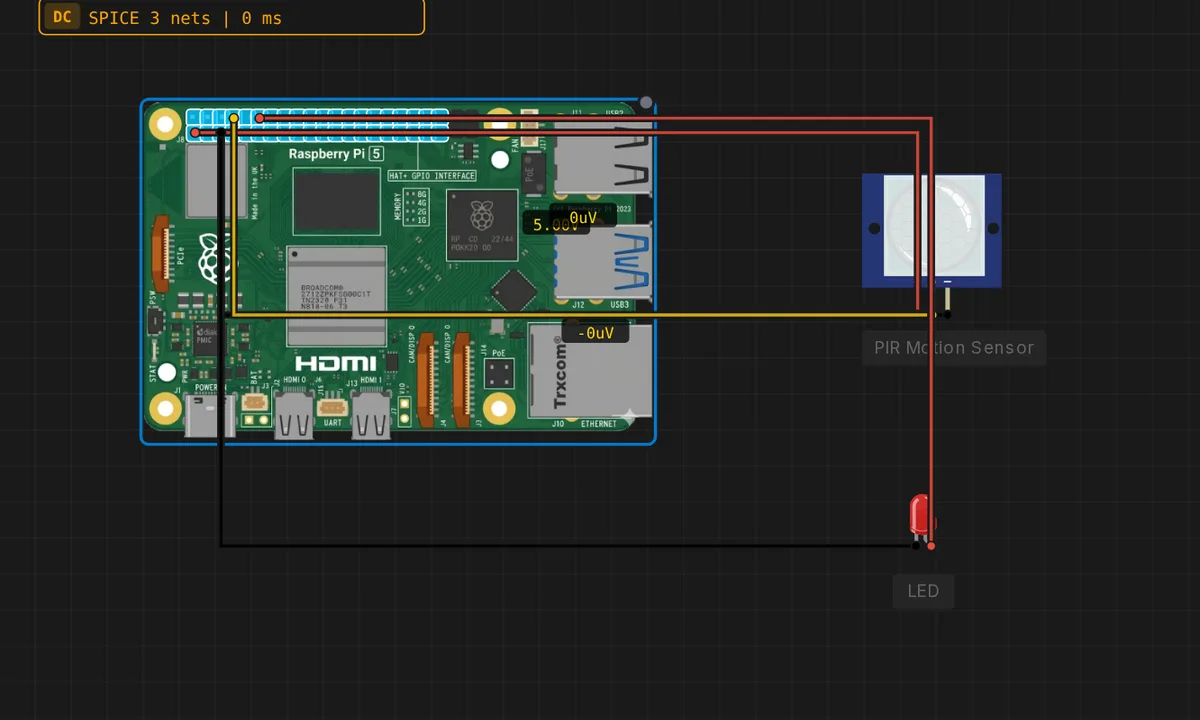
The exact circuit you get when you open this example — already wired, ready to run.
The Python script
#!/usr/bin/env python3
# Raspberry Pi 5 - PIR motion alarm
# Wiring: PIR VCC->5V, GND->GND, OUT->GPIO4 ; LED on GPIO17.
from gpiozero import MotionSensor, LED
from time import sleep

pir = MotionSensor(4)
led = LED(17)
print("Motion alarm armed - trigger the PIR sensor (Ctrl-C to stop)")
try:
    while True:
        if pir.motion_detected:
            led.on()
            print("Motion detected!")
        else:
            led.off()
        sleep(0.2)
except KeyboardInterrupt:
    led.off()
    print("Stopped")
How it works
The script creates MotionSensor(4) — gpiozero configures GPIO4 as input with the sensor’s debounce handling — and LED(17) for the alarm output. The loop polls pir.motion_detected every 200 ms, lighting the LED and printing “Motion detected!” while motion is present, and turning everything off otherwise.
The 200 ms poll rate is a compromise: fast enough to react to a person walking through the room within a fifth of a second, slow enough that the Pi’s CPU stays nearly idle. The PIR’s own settling delay (10-30 seconds after power-on in real hardware) is the sensor’s contribution to the timing.
Before you build it for real
A real PIR needs 10-30 seconds to stabilize after power-on — the simulator’s sensor is ready instantly, so your first real deployment will look “broken” for half a minute. The module has two trim pots (sensitivity and retrigger time) that the simulator models as defaults; on real hardware, a sensor that never fires or fires constantly is usually a trimmer issue, not wiring. And the 5 V rail question matters: the PIR is powered from 5V here, but its OUT signal must stay within the Pi’s 3.3 V GPIO limit — verify the module’s output level before connecting, or add a divider on OUT.
Get the parts
Related examples
FAQ
Why is the PIR powered from 5V instead of 3V3?
PIR modules are commonly 5 V parts, and the Pi’s header carries a 5 V rail precisely for peripherals like this. The important part is that the PIR’s OUT signal is level-compatible with the Pi’s 3.3 V GPIO — most modern HC-SR501 clones output 3.3 V on OUT, but check yours; a true 5 V OUT needs a divider before GPIO4.
Why poll motion_detected instead of using events?
The script polls pir.motion_detected every 200 ms and drives the LED directly — simple and deterministic. gpiozero also offers when_motion callbacks for event-driven code, but polling keeps the state visible in the loop and is easier to reason about for a first alarm.