
[Pico] Blink LED
[Pico] Blink LED is a runnable microcontroller simulation example on SensBench — open the wired circuit, inspect the code, and compile real firmware in your browser, no install needed. Last updated Aug 14, 2026.
FREE SIMULATOR EXAMPLE · BEGINNER
[Pico] Blink LED
This example blinks the Raspberry Pi Pico’s built-in LED on GPIO25 — one half-second on, one half-second off — while printing every state change to the Serial Monitor. It is the simplest proof that your toolchain works: code compiles, firmware uploads, and the RP2040 is running your instructions.
| Board | Raspberry Pi Pico (RP2040 dual-core Cortex-M0+, 133 MHz) |
|---|---|
| Difficulty | beginner |
| Category | basics |
| Libraries | None — just the Arduino core |
| Runs in | Sensbench browser simulator — free, no account |
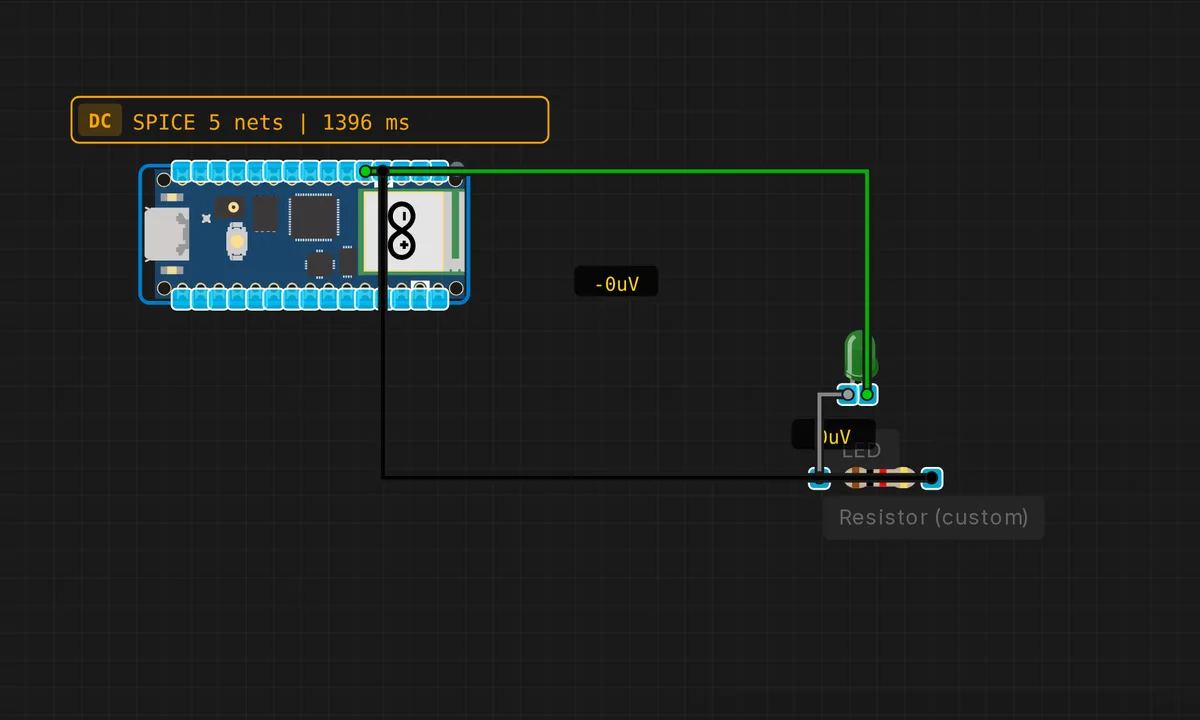
The exact circuit you get when you open this example — already wired, ready to run.
The sketch
// Raspberry Pi Pico — Blink LED
// Toggles the onboard LED on GPIO 25

void setup() {
  pinMode(LED_BUILTIN, OUTPUT); // GPIO 25
  Serial.begin(115200);
  Serial.println("Pico Blink Example");
}

void loop() {
  digitalWrite(LED_BUILTIN, HIGH);
  Serial.println("LED ON");
  delay(500);

  digitalWrite(LED_BUILTIN, LOW);
  Serial.println("LED OFF");
  delay(500);
}
How it works
setup() sets the built-in LED pin as an output and opens the USB serial port at 115200 baud — the standard speed for the Pico’s USB CDC serial. The RP2040 starts sending data the moment the port opens, so the first Serial.println("Pico Blink Example") appears in the monitor before the first blink.
The loop is the same pattern you would write on any Arduino board: HIGH, delay, LOW, delay — but the Pico is running at 133 MHz on a dual-core Cortex-M0+, so that 500 ms delay is an eternity of idle cycles. The Serial.println() on every transition means you can watch the rhythm without looking at the board, which is useful when the Pico is buried in a project box.
Before you build it for real
The Pico’s onboard LED is tiny — fine for a sanity check, but if you wire an external LED to any GPIO for better visibility, you need a series resistor (220 Ω for a red LED). The RP2040’s GPIOs are 3.3 V only and not 5 V tolerant — connecting a 5 V logic signal or forgetting the resistor can permanently damage the pin. The per-pin current limit is 12 mA with a 50 mA total across all GPIOs, so plan your LED currents accordingly.
Related examples
FAQ
Which pin is the Pico's built-in LED on?
GPIO25. On most Pico boards the LED is soldered right next to the USB connector, and the Arduino core maps LED_BUILTIN to that pin. Some third-party Pico clones put the LED on a different pin — if LED_BUILTIN does not work on your real board, check the pinout of your specific variant.
Why use Serial output for a blink sketch?
The Serial.println() calls let you confirm the sketch is running and the timing is correct — without them, a silent board could be crashed, unpowered, or waiting for upload. The 500 ms blink is fast enough to see, but the serial log is your proof that every line executed.