
Pico: HC-SR04 Ultrasonic Distance
Pico: HC-SR04 Ultrasonic Distance is a runnable microcontroller simulation example on SensBench — open the wired circuit, inspect the code, and compile real firmware in your browser, no install needed. Last updated Aug 14, 2026.
FREE SIMULATOR EXAMPLE · BEGINNER
Pico: HC-SR04 Ultrasonic Distance
This example measures distance with an HC-SR04 ultrasonic sensor on the Raspberry Pi Pico — TRIG on GP17, ECHO on GP18, VCC on 3V3. It fires a 10 us trigger pulse, times the echo, and prints the distance in centimeters to the Serial Monitor about twice per second.
| Board | Raspberry Pi Pico (RP2040 dual-core Cortex-M0+, 133 MHz) |
|---|---|
| Difficulty | beginner |
| Category | sensors |
| Libraries | None — just the Arduino core |
| Runs in | Sensbench browser simulator — free, no account |
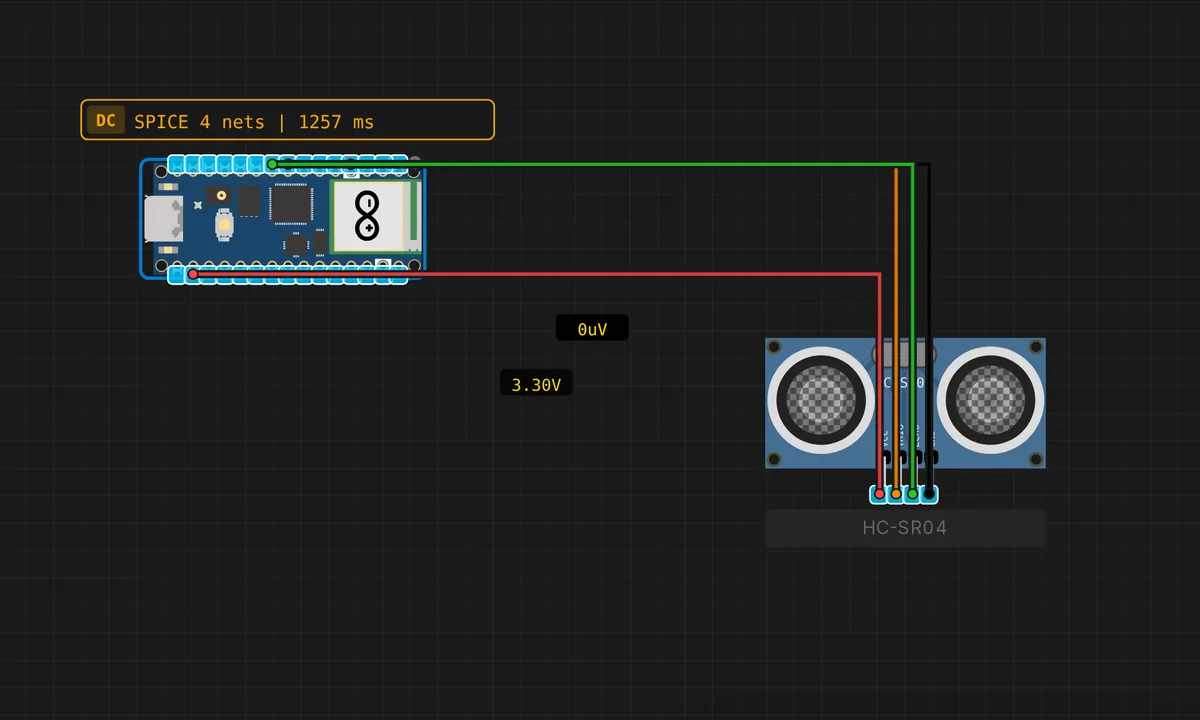
The exact circuit you get when you open this example — already wired, ready to run.
The sketch
// Raspberry Pi Pico — HC-SR04 Ultrasonic Distance Sensor
// Wiring: TRIG → D5(GP17)  |  ECHO → D6(GP18)  |  VCC → 3.3V  |  GND → GND

#define TRIG_PIN 17  // GPIO 17 (D5)
#define ECHO_PIN 18  // GPIO 18 (D6)

void setup() {
  Serial.begin(115200);
  pinMode(TRIG_PIN, OUTPUT);
  pinMode(ECHO_PIN, INPUT);
  Serial.println("Pico HC-SR04 ready");
}

long measureCm() {
  digitalWrite(TRIG_PIN, LOW);
  delayMicroseconds(2);
  digitalWrite(TRIG_PIN, HIGH);
  delayMicroseconds(10);
  digitalWrite(TRIG_PIN, LOW);
  long d = pulseIn(ECHO_PIN, HIGH, 30000UL);
  return (d == 0) ? -1 : (long)(d * 0.0343 / 2.0);
}

void loop() {
  long cm = measureCm();
  if (cm < 0) {
    Serial.println("Out of range");
  } else {
    Serial.print("Distance: "); Serial.print(cm); Serial.println(" cm");
  }
  delay(500);
}
How it works
The HC-SR04 measures distance by timing a sound pulse: the Pico pulls TRIG high for 10 us, the sensor fires an ultrasonic burst, and its ECHO pin goes high when the burst returns. The code measures the high pulse with pulseIn() and converts time to distance with the sound-speed formula: d = duration * 0.0343 / 2.0 — half the round trip, at 343 m/s.
The sketch returns -1 when the echo times out, and the loop prints “Out of range” in that case — a cleaner pattern than printing a misleading large number. The 500 ms loop delay keeps the measurement rate around 2 Hz, which is plenty for obstacle avoidance and leaves the CPU free for other work.
Before you build it for real
This is the classic 5 V logic trap. The HC-SR04 is a 5 V sensor: its ECHO output drives high at 5 V, which exceeds the Pico’s absolute maximum input of about 3.6 V. Powering VCC from 3V3 as this sketch does keeps ECHO in range on most modules, but some clones still swing to 5 V even at 3.3 V supply — the bulletproof fix is a voltage divider on ECHO (1 kOhm series + 2 kOhm to ground). Also, the sensor’s beam is about 30 degrees wide and it cannot detect soft surfaces well: cloth and foam absorb the pulse and report out of range.
Get the parts
Related examples
FAQ
Why does ECHO need a 3.3 V-safe pin?
The HC-SR04’s ECHO pin outputs a 5 V pulse — on a 5 V Arduino that is fine, but the Pico’s GPIOs are not 5 V tolerant. This sketch wires VCC to 3V3 so ECHO stays within 3.3 V; if you power the sensor from 5 V, you must add a resistor divider (1 kOhm + 2 kOhm) on ECHO or you risk damaging GP18.
What does the 30 ms timeout in pulseIn() do?
pulseIn(ECHO_PIN, HIGH, 30000) tells the Pico to wait at most 30 ms for the echo pulse. Sound travels about 10 m in a 30 ms round-trip, so anything beyond that is treated as out of range and returns 0 — the sketch then prints “Out of range” instead of hanging forever.