
Pico: RGB LED Cycle
Pico: RGB LED Cycle is a runnable microcontroller simulation example on SensBench — open the wired circuit, inspect the code, and compile real firmware in your browser, no install needed. Last updated Aug 14, 2026.
FREE SIMULATOR EXAMPLE · BEGINNER
Pico: RGB LED Cycle
This example cycles an RGB LED through seven colors — red, green, blue, yellow, cyan, magenta, and off — using three GPIO pins on the Raspberry Pi Pico. Each color is a simple combination of three digital outputs, and the Serial Monitor names the current color so you can learn the RGB mapping without a color chart.
| Board | Raspberry Pi Pico (RP2040 dual-core Cortex-M0+, 133 MHz) |
|---|---|
| Difficulty | beginner |
| Category | basics |
| Libraries | None — just the Arduino core |
| Runs in | Sensbench browser simulator — free, no account |
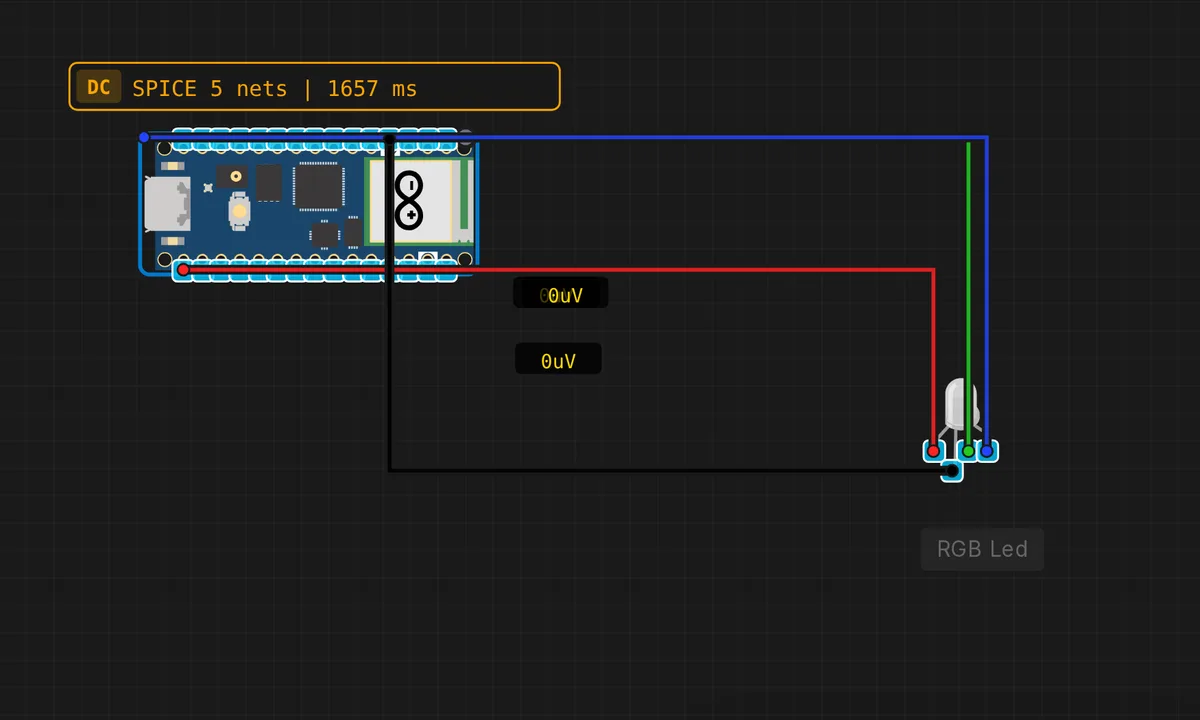
The exact circuit you get when you open this example — already wired, ready to run.
The sketch
// Raspberry Pi Pico — RGB LED color cycle

#define R_PIN 6
#define G_PIN 7
#define B_PIN 8

void setRGB(bool r, bool g, bool b) {
  digitalWrite(R_PIN, r ? HIGH : LOW);
  digitalWrite(G_PIN, g ? HIGH : LOW);
  digitalWrite(B_PIN, b ? HIGH : LOW);
}

void setup() {
  pinMode(R_PIN, OUTPUT);
  pinMode(G_PIN, OUTPUT);
  pinMode(B_PIN, OUTPUT);
  Serial.begin(115200);
  Serial.println("Pico RGB LED demo");
}

void loop() {
  setRGB(1,0,0); Serial.println("RED");    delay(600);
  setRGB(0,1,0); Serial.println("GREEN");  delay(600);
  setRGB(0,0,1); Serial.println("BLUE");   delay(600);
  setRGB(1,1,0); Serial.println("YELLOW"); delay(600);
  setRGB(0,1,1); Serial.println("CYAN");   delay(600);
  setRGB(1,0,1); Serial.println("MAGENTA");delay(600);
  setRGB(0,0,0); Serial.println("OFF");    delay(300);
}
How it works
The setRGB() helper takes three booleans and writes all three pins in a single call — this keeps the main loop clean and readable. Each color in the cycle is one line: RED, GREEN, BLUE, then the mixes YELLOW, CYAN, MAGENTA, and finally OFF. The Serial.println() on each step names the color so you can verify the sequence without looking at the LED.
The timing is 600 ms per color — long enough to identify each hue, short enough to keep the cycle moving. The 300 ms OFF pause at the end gives a clear visual reset before the cycle repeats. If you edit the delay values, the colors stay in the same order because the sequence is hard-coded, not computed.
Before you build it for real
This sketch uses digital writes only — each GPIO is either 3.3 V or 0 V, so the LED is at full brightness or off. A real RGB LED needs three current-limiting resistors (one per color channel, typically 220 Ω for red and 150 Ω for green/blue on a common-cathode LED). Without resistors, each channel will pull well past the RP2040’s 12 mA per-pin limit. Also, the LED’s forward voltage differs by color — red is ~2 V, green and blue are ~3 V — so on a 3.3 V system, blue and green may be dimmer than red unless you adjust the resistor values.
Get the parts
Related examples
FAQ
Why are there only seven colors?
Each GPIO pin is either fully on or fully off — digital, not analog. With three binary channels you get 2³ = 8 combinations, and one is all-off (black). To get smooth color fades and intermediate hues, you would need PWM on each pin with analogWrite() or the Pico’s PIO-based PWM.
Can I use different GPIO pins for the RGB LED?
Yes — any three GPIO pins work. GP6-8 are chosen here because they are adjacent on the Pico pinout, making breadboard wiring tidy. If you change the pins, update the three #define lines at the top and the rest of the sketch follows.