
Pico: Servo Motor Sweep
Pico: Servo Motor Sweep is a runnable microcontroller simulation example on SensBench — open the wired circuit, inspect the code, and compile real firmware in your browser, no install needed. Last updated Aug 14, 2026.
FREE SIMULATOR EXAMPLE · BEGINNER
Pico: Servo Motor Sweep
This example sweeps a servo motor from 0 to 180 degrees and back on the Raspberry Pi Pico, driven from GP15 via the built-in Servo library. The Serial Monitor announces each end of travel so you can verify the full range without watching the motor.
| Board | Raspberry Pi Pico (RP2040 dual-core Cortex-M0+, 133 MHz) |
|---|---|
| Difficulty | beginner |
| Category | robotics |
| Libraries | None — just the Arduino core |
| Runs in | Sensbench browser simulator — free, no account |
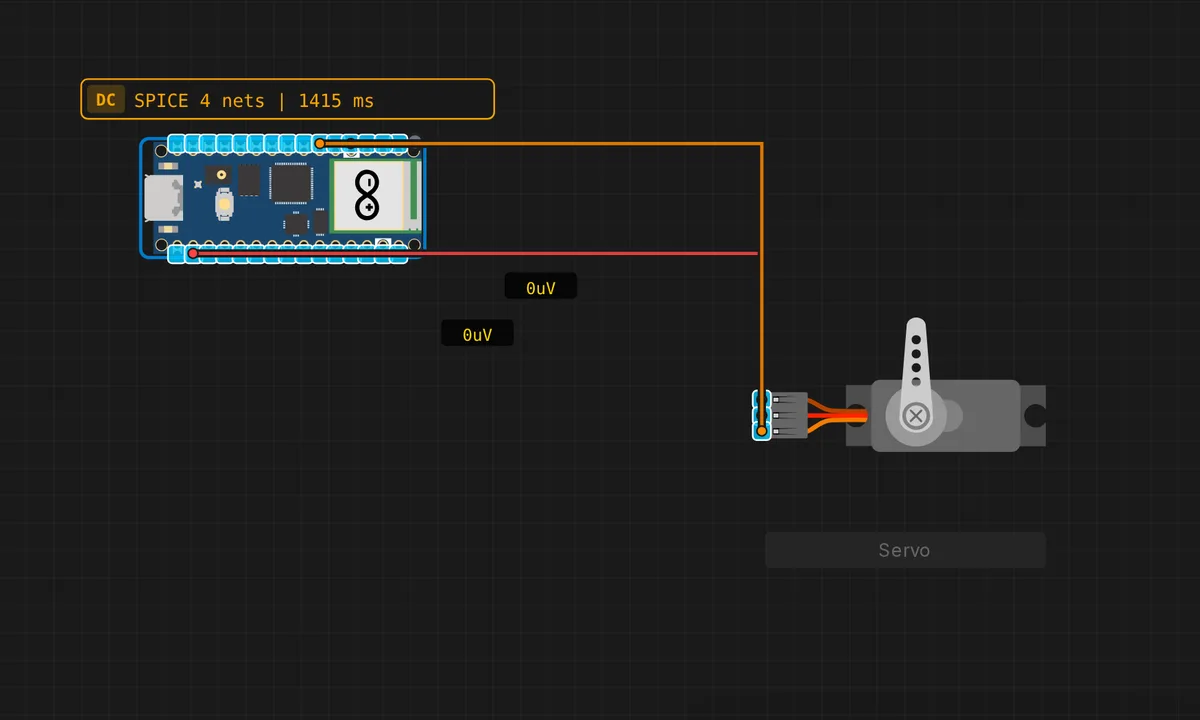
The exact circuit you get when you open this example — already wired, ready to run.
The sketch
// Raspberry Pi Pico — Servo Motor Sweep
// Wiring: PWM → D3(GP15)  |  V+ → 3.3V  |  GND → GND
// Uses built-in Servo library

#include <Servo.h>

#define SERVO_PIN 15  // GPIO 15 (D3)

Servo myServo;

void setup() {
  myServo.attach(SERVO_PIN);
  Serial.begin(115200);
  Serial.println("Pico Servo Sweep");
}

void loop() {
  for (int a = 0; a <= 180; a += 3) { myServo.write(a); delay(20); }
  Serial.println("180°"); delay(300);
  for (int a = 180; a >= 0; a -= 3) { myServo.write(a); delay(20); }
  Serial.println("0°");   delay(300);
}
How it works
The Servo library generates a 50 Hz PWM signal on GP15 where the pulse width encodes the angle: about 1 ms for 0 degrees, 1.5 ms for 90, 2 ms for 180. myServo.write(a) converts the angle to the right pulse width internally — the sketch just supplies the degree value.
The sweep loop increments the angle by 3 degrees with a 20 ms pause, then decrements back. The Serial.println() markers at the ends confirm the sweep completed — the servo reaching “180” in the log means the pulse train ran to the end, even if you are not watching the motor.
Before you build it for real
The Pico is a 3.3 V board, and most hobby servos are 5 V motors: wire the signal line to GP15 (it is a logic input to the servo’s controller) but power the motor from a separate 5 V supply with a common ground — do not draw servo current from the Pico’s 3V3 pin or the RP2040 will brown out and reboot mid-sweep. A 9 g micro servo can stall-draw 500 mA-1 A; even a small one in motion easily exceeds the Pico’s total budget. Also, this sketch uses blocking delay() between steps — fine for a demo, but a real robot that also reads sensors should use a millis()-based scheduler.
Get the parts
Related examples
FAQ
Why does the servo need PWM-capable pins?
Servos expect a 50 Hz control signal where the pulse width (1-2 ms) sets the angle. The Pico’s GPIOs are all PWM-capable (unlike some boards where only specific pins work), so GP15 is fine. The built-in Servo library handles the pulse generation for you.
Why step 3 degrees at a time?
A 3 degree step with a 20 ms delay between writes gives a smooth, visible sweep: 0-180 degrees takes about 1.2 seconds. Smaller steps would be smoother but slower, larger steps would look jerky. The delay between writes also gives the servo time to physically move to each position — servos cannot teleport.