
Pico W — IoT relay web server
Pico W — IoT relay web server is a runnable microcontroller simulation example on SensBench — open the wired circuit, inspect the code, and compile real firmware in your browser, no install needed. Last updated Aug 14, 2026.
FREE SIMULATOR EXAMPLE · BEGINNER
Pico W — IoT relay web server
This example turns a Pico W into an IoT relay controller: hit http://10.13.37.42/on and the relay on GP2 closes, switching an LED on a separate circuit. The classic web-controlled switch — WiFi join, HTTP server, one GPIO, one relay.
| Board | Raspberry Pi Pico W (RP2040 + WiFi) |
|---|---|
| Difficulty | beginner |
| Category | communication |
| Libraries | None — just the Arduino core |
| Runs in | Sensbench browser simulator — free, no account |
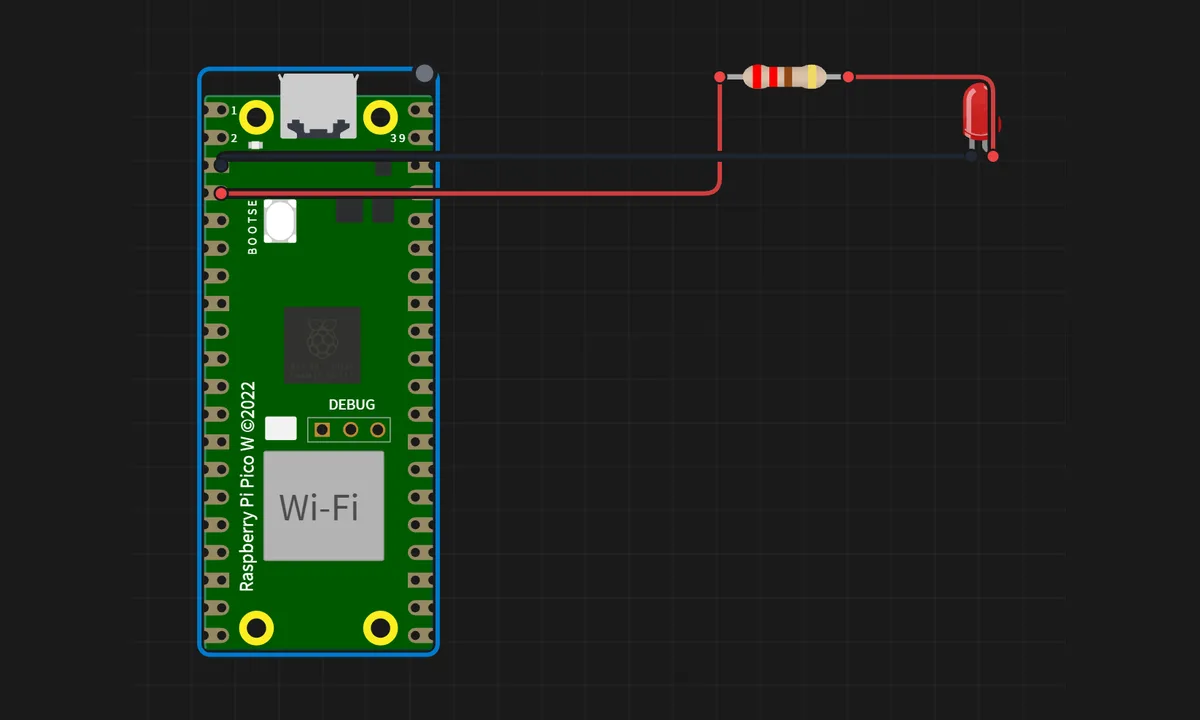
The exact circuit you get when you open this example — already wired, ready to run.
The MicroPython script
# main.py
# IoT Relay Control Web Server — MicroPython
#
# A blocking-style HTTP server on port 80 that flips a relay on
# GP2 in response to GET /on and GET /off. The server runs on the
# IP that the emulator hands out (10.13.37.42).

import network
import socket
import machine
import time

relay = machine.Pin(2, machine.Pin.OUT)
# Active-high so the LED wired to GP2 on the canvas lights when ON.
relay_state = 0
relay.value(relay_state)

ssid = "SENSBENCH-GUEST"
password = ""

wlan = network.WLAN(network.STA_IF)
wlan.active(True)
wlan.connect(ssid, password)

print("Connecting...")
while not wlan.isconnected():
    time.sleep(0.5)

ip = wlan.ifconfig()[0]
print("Connected at:", ip)

s = socket.socket()
s.setsockopt(socket.SOL_SOCKET, socket.SO_REUSEADDR, 1)
s.bind((ip, 80))
s.listen(1)

print("Open browser: http://%s/" % ip)

def page():
    on = (relay_state == 1)
    color = "#22c55e" if on else "#666"
    label = "RELAY ON" if on else "RELAY OFF"
    return ("<html><head><meta name=viewport content='width=device-width,initial-scale=1'></head>"
            "<body style='font-family:sans-serif;text-align:center;padding:24px;background:#fafafa'>"
            "<h2>Pico W Relay (GP2)</h2>"
            "<div style='margin:18px auto;width:170px;padding:26px 0;border-radius:14px;"
            "background:%s;color:#fff;font-size:24px;font-weight:bold'>%s</div>"
            "<button style='font-size:18px;padding:12px 28px;margin:6px' "
            "onclick=\"fetch('on').then(()=>location.reload())\">ON</button>"
            "<button style='font-size:18px;padding:12px 28px;margin:6px' "
            "onclick=\"fetch('off').then(()=>location.reload())\">OFF</button>"
            "</body></html>") % (color, label)

# Wrap each client in try/except: a browser that drops the connection
# mid-response would otherwise raise ECONNRESET and kill the server loop.
while True:
    try:
        conn, addr = s.accept()
        request = str(conn.recv(1024))
        if "/on" in request:
            relay_state = 1; relay.value(relay_state)
        elif "/off" in request:
            relay_state = 0; relay.value(relay_state)
        conn.send("HTTP/1.1 200 OK\r\nContent-Type: text/html\r\n\r\n" + page())
        conn.close()
    except OSError:
        try:
            conn.close()
        except Exception:
            pass
How it works
The script joins SENSBENCH-GUEST and runs a blocking HTTP server on port 80. GET /on energizes the relay on GP2, GET /off releases it, and the server replies with plain text. The relay’s contacts switch a separate LED circuit — the isolation pattern a real relay exists to provide.
The server loop is deliberately simple: accept, parse the first line, act, respond, close. At 9600-baud-class simplicity it handles one client at a time, which is honest for a demo but the exact limitation the async example exists to solve.
Before you build it for real
A real relay cannot hang directly on GP2: the coil current exceeds the RP2040’s pin budget, so the physical build needs a transistor driver and a flyback diode across the coil — the simulator’s virtual relay hides both. The server is also blocking: one client at a time, so a browser’s parallel requests (favicon + page) queue behind each other, and a slow client stalls everyone. And the hard-coded WiFi credentials mean the firmware is tied to one network — real deployments read them from a config file or first-boot setup flow.
Get the parts
Related examples
FAQ
Why does the server respond on 10.13.37.42?
That is the IP address the emulated WiFi network hands to the Pico W — a simulated LAN segment. On real hardware your router assigns a DHCP address instead, and you would read it from the serial console or your router’s client list. The fixed address keeps the demo deterministic.
Can a real relay be driven directly from GP2?
No. A relay coil needs tens of milliamps — beyond the RP2040’s 12 mA per-pin budget. The simulator’s relay is a virtual component; a real build needs a transistor driver between the pin and the coil, plus the flyback diode across it. The relay example page in this collection shows the pattern.