
RGB LED Colors
RGB LED Colors is a runnable microcontroller simulation example on SensBench — open the wired circuit, inspect the code, and compile real firmware in your browser, no install needed. Last updated Aug 14, 2026.
FREE SIMULATOR EXAMPLE · INTERMEDIATE
RGB LED Colors
This example cycles an RGB LED through seven colors — red, green, blue, yellow, cyan, magenta, white — one second each, on Arduino PWM pins 9, 10 and 11. It is three analogWrite() calls per color and the cleanest possible introduction to PWM color mixing.
| Board | Arduino Uno (ATmega328P, 16 MHz, 5 V logic) |
|---|---|
| Difficulty | intermediate |
| Category | basics |
| Libraries | None — just the Arduino core |
| Runs in | Sensbench browser simulator — free, no account |
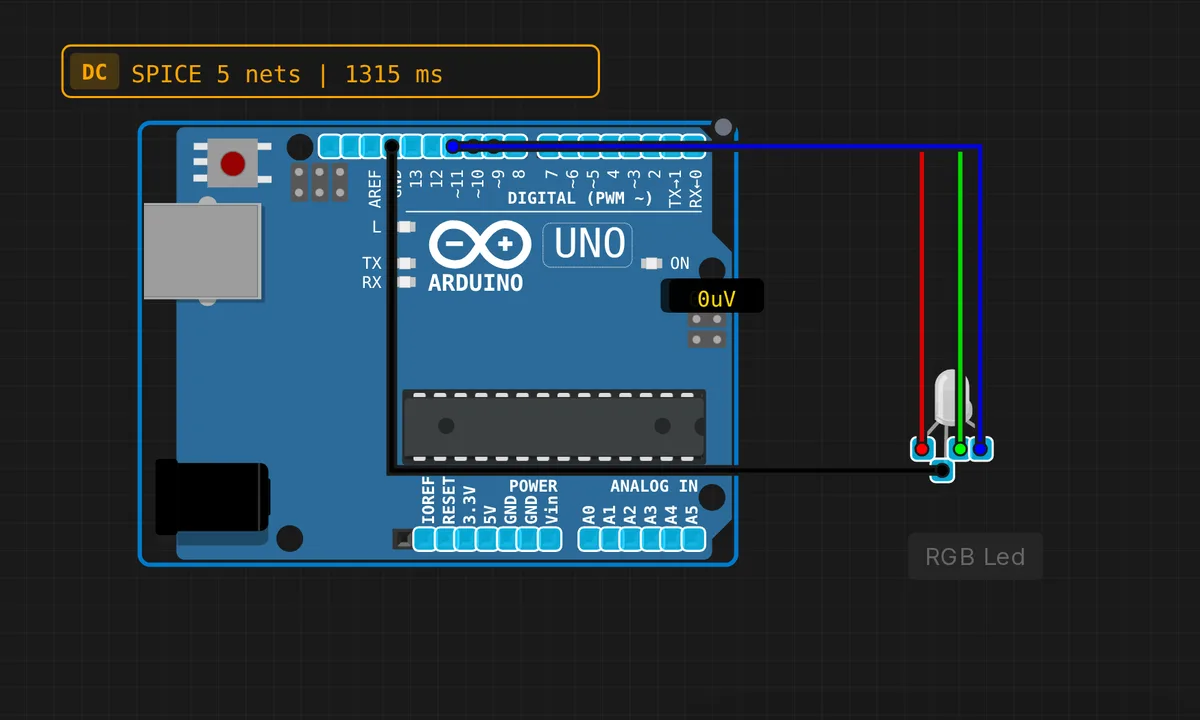
The exact circuit you get when you open this example — already wired, ready to run.
The sketch
// RGB LED Color Cycling
// Display different colors

const int RED_PIN = 9;
const int GREEN_PIN = 10;
const int BLUE_PIN = 11;

void setup() {
  pinMode(RED_PIN, OUTPUT);
  pinMode(GREEN_PIN, OUTPUT);
  pinMode(BLUE_PIN, OUTPUT);
}

void setColor(int red, int green, int blue) {
  analogWrite(RED_PIN, red);
  analogWrite(GREEN_PIN, green);
  analogWrite(BLUE_PIN, blue);
}

void loop() {
  // Red
  setColor(255, 0, 0);
  delay(1000);

  // Green
  setColor(0, 255, 0);
  delay(1000);

  // Blue
  setColor(0, 0, 255);
  delay(1000);

  // Yellow
  setColor(255, 255, 0);
  delay(1000);

  // Cyan
  setColor(0, 255, 255);
  delay(1000);

  // Magenta
  setColor(255, 0, 255);
  delay(1000);

  // White
  setColor(255, 255, 255);
  delay(1000);
}
How it works
setColor() is the entire trick: three analogWrite() calls, one per channel, each taking a 0-255 duty cycle. Yellow is red and green at full, white is all three — color mixing on an RGB LED is nothing more than independent brightness control of three dies in one epoxy package.
The pin choice matters. On the Uno, analogWrite() only produces real PWM on pins 3, 5, 6, 9, 10 and 11, and this sketch spends three of them. Pins 9 and 10 hang off Timer1 while pin 11 is on Timer2 — both run near 490 Hz here, invisible for LEDs, but worth remembering the day you try to filter PWM into an analog voltage.
The loop is a lookup table written as code: seven setColor() calls with delay(1000) between them. Adding a color is one line; making the LED breathe means swapping the delay for a for loop that ramps the values up and down. Anything fancier — HSV fades, random dips — is still just arithmetic on those same three numbers.
Before you build it for real
Two hardware realities the simulator hides. First, this circuit has no series resistors — fine on screen, but on a real Uno each channel needs its own resistor (220 Ω is a safe start). Note the red die drops ~2 V against ~3.2 V for green and blue, so identical resistors give you a hot red and a dim blue; trim per channel. Second, know your LED’s common pin: this code assumes common cathode, where 255 is full brightness. On a common-anode part everything inverts — 255 is off and white becomes black. Keep the Uno’s budget in mind too: 20 mA per pin is the rating (40 mA absolute max), so three channels at 20 mA is fine, but do not parallel LEDs on one pin.
Get the parts
Related examples
FAQ
Why pins 9, 10 and 11 specifically?
Because they are three of the Uno’s six hardware PWM pins (3, 5, 6, 9, 10, 11). analogWrite() on a non-PWM pin silently gives you full-on or full-off — no dimming — so the pin choice is effectively the whole example.
My white looks wrong and one channel seems too bright.
Two usual suspects. First, a common-anode LED inverts everything: use 255 minus each value, and white becomes 0,0,0. Second, unbalanced resistors — the red die has a lower forward voltage (~2 V versus ~3.2 V), so with equal resistors red hogs current. Bump red’s resistor to around 330 Ω and the mix evens out.