
Simon Says Game
Simon Says Game is a runnable microcontroller simulation example on SensBench — open the wired circuit, inspect the code, and compile real firmware in your browser, no install needed. Last updated Aug 14, 2026.
FREE SIMULATOR EXAMPLE · ADVANCED
Simon Says Game
This example builds the classic Simon memory game on an Arduino Uno: four LEDs on pins 8 through 11, four buttons on pins 2 through 5, and a sequence that grows by one step every round you survive. Watch the flashes, repeat them in order, and one wrong press earns you the full-board blink of shame and a restart.
| Board | Arduino Uno (ATmega328P, 16 MHz, 5 V logic) |
|---|---|
| Difficulty | advanced |
| Category | games |
| Libraries | None — just the Arduino core |
| Runs in | Sensbench browser simulator — free, no account |
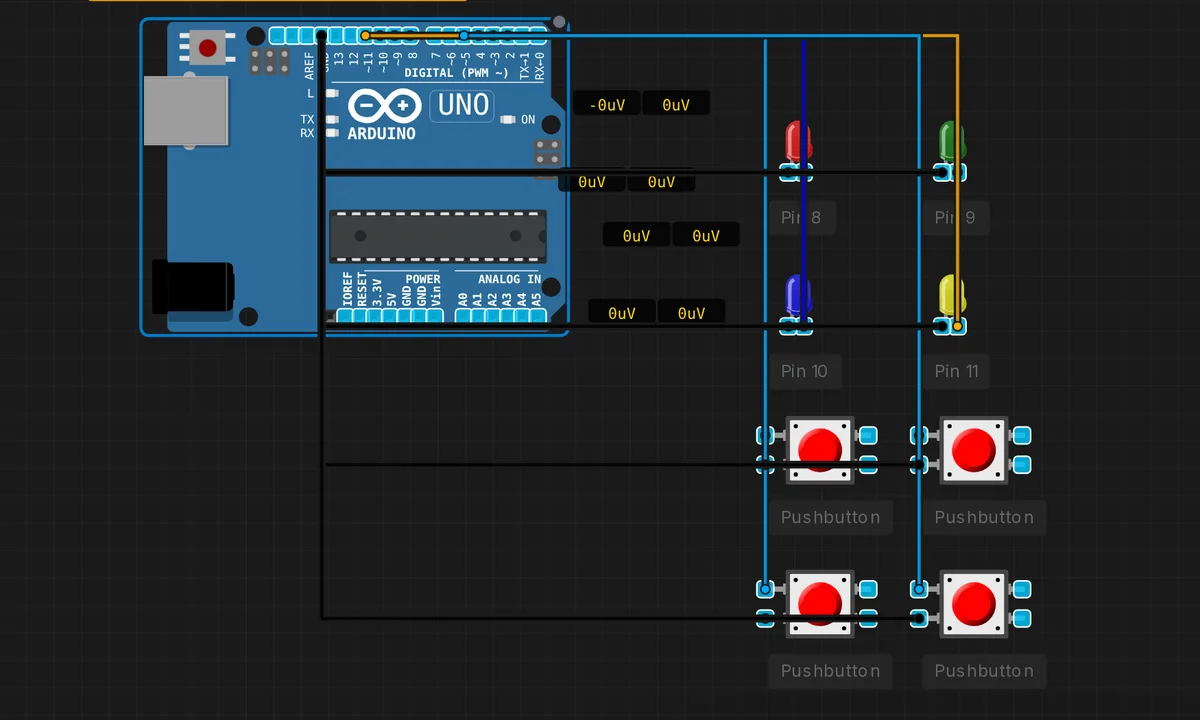
The exact circuit you get when you open this example — already wired, ready to run.
The sketch
// Simon Says Game
// Memory game with 4 LEDs and buttons

const int LED_PINS[] = {8, 9, 10, 11};
const int BUTTON_PINS[] = {2, 3, 4, 5};
const int NUM_LEDS = 4;

int sequence[100];
int sequenceLength = 0;
int currentStep = 0;

void setup() {
  Serial.begin(9600);

  for (int i = 0; i < NUM_LEDS; i++) {
    pinMode(LED_PINS[i], OUTPUT);
    pinMode(BUTTON_PINS[i], INPUT_PULLUP);
  }

  randomSeed(millis());
  newGame();
}

void newGame() {
  sequenceLength = 1;
  currentStep = 0;
  addToSequence();
  playSequence();
}

void addToSequence() {
  sequence[sequenceLength - 1] = random(0, NUM_LEDS);
}

void playSequence() {
  for (int i = 0; i < sequenceLength; i++) {
    flashLED(sequence[i]);
    delay(500);
  }
}

void flashLED(int led) {
  digitalWrite(LED_PINS[led], HIGH);
  delay(300);
  digitalWrite(LED_PINS[led], LOW);
}

void loop() {
  for (int i = 0; i < NUM_LEDS; i++) {
    if (digitalRead(BUTTON_PINS[i]) == LOW) {
      flashLED(i);

      if (i == sequence[currentStep]) {
        currentStep++;
        if (currentStep == sequenceLength) {
          delay(1000);
          sequenceLength++;
          currentStep = 0;
          addToSequence();
          playSequence();
        }
      } else {
        // Wrong button - game over
        for (int j = 0; j < 3; j++) {
          for (int k = 0; k < NUM_LEDS; k++) {
            digitalWrite(LED_PINS[k], HIGH);
          }
          delay(200);
          for (int k = 0; k < NUM_LEDS; k++) {
            digitalWrite(LED_PINS[k], LOW);
          }
          delay(200);
        }
        newGame();
      }

      delay(300);
      while (digitalRead(BUTTON_PINS[i]) == LOW);
    }
  }
}
How it works
The wiring logic is set up in one loop: pinMode(BUTTON_PINS[i], INPUT_PULLUP) enables the ATmega328P’s internal pull-ups, so each button simply connects its pin to GND and a press reads LOW — no external resistors on the button side. The four LEDs on pins 8-11 are plain outputs. One array per component type keeps the whole game table-driven.
The sequence lives in sequence[100] and grows one entry per survived round: addToSequence() appends random(0, NUM_LEDS), seeded once with randomSeed(millis()). playSequence() walks the array, flashing each LED for 300 ms with a 500 ms gap — slow enough to memorize, fast enough to stay tense.
Input handling in loop() scans all four buttons, flashes the one you pressed, and compares it against sequence[currentStep]. Finish the round and the length increments and replays; miss and the game over signal is all four LEDs blinking three times before newGame() resets you to a single step. The while (digitalRead(...) == LOW); line holds until you release the button — a crude but effective debounce for a game.
Before you build it for real
The simulator forgives three things real hardware will not. First, the LEDs have no series resistors — on a real Uno each bare LED on a 5 V pin pulls against the 20 mA per-pin budget and slowly cooks the pin driver; use 220 ohm per LED. Second, INPUT_PULLUP inverts the logic: buttons must wire pin-to-GND, and pressed means LOW. Wire them to 5 V out of habit and the game appears completely dead because it never sees a LOW. Third, randomSeed(millis()) runs at nearly the same instant after every power-up, so a real board deals you suspiciously similar sequences — seed from a floating analog pin instead.
Get the parts
Related examples
FAQ
Why does one button press register several times on real hardware?
Real tactile buttons bounce — the contacts chatter for 5-20 ms before settling. This sketch hides it crudely with a 300 ms delay and a wait-for-release loop, which is fine for a game but not a general debounce. For cleaner input, re-read the pin 10-20 ms later and only accept the press if it is still held.
Why do I get the same sequences every time I power up?
randomSeed(millis()) runs immediately in setup, when millis() is nearly the same small number on every boot — so the generator starts from almost the same seed. On real hardware, seed it from analogRead() on an unconnected analog pin, which picks up enough noise to differ each run.